Security leaders know that reducing risk is not just about finding the right exposures, but helping the organization act on them before known issues turn into real incidents.
That is often where remediation gets harder. Security teams may know which actions matter most, but progress can slow when infrastructure, cloud, endpoint, and IT teams do not have the context needed to execute. Teams need clear asset detail to scope the work, trusted status signals to validate remediation, and usable reporting to track progress and stay aligned.
This is exactly the challenge Exposure Command is built to help solve. Exposure Command helps customers understand and prioritize the exposures that matter most, while Remediation Hub (a prioritized remediation view within Exposure Command) helps teams turn that prioritization into action. With new enhancements to Remediation Hub, customers can now do that with more context and confidence, along with better visibility into progress over time through exportable reports.
Why remediation work slows down
Prioritization is an important step, but remediation rarely happens in one place or with one team. Security, infrastructure, cloud, endpoint, and IT operations all need enough context to understand what is being asked of them.
When that context is hard to access, progress slows. Security teams may know what should be fixed, but asset owners still need the information required to assess impact, plan the work, and take action. Teams also need to understand whether assets are actually protected, whether patching has fully taken effect, and how remediation progress should be tracked over time. Without that clarity, remediation becomes harder to coordinate and harder to validate.
Making remediation more actionable
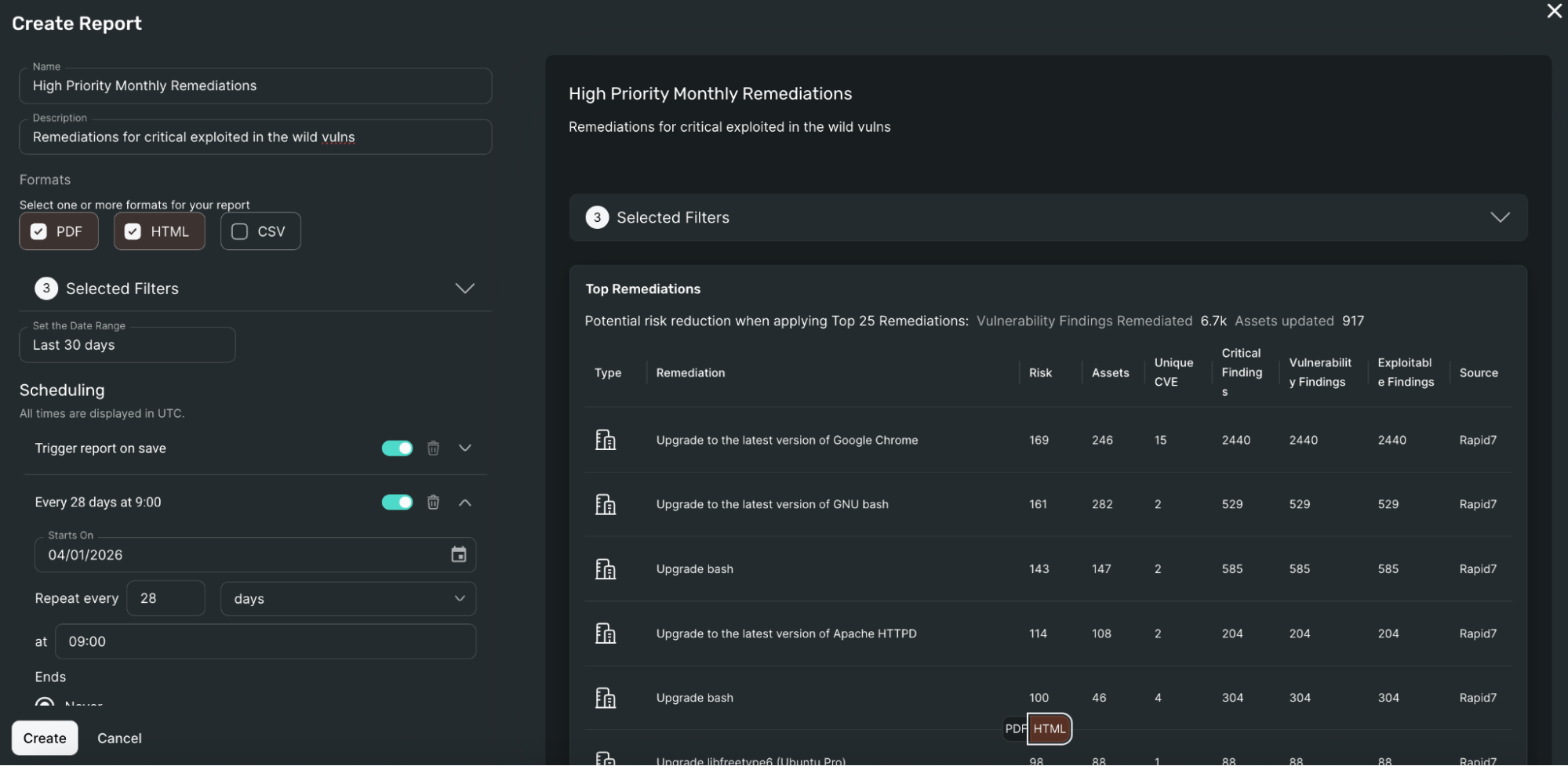
The Top Remediations Report helps close that gap by adding a comprehensive asset-level breakdown for each remediation. In addition to summary remediation information, customers can see source-specific metadata such as operating system, IP address, cloud provider, tags, endpoint protection, and patch management.
It can be used as a high-level summary of remediation priorities; many security teams use it to define remediation goals and share clear, actionable guidance with teams that may not work directly in security tools.
That gives teams a clearer view of the work behind each remediation and makes it easier to move from prioritization to execution.
Customers can also tailor reports to match the way they work, with customizable filters for specific environments, tags, or ownership groups. Reports can be exported in CSV, HTML, and PDF formats, shared with the teams responsible for action, and automatically generated and emailed on a schedule.
Building clearer visibility into patching and endpoint coverage
Action is only part of the equation, since teams also need clear, trustworthy context around asset posture.
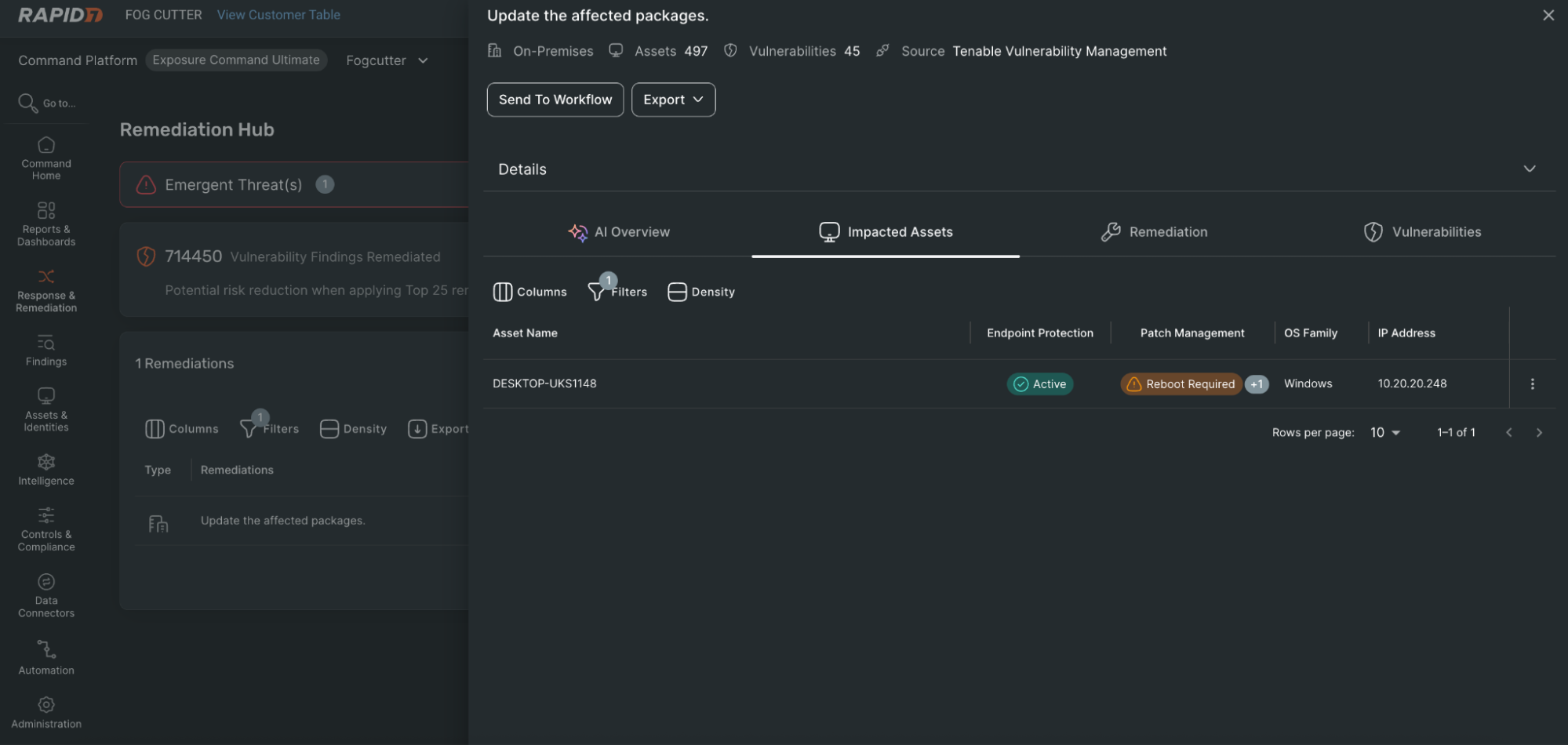
Remediation Hub now shows the source of patch management and endpoint protection coverage directly in remediation details, giving customers clearer visibility into where that data comes from and which tools are protecting a given asset. This is especially helpful in environments with multiple solutions in use, and reduces confusion when missing integrations would otherwise make assets appear unprotected.
The update also surfaces whether an asset still requires a reboot after patching, helping explain why vulnerabilities may persist even when remediation work has already started. Together, these additions make it easier for teams to assess true exposure, validate remediation progress, and identify where follow-up is still needed.
Extending remediation data into operational workflows
Remediation does not stop once a team has identified what to fix or validated that a change has been made. Security leaders also need ways to track progress, measure performance, and share remediation outcomes across the organization. That is where exported remediation data becomes important.
By extending access to remediation data outside the platform, customers can more easily support the workflows across reporting, operations, and leadership teams. This makes it easier to analyze remediation activity over time, align to internal reporting needs, and give stakeholders a clearer view of progress.
For security leaders, that means better visibility into whether remediation efforts are moving the organization in the right direction. For operational teams, it means less manual work to assemble and share updates, and more flexibility in how remediation data is used.
What this looks like in practice
For vulnerability management teams, this means faster handoff. Instead of sharing a remediation recommendation and then answering follow-up questions, they can send a report that already includes the asset context needed to begin planning.
For infrastructure and cloud teams, it becomes easier to focus on the parts of the environment they own. Filters help narrow remediation data to the assets, environments, and ownership groups that matter most, reducing noise and making action more straightforward.
For endpoint and patching teams, greater visibility into coverage source and reboot status helps explain why exposure may still remain, even when remediation work is already underway. That makes validation easier and helps teams troubleshoot more effectively.
For security and IT leaders, scheduled reporting and exported remediation data improve shared visibility. Rather than relying on one-off exports or manual updates, teams can more consistently track prioritized remediation work and measure progress over time.
Better context, faster progress
These enhancements help customers do more than identify top remediation priorities. They help teams act on them, validate them, and track them with more confidence.
By bringing together deeper asset context, clearer patch and endpoint visibility, and more usable remediation reporting, Remediation Hub helps reduce the friction that often slows remediation down. The result is smoother collaboration across functional teams, less manual effort, and quicker progress on the remediation work that matters most.
Read more about how Exposure Command helps teams share remediation context, improve coordination, and move faster on risk reduction.