
NTA Security Solutions
What are Network Traffic Analysis (NTA) tools?
How Rapid7 can help you monitor and analyze network traffic
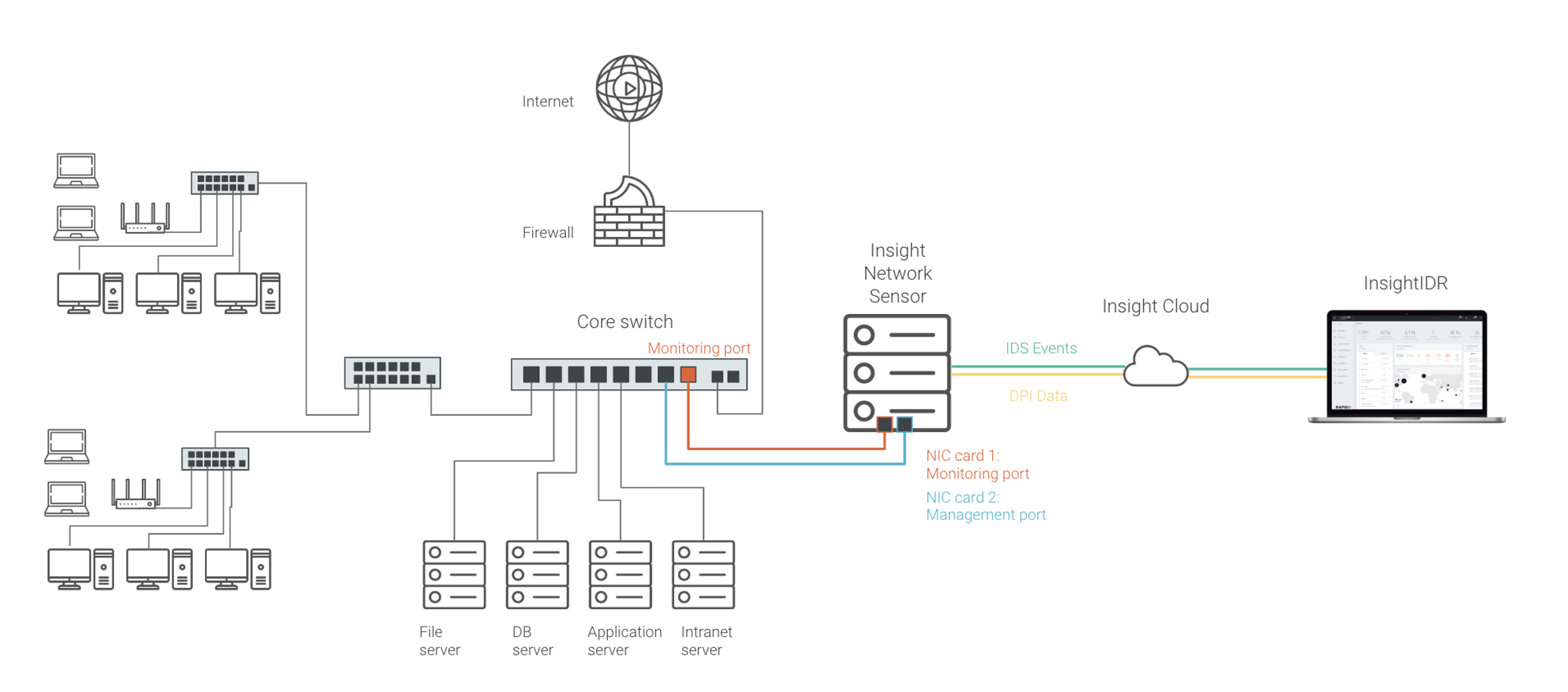
By deploying the lightweight Insight Network Sensor, Incident Command customers can continuously monitor network traffic at any location or site across their network. This data builds visibility across the attack surface and detects intrusions (or other potential security events) on the network. Together, alongside the existing user, log, and endpoint data in Incident Command, network traffic analysis will help analysts ensure continuous visibility everywhere, recognize compromise quickly, and trace the steps of potential attackers across systems and applications.
The Insight Network Sensor is easily downloaded and deployed, either on-premises or on a virtual VMware network. The sensor collects all network traffic metadata for analysis and observation on the central management portal, without interacting with other devices or impacting network performance. These IDS events and DPI data are passed to Incident Command and aggregated with other critical data sources.
Traditional Intrusion Detection System (IDS) tools can be incredibly noisy. The Rapid7 managed detection and response (MDR) services team has carefully filtered IDS events to capture only the most critical and actionable detections. This means when malware, botnets, or other compromises are detected, teams won’t have to go through tedious cycles to determine their validity. Analysts can take action confidently, on reliable, vetted alerts.
Rapid7’s proprietary DPI engine captures and analyzes traffic in readable, interpretable details, without the complexity and overhead of full packet capture. This passive analysis also means no performance impact to the network. With this rich flow data, teams have deep detail with which to track attacker entry and movement across the network. This can help accelerate investigations and inform response action.
The Importance of NTA security in threat detection and response programs
Network Traffic Analysis is a critical piece of modern threat detection and response practices because many operational and security issues can be investigated by implementing NTA at both the network edge and the network core. With a traffic analysis tool, you can spot things like large downloads, streaming, or suspicious inbound or outbound traffic.
NTA also provides an organization with more visibility into threats on their networks, beyond the endpoint. With the rise in mobile devices, IoT devices, smart TV’s, etc., you need something with more intelligence than just the logs from firewalls. Firewall logs are also problematic when a network is under attack. You may find that they are inaccessible due to resource load on the firewall or that they’ve been overwritten (or sometimes even modified by hackers), resulting in the loss of vital forensic information.
Use cases for analyzing and monitoring network traffic include:
- Detection of ransomware activity
- Monitoring data exfiltration/internet activity
- Monitor access to files on file servers or MSSQL databases
- Track a user's activity on the network, through User Forensics reporting
- Provide an inventory of what devices, servers and services are running on the network
- Highlight and identify root cause of bandwidth peaks on the network
NTA Security