Discovery: The foundation of exposure management
To understand your attack surface, and all related exposures, Rapid7's Command Platform provides Attack Surface Management, (included in Surface Command, Exposure Command and Incident Command). It provides a 360° view of all assets in the organization, their associated risks, and how they relate to one another. This provides teams with the attack surface visibility they can trust to detect security issues from endpoint to cloud.
This blog will cover how to use connectors to bring security data from your cloud, IT, AI and cybersecurity systems into Surface Command and make it actionable for the Discovery phase of Continuous Threat Exposure Management (CTEM), as well as some best practices on data management. Read on to the end of the blog to learn more about the latest connectors for most mainstream AI platforms.
What are connectors in Rapid7 Surface Command?
Connectors are lightweight, API-based integrations for common security data sources that allow Surface Command to ingest data about assets, identities, vulnerabilities, cloud environments, and more. By ingesting data from multiple different data sources, Surface Command can discover your entire attack surface, providing important context on exposure severity, business criticality, and exploitability.
Surface Command uses a Unified Data Model, mapping data from different sources into common asset types such as identities, networks, vulnerabilities, and findings. When new connectors are developed, they are aligned with these existing models for consistency and correlation.
Common data sources include vulnerability scanning tools, endpoint protection technologies, and cloud infrastructure, such as AWS, Azure, and GCP. Each connector is designed to work with the specific APIs and data formats of its target system. Surface Command provides connectors for most major security and IT management tools, and more are being developed every month. Custom connectors can also be created for enterprise-specific systems, providing there is an API to work with.
Each connector captures asset properties and relationships, storing a complete record of what is known in the original system. To keep data current, connectors periodically pull updates from their source. This can be scheduled per connector, depending on how dynamic the data is (e.g., cloud environments).
Surface Command then manages the data ingestion, correlating and mapping incoming data across systems to maintain accuracy and unify the view across assets.
The Rapid7 Extensions Library
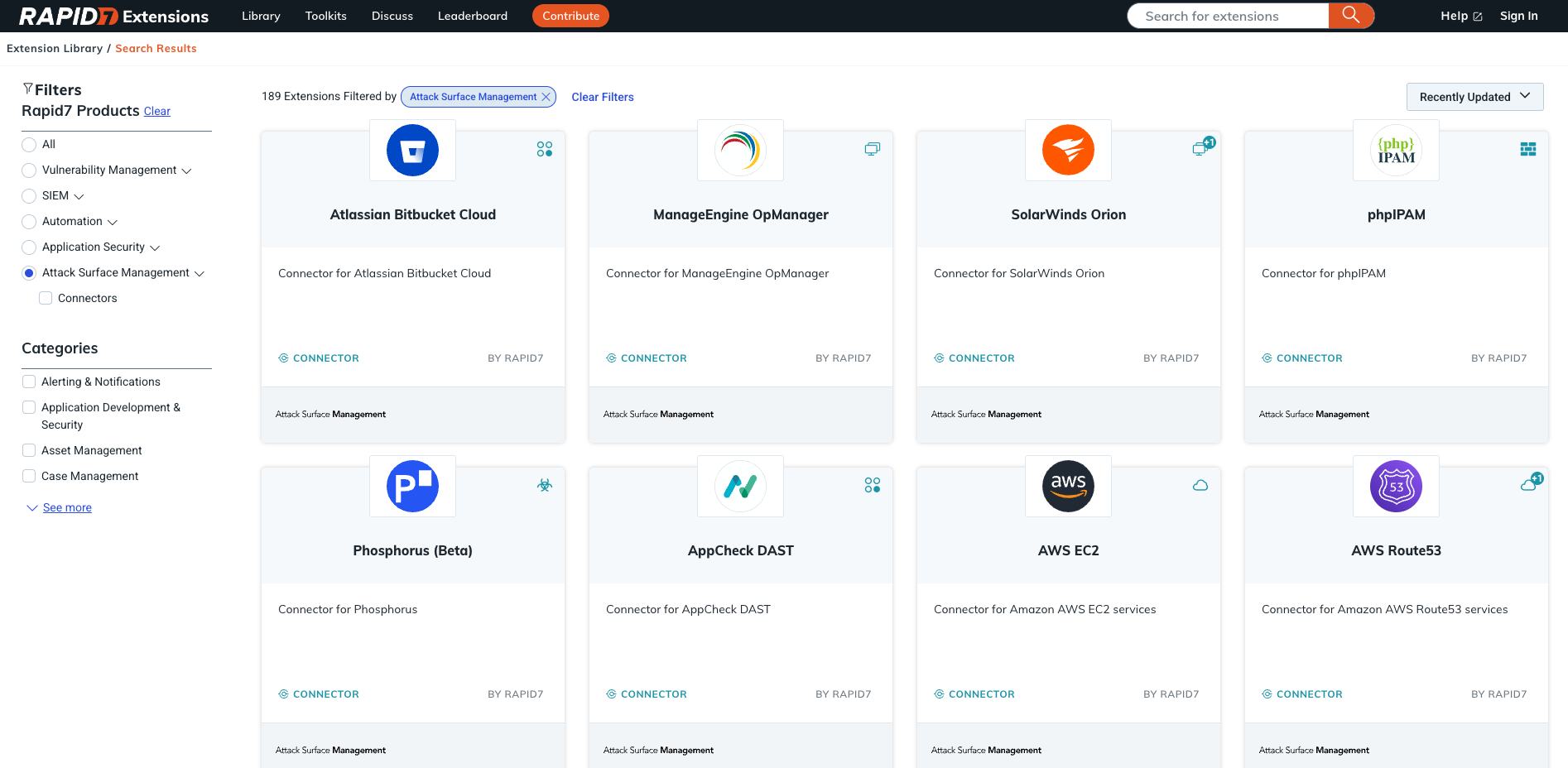 Figure 1: The Attack Surface Management view within the Rapid7 Extensions library.
⠀
The Extensions Library is your home for exploring and installing Rapid7 product extensions and integrations. You can access it at extensions.rapid7.com or by clicking on the Extensions icon (three squares and a plus) in the top right of the screen.
Surface Command currently supports 189 Extensions (also known as connectors), with new ones added weekly. You can easily filter by category, or search directly for the application you require.
Connecting the dots, one API at a time
Before you begin, we recommend you have your API key and URL ready for each application you’ll need to connect them to Surface Command. Surface Command requires read only access to each application.
Enter the relevant information (obfuscated for security reasons) and you are ready to test the API connection, and begin the data ingestion process. Repeat this process for all relevant applications. Surface Command will automatically correlate the incoming data and enrich each asset or identity with relevant business context.
⠀
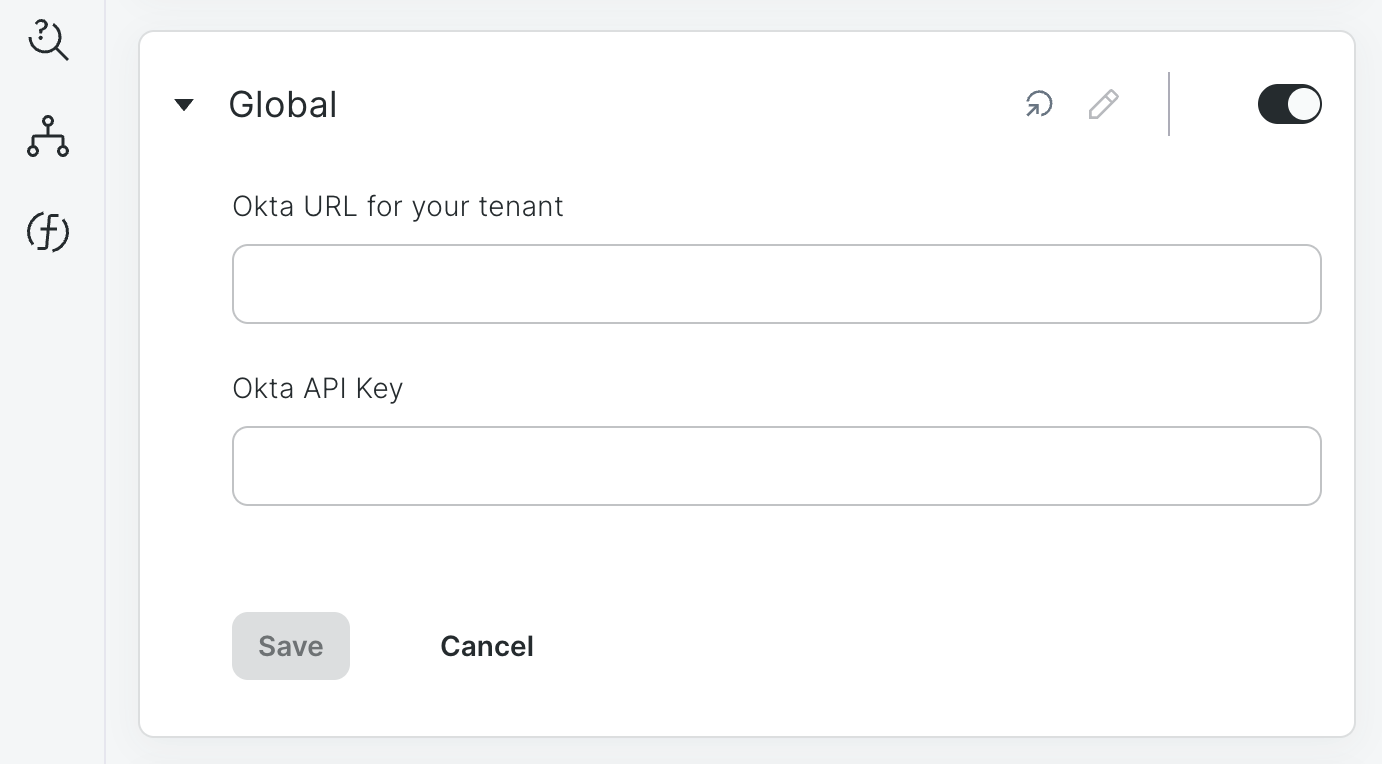 Figure 2: How to enter the API information for each connector.
Pro tip: Connectors & scheduling
So, we have added our connectors to Surface Command to pull in valuable information about our attack surface, we now need to schedule the running for each one.
Surface Command makes this easy. You can set connectors to run daily, weekly, or hourly — and we recommend scheduling them outside regular business hours.
To do this, simply click on Configurations / Import Feeds. Look for the connector you wish to schedule and use the edit button to access the configuration menu.
You can also select the frequency weekly, daily, or hourly. If you have multiple connectors added to Surface Command, we recommend running these at slightly different times.
⠀
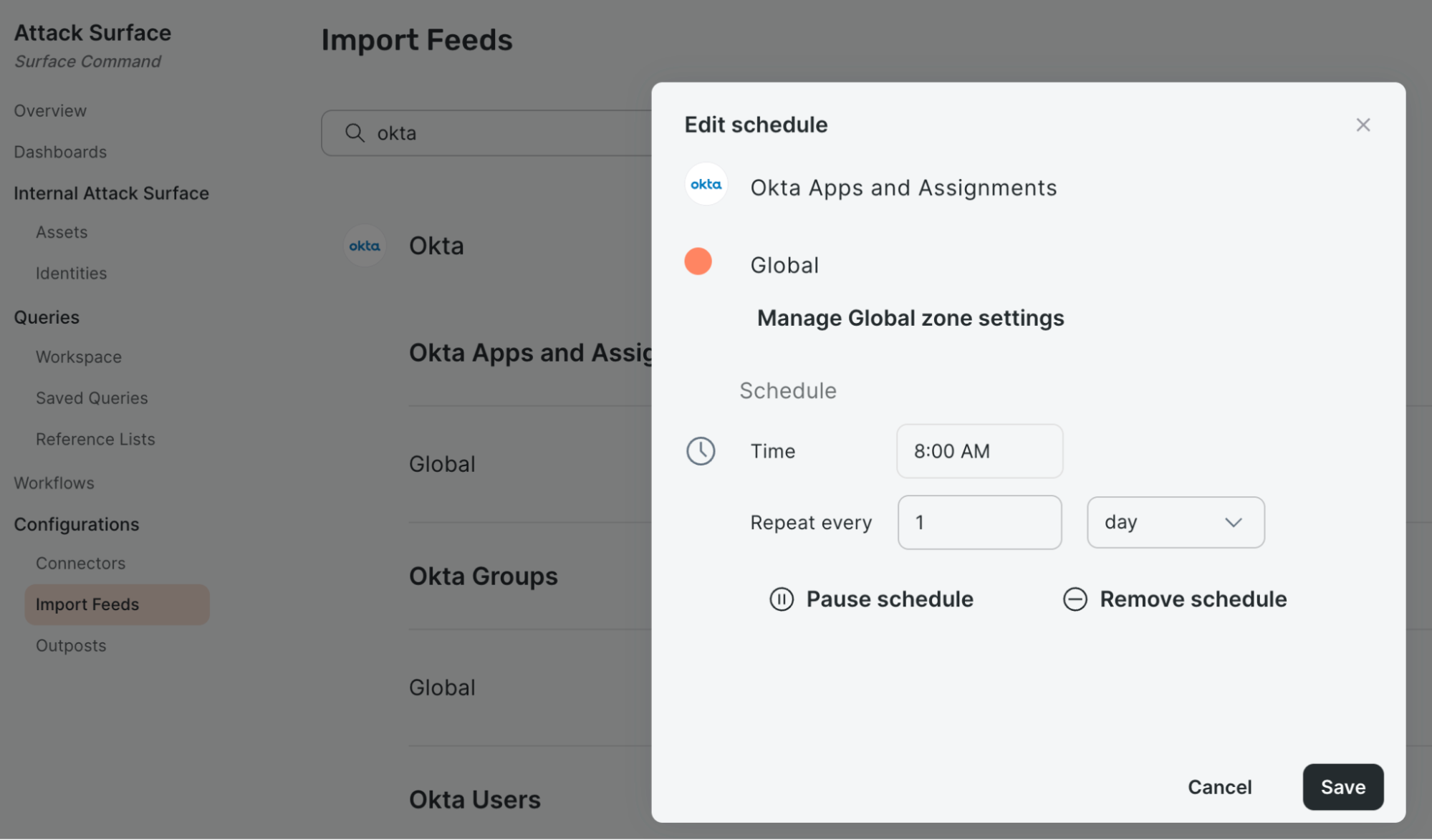 Figure 3: Editing the data import schedule for each connector.
Asset detail and associated connectors
Once your connectors are running, you can view any asset in Surface Command and immediately see which security tools are reporting on it. This makes it easy to identify gaps in protection, for example, an asset without endpoint detection or vulnerability coverage.
⠀
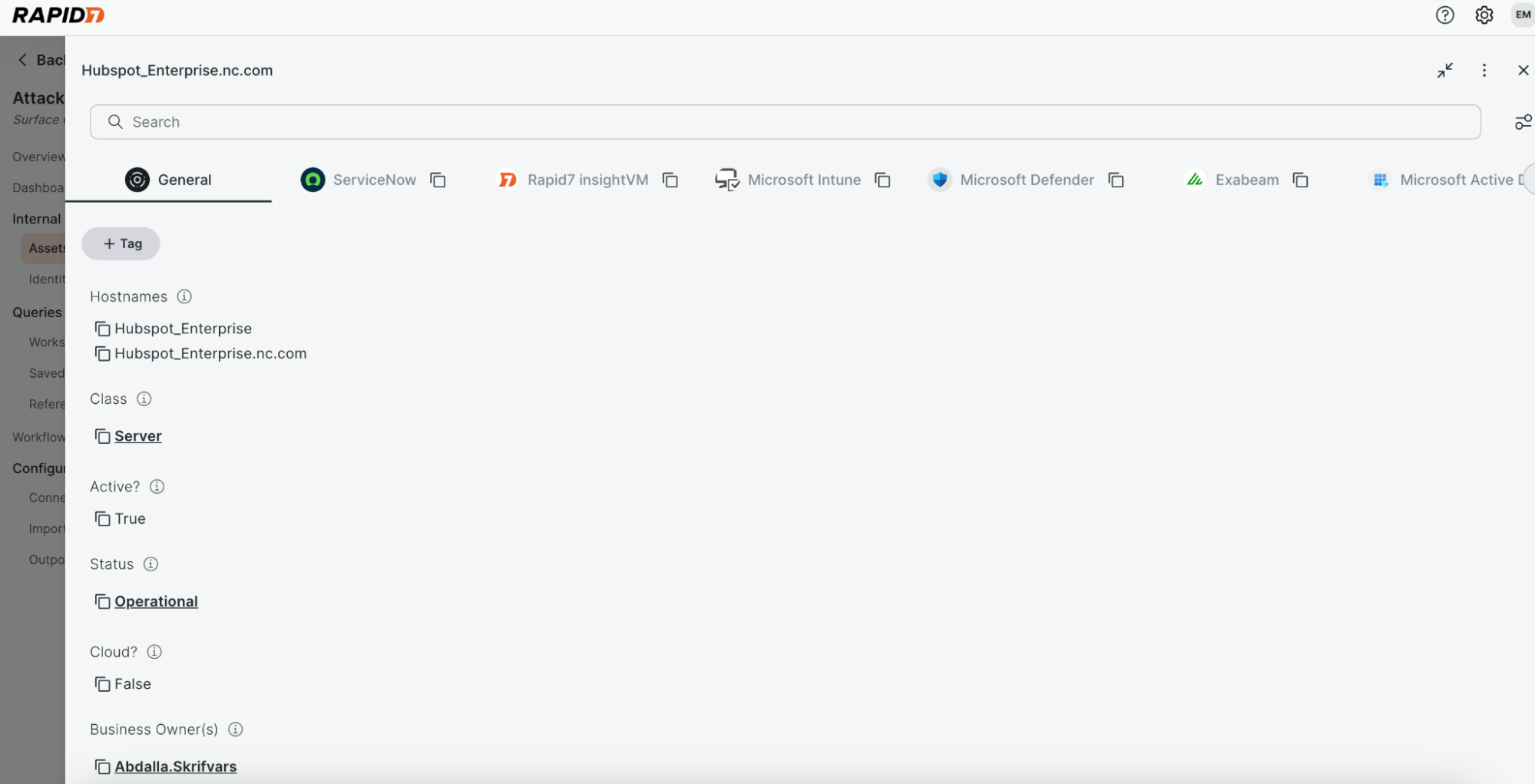 Figure 4: Showing all of the Connectors associated with this Asset.
New beta connectors for OpenAI and Anthropic
We’re excited to introduce two new beta connectors in Surface Command that expand our visibility into how organizations provision and use modern AI platforms: OpenAI and Anthropic. Learn more about Rapid7's approach to AI in a new blog, here.
OpenAI connector
The OpenAI integration focuses on helping teams understand who is using OpenAI services and how they're using them. We now ingest:
OpenAI Platform Users: users who create or work with API keys
ChatGPT Users: identified via audit log analysis due to limited API support
Because ChatGPT Enterprise provides no native API for listing users, we built a workaround that parses audit logs to derive a unique user list, conversation counts, and last-active timestamps. It’s lightweight, but it’s the most accurate method available given current API constraints.
Anthropic connector
The Anthropic integration provides deeper insights and includes:
Anthropic Console Users
Claude Code Users
Anthropic Workspaces
Claude Code offers especially rich analytics, including:
Lines of code generated
Tool actions
Estimated costs
Model usage patterns
This enables increasingly powerful AI posture and usage monitoring across engineering teams.
Inside the identities view
With these connectors enabled, you can now open any user in Surface Command and see:
Their Anthropic user profile and workspace membership
Their OpenAI usage, including ChatGPT conversation activity
Their Claude Code analytics and estimated spend
Extensible exposure management AI usage
By adding these two AI connectors to Surface Command, Rapid7 extends the platform’s ability to ingest and correlate emerging AI usage data alongside existing asset and identity signals. This allows customers to gain visibility into who is using AI services, understand potential exposure, and apply the same governance and risk workflows they already rely on—without introducing new tools or silos. As new connectors are added, customers can continue expanding their exposure coverage as their environments evolve.
What’s coming next?
We’re already working on additional AI platform coverage:
Gemini usage insights through the Google Workspace connector
Microsoft Azure Copilot user visibility
These additions will round out our support for AI user posture across the major platforms.
Take Command of your attack surface
▶︎ Attack Surface Management: Free Trial
Access this hands-on experience of Surface Command to see how your team can accelerate high-risk asset identification, prioritization, and remediation.